Account Contact
Your Cart
Pay the courier with no extra fees.
Need help? DistriNode AI can handle any task on our site.

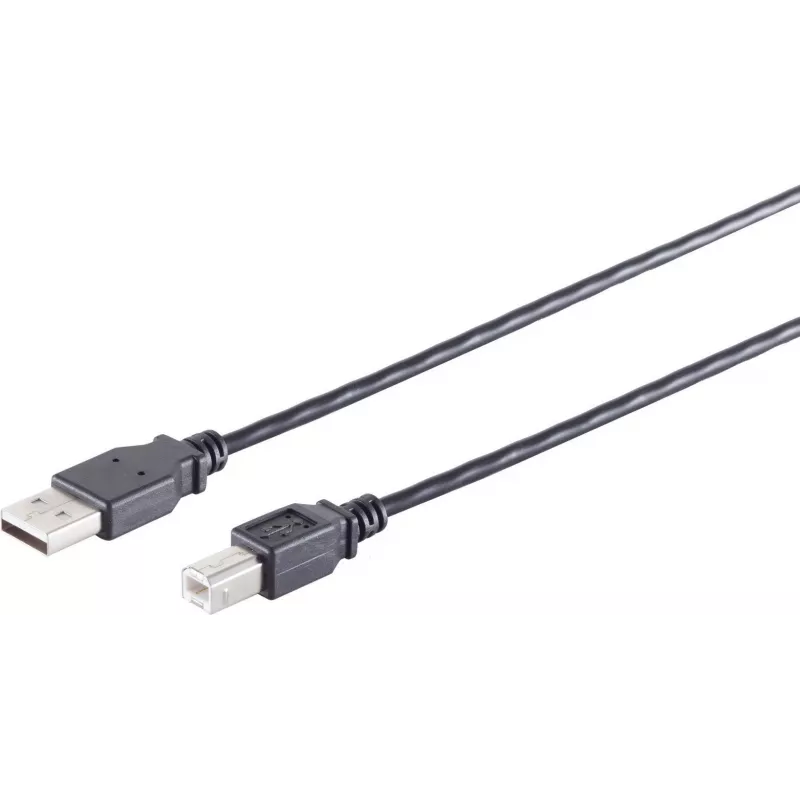
USB 2.0 cable ShiverPeaks 13-23025 — USB A to USB B, 1 m, black

USB 2.0 cable ShiverPeaks 13-23025 — USB A to USB B, 1 m, black
R261
ShiverPeaks USB 2.0 cable 13-23025 is a 1 m data cable with a USB A (host) connector on one end and a USB B (device) connector on the other. The cable supports USB 2.0 signaling with theoretical transfer rates up to 0.48 Gbit/s and is intended for wired connections between computers and peripherals.... Read More
Stock 3687 Code 2351644 Brand SHIVERPEAKS Model 13-23025 Warranty 2 Years

Shipping & Returns

Estimated delivery Tuesday, October 6
You will be kept updated through our detailed tracking system
Payment options
EFTPayFastBank CardSnapScanZapperGoogle PayApple PayMobicredMoreTymePay on Arrival

ShiverPeaks USB 2.0 cable 13-23025 is a 1 m data cable with a USB A (host) connector on one end and a USB B (device) connector on the other. The cable supports USB 2.0 signaling with theoretical transfer rates up to 0.48 Gbit/s and is intended for wired connections between computers and peripherals. Its single black jacket and standard connectors make it suitable for typical desktop and office setups where reliable short-range connectivity is required.

Advantages

This USB A to USB B cable provides a standardized physical connection for printers, scanners, audio interfaces and other USB B devices, ensuring compatibility with systems that support USB 2.0. The 1 m length balances reach and cable management for desktop environments. The black outer jacket offers a neutral appearance that integrates with most office equipment while protecting the internal conductors.

Suitable for

  • Connecting printers and multifunction devices to computers
  • Linking scanners and document feeders to host systems
  • Connecting audio interfaces and MIDI hardware to workstations
  • Short-range data transfer and device control in office or home setups

Key specifications

  • Connector A: USB Type A (host)
  • Connector B: USB Type B (device)
  • USB version: USB 2.0 (High Speed, up to 0.48 Gbit/s)
  • Cable length: 1 m
  • Colour: Black

How to use

Plug the USB A connector into an available USB port on the host computer and insert the USB B connector into the target peripheral device. Ensure connectors are aligned and do not force them; USB B plugs have a square shape with chamfered corners. After physical connection, allow the operating system to detect and install drivers if required. For stable operation, avoid sharp bends and keep the cable away from strong electromagnetic sources.

Recommendations

Use this cable for short, direct connections between a computer and USB B peripherals where USB 2.0 speed is sufficient. For longer runs or higher throughput requirements, consider cables or interfaces that support USB 3.x or dedicated networked solutions.

Key Highlights
  • Connecting printers and multifunction devices to computers
  • Linking scanners and document feeders to host systems
  • Connecting audio interfaces and MIDI hardware to workstations
  • Short-range data transfer and device control in office or home setups
  • Connector A: USB Type A (host)
  • Connector B: USB Type B (device)
  • USB version: USB 2.0 (High Speed, up to 0.48 Gbit/s)
  • Cable length: 1 m
  • Colour: Black
Specifications
Cable jacket material
Polyvinyl chloride (PVC)
Cable length
1 m
Connector 1
USB A
Connector 1 form factor
Straight
Connector 1 gender
Male
Connector 2
USB B
Connector 2 form factor
Straight
Connector 2 gender
Female
Maximum data transfer rate
0.48 Gbit/s
Product colour
Black
Quantity per pack
1 pc(s)
USB version
USB 2.0
Price history over the last 6 months
USB 2.0 cable ShiverPeaks 13-23025 — USB A to USB B, 1 m, black
Current
R261
Lowest
R251
Highest
R261
Change 24H
+R10   +4%
Week
—   
Month
—   

Popular products in this category

WhatsApp
Hi, I’m DistriNode’s AI assistant. I can help you find products, compare options, create quote PDFs, or open support requests.