Account Contact
Your Cart
Pay the courier with no extra fees.
Need help? DistriNode AI can handle any task on our site.

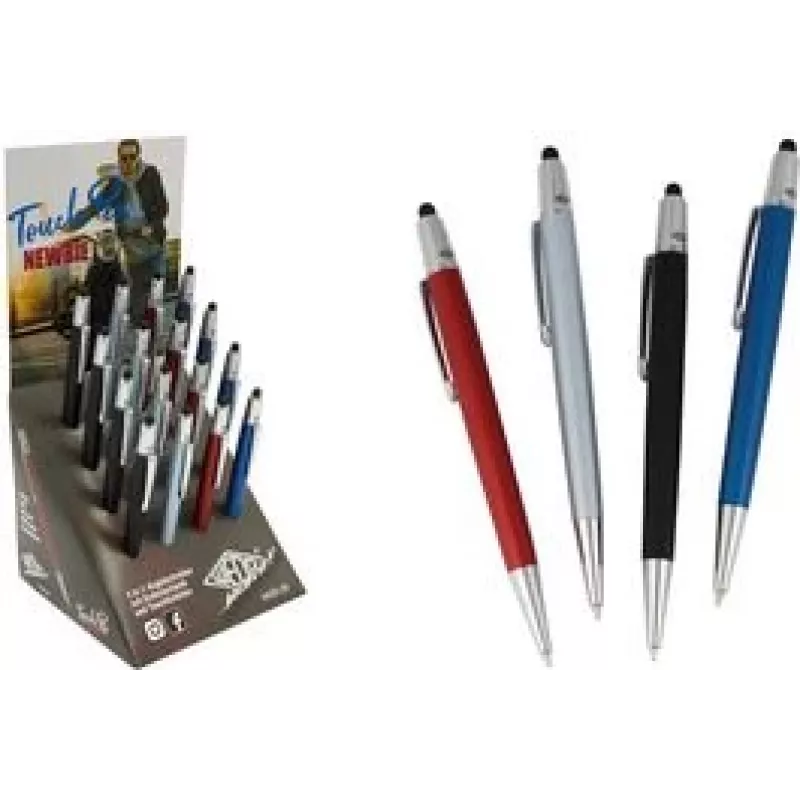
Touch Pen WEDO NEWBIE 2in1 — 16-pack stylus for smartphones, iPad and tablets

Touch Pen WEDO NEWBIE 2in1 — 16-pack stylus for smartphones, iPad and tablets
R4,024
WEDO NEWBIE 2in1 touch pen set includes 16 compact styluses designed for reliable use with smartphones, iPad and other tablets. Each 2in1 pen provides a conductive soft tip for accurate touchscreen input and an alternate functional end for general navigation. The pack offers a practical solution whe... Read More
Stock 16 Code 2190746 Brand WEDO Model 261 22072 Warranty 2 Years

Shipping & Returns

Estimated delivery Wednesday, October 7
You will be kept updated through our detailed tracking system
Payment options
EFTPayFastBank CardSnapScanZapperGoogle PayApple PayMobicredMoreTymePay on Arrival

WEDO NEWBIE 2in1 touch pen set includes 16 compact styluses designed for reliable use with smartphones, iPad and other tablets. Each 2in1 pen provides a conductive soft tip for accurate touchscreen input and an alternate functional end for general navigation. The pack offers a practical solution where multiple users or devices require basic stylus access in classrooms, offices, retail environments or homes.

Advantages

The 16-pack provides uniform performance across devices, reducing the need to share single pens. Each stylus combines a responsive conductive tip for tapping and swiping with a secondary end that supports simple navigation tasks. The pens are lightweight and easy to handle, minimizing fatigue during extended use. The simple, consistent design helps maintain touchscreen cleanliness and lowers wear on device screens compared with finger-only input.

Suitable for

  • Classroom activities with tablets and interactive displays
  • Office meetings, presentations and shared workstations
  • Retail checkout points and customer kiosks
  • Household use with smartphones, tablets and e-readers

Key specifications

  • Quantity: 16 styluses per pack
  • Design: 2in1 ends — conductive soft tip and alternate navigation end
  • Compatibility: capacitive touchscreen devices including smartphones, tablets and iPads
  • Weight and size: compact, lightweight design for comfortable handling
  • Materials: conductive tip material with a secondary functional end for navigation

How to use

Hold the stylus as you would a pen and use the conductive soft tip to tap, swipe and perform precise input on capacitive touchscreens. For general navigation tasks or broader gestures, use the alternate end as intended. No pairing or batteries are required. Store the pens in a dry place when not in use and keep tips clean by wiping with a soft, lint-free cloth to maintain consistent touchscreen response.

Recommendations

For best results, use the conductive tip for fine on-screen tasks such as writing or drawing and the alternate end for menu navigation or swiping. Replace a pen if the tip shows visible wear. Keep pens away from liquids and avoid excessive pressure on screens to prevent damage.

Key Highlights
  • Classroom activities with tablets and interactive displays
  • Office meetings, presentations and shared workstations
  • Retail checkout points and customer kiosks
  • Household use with smartphones, tablets and e-readers
  • Quantity: 16 styluses per pack
  • Design: 2in1 ends — conductive soft tip and alternate navigation end
  • Compatibility: capacitive touchscreen devices including smartphones, tablets and iPads
  • Weight and size: compact, lightweight design for comfortable handling
  • Materials: conductive tip material with a secondary functional end for navigation
Price history over the last 6 months
Touch Pen WEDO NEWBIE 2in1 — 16-pack stylus for smartphones, iPad and tablets
Current
R4,024
Lowest
R4,015
Highest
R4,030
Change 24H
-R0   0%
Week
—   
Month
—   

Popular products in this category

WhatsApp
Hi, I’m DistriNode’s AI assistant. I can help you find products, compare options, create quote PDFs, or open support requests.