Account Contact
Your Cart
Pay the courier with no extra fees.
Need help? DistriNode AI can handle any task on our site.

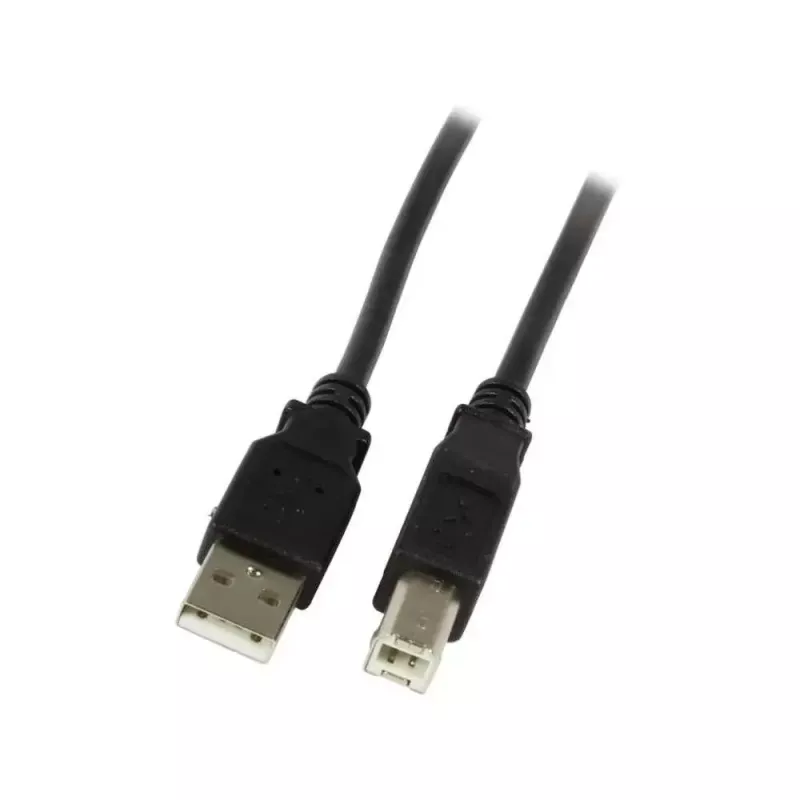
USB Cable Synergy 21 S215472 USB 2.0 5m USB A USB B Black

USB Cable Synergy 21 S215472 USB 2.0 5m USB A USB B Black
R350
The Synergy 21 S215472 USB cable is a 5 meter USB 2.0 connection cable with a USB A plug on one end and a USB B plug on the other. Designed for reliable wired links between computers and peripheral devices, this black cable supports a maximum data transfer rate of 0.48 Gbit/s and is suitable for typ... Read More
Stock 2 Code 2565923 Brand SYNERGY21 Model S215472 Warranty 2 Years

Shipping & Returns

Estimated delivery Tuesday, October 6
You will be kept updated through our detailed tracking system
Payment options
EFTPayFastBank CardSnapScanZapperGoogle PayApple PayMobicredMoreTymePay on Arrival

The Synergy 21 S215472 USB cable is a 5 meter USB 2.0 connection cable with a USB A plug on one end and a USB B plug on the other. Designed for reliable wired links between computers and peripheral devices, this black cable supports a maximum data transfer rate of 0.48 Gbit/s and is suitable for typical office and home equipment such as printers, scanners and some external devices that use USB-B input.

Advantages

The cable provides a single, continuous 5 m reach that reduces the need to reposition equipment. USB 2.0 compatibility ensures broad device support and straightforward plug-and-play operation without additional drivers on most systems. The molded connectors and outer jacket are built to withstand repeated insertions and everyday handling, while the black finish offers a neutral appearance that blends with common office and home environments.

Suitable for

  • Connecting desktop or laptop computers to printers
  • Linking scanners to host devices
  • Connecting USB-B compatible audio interfaces or hubs that accept USB-B
  • Extending device placement where short cables are impractical

Key specifications

  • Connector types: USB A (male) to USB B (male)
  • USB standard: USB 2.0
  • Maximum data transfer rate: 0.48 Gbit/s
  • Cable length: 5 meters
  • Cable color: black

How to use

Connect the USB A plug to an available USB port on your computer or hub and insert the USB B plug into the target peripheral device. Ensure both ends are fully seated to establish a stable connection. Most operating systems will recognize the connected device automatically; if device-specific drivers are required, install them according to the peripheral manufacturer's instructions. Avoid sharp bends near the connector ends and route the cable to prevent strain on ports.

Recommendations

For optimal performance, use the cable for USB 2.0 devices and typical peripheral tasks such as printing and scanning. Avoid using the cable in environments with excessive mechanical stress or exposure to liquids. When routing the cable, leave gentle service loops and avoid tight ties that could compress the conductors.

Key Highlights
  • Connecting desktop or laptop computers to printers
  • Linking scanners to host devices
  • Connecting USB-B compatible audio interfaces or hubs that accept USB-B
  • Extending device placement where short cables are impractical
  • Connector types: USB A (male) to USB B (male)
  • USB standard: USB 2.0
  • Maximum data transfer rate: 0.48 Gbit/s
  • Cable length: 5 meters
  • Cable color: black
Specifications
AWG wire size
24/28
Cable colour
Black
Cable diameter
4.5 mm
Cable length
5 m
Conductor material
Copper
Connector 1
USB A
Connector 1 form factor
Straight
Connector 1 gender
Male
Connector 2
USB B
Connector 2 form factor
Straight
Connector 2 gender
Male
Maximum data transfer rate
0.48 Gbit/s
Product colour
Black
USB version
USB 2.0
Price history over the last 6 months
USB Cable Synergy 21 S215472 USB 2.0 5m USB A USB B Black
Current
R350
Lowest
R339
Highest
R350
Change 24H
+R9   +3%
Week
—   
Month
—   

Popular products in this category

WhatsApp
Hi, I’m DistriNode’s AI assistant. I can help you find products, compare options, create quote PDFs, or open support requests.