Account Contact
Your Cart
Pay the courier with no extra fees.
Need help? DistriNode AI can handle any task on our site.

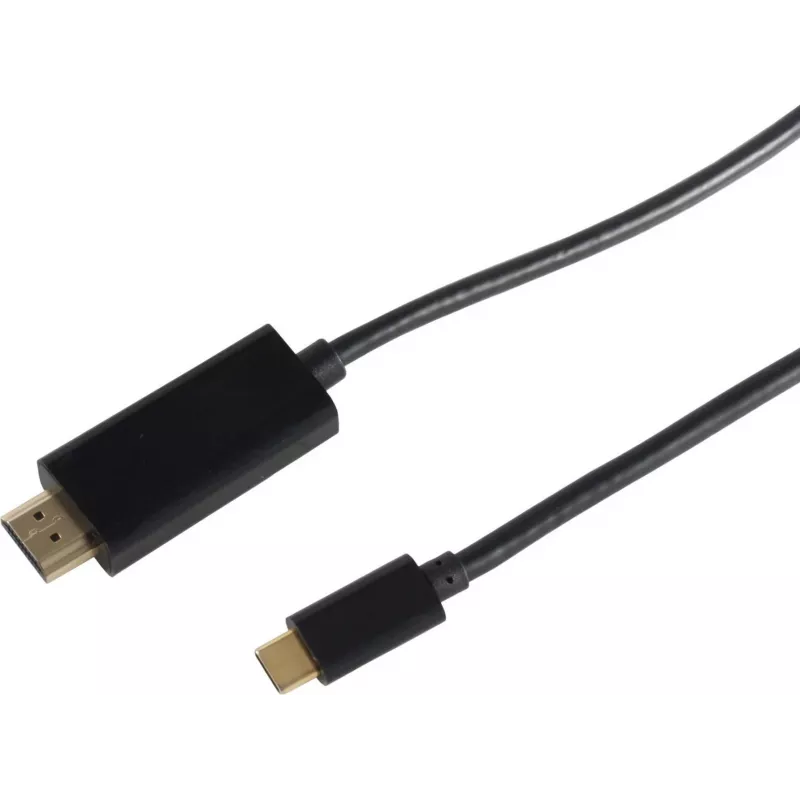
Video Cable Adapter S/CONN 10-57025 1m HDMI Type A USB Type-C Black

Video Cable Adapter S/CONN 10-57025 1m HDMI Type A USB Type-C Black
R544
The S/CONN 10-57025 1m HDMI Type A to USB Type-C video cable adapter by ShiverPeaks connects USB-C devices to HDMI displays with support for resolutions up to 4K2K. Designed for direct digital video transmission, this compact black adapter provides a straightforward connection between laptops, table... Read More
Stock 85 Code 2351503 Brand SHIVERPEAKS Model 10-57025 Warranty 2 Years

Shipping & Returns

Estimated delivery Tuesday, October 6
You will be kept updated through our detailed tracking system
Payment options
EFTPayFastBank CardSnapScanZapperGoogle PayApple PayMobicredMoreTymePay on Arrival

The S/CONN 10-57025 1m HDMI Type A to USB Type-C video cable adapter by ShiverPeaks connects USB-C devices to HDMI displays with support for resolutions up to 4K2K. Designed for direct digital video transmission, this compact black adapter provides a straightforward connection between laptops, tablets, smartphones or other USB-C sources and TVs, monitors or projectors that accept a standard HDMI Type A input.

Advantages

This 1 m adapter supports high-resolution video up to 4K2K, enabling detailed image output on compatible displays. Its HDMI Type A and USB Type-C connectors offer broad compatibility with modern devices and standard HDMI inputs. The compact, single-cable design minimises clutter and simplifies setup, while the black finish integrates unobtrusively with existing AV equipment.

Suitable for

  • Connecting USB-C laptops to HDMI monitors or TVs
  • Presentations using a projector with HDMI input
  • Streaming video from a smartphone or tablet to a TV
  • Console or PC gaming when using a USB-C video output device

Key specifications

  • Cable length: 1 m
  • Connector 1: HDMI Type A (Standard)
  • Connector 2: USB Type-C
  • Supported maximum resolution: up to 4K2K
  • Colour: Black

How to use

Insert the HDMI Type A end of the adapter into the HDMI input of the display device and connect the USB Type-C end to the source device that supports video output over USB-C. Ensure the display is powered on and set to the correct HDMI input. If the source device requires selection of an external display or activation of video output via settings, enable the appropriate output mode. After connection, adjust display resolution and scaling on the source device as needed.

Recommendations

For best results, use with devices that explicitly support video output over USB-C (DisplayPort Alt Mode). Avoid sharp bends near the connectors and keep the cable length within 1 m for optimal signal integrity. If image or sound issues occur, verify that the display input is selected correctly and that device drivers or firmware are up to date.

Key Highlights
  • Connecting USB-C laptops to HDMI monitors or TVs
  • Presentations using a projector with HDMI input
  • Streaming video from a smartphone or tablet to a TV
  • Console or PC gaming when using a USB-C video output device
  • Cable length: 1 m
  • Connector 1: HDMI Type A (Standard)
  • Connector 2: USB Type-C
  • Supported maximum resolution: up to 4K2K
  • Colour: Black
Specifications
3D
Yes
Cable length
1 m
Cable material
Copper
Connector 1
HDMI Type A (Standard)
Connector 1 form factor
Straight
Connector 1 gender
Male
Connector 2
USB Type-C
Connector 2 form factor
Straight
Connector 2 gender
Male
Connector contacts plating
Gold
HDCP
Yes
Jacket material
Acrylonitrile butadiene styrene (ABS)
Product colour
Black
Quantity per pack
1 pc(s)
Supported resolutions
4K2K, 4K
Price history over the last 6 months
Video Cable Adapter S/CONN 10-57025 1m HDMI Type A USB Type-C Black
Current
R544
Lowest
R533
Highest
R544
Change 24H
+R10   +2%
Week
—   
Month
—   

Popular products in this category

WhatsApp
Hi, I’m DistriNode’s AI assistant. I can help you find products, compare options, create quote PDFs, or open support requests.