Account Contact
Your Cart
Pay the courier with no extra fees.
Need help? DistriNode AI can handle any task on our site.

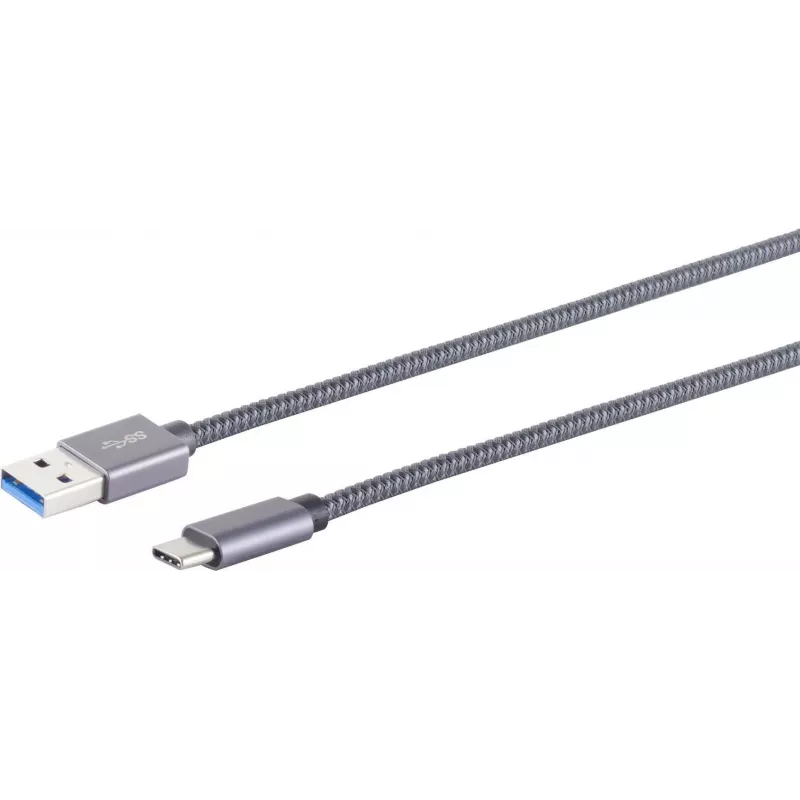
USB Cable S/CONN 13-38010 USB 3.2 Gen 2 0.5m

USB Cable S/CONN 13-38010 USB 3.2 Gen 2 0.5m
R471
The ShiverPeaks USB Cable S/CONN 13-38010 is a 0.5 m data cable designed for devices that use a USB A to USB C connection. It supports USB 3.2 Gen 2 (also known as USB 3.1 Gen 2) with a maximum data transfer rate of up to 10 Gbit/s and is finished in grey for a neutral, professional appearance.Advan... Read More
Stock 264 Code 2352321 Brand SHIVERPEAKS Model 13-38010 Warranty 2 Years

Shipping & Returns

Estimated delivery Tuesday, October 6
You will be kept updated through our detailed tracking system
Payment options
EFTPayFastBank CardSnapScanZapperGoogle PayApple PayMobicredMoreTymePay on Arrival

The ShiverPeaks USB Cable S/CONN 13-38010 is a 0.5 m data cable designed for devices that use a USB A to USB C connection. It supports USB 3.2 Gen 2 (also known as USB 3.1 Gen 2) with a maximum data transfer rate of up to 10 Gbit/s and is finished in grey for a neutral, professional appearance.

Advantages

This USB A to USB C cable provides a compact 0.5 m length suitable for close connections and tidy setups. Support for USB 3.2 Gen 2 enables high-speed data transfers up to 10 Gbit/s, which is useful for file synchronization, backups and working with external storage. The cable’s standard connectors ensure compatibility with a wide range of host devices and peripherals that accept USB A and USB C interfaces.

Suitable for

  • Connecting laptops or desktop PCs with USB A ports to smartphones, tablets or peripherals with USB C
  • Transferring large files between computers and external SSDs or HDDs supporting 10 Gbit/s speeds
  • Short-reach cable runs for docking stations, hubs or desktop setups where excess length is undesirable

Key specifications

  • Connector 1: USB A
  • Connector 2: USB C
  • USB version: USB 3.2 Gen 2 (3.1 Gen 2)
  • Maximum data transfer rate: up to 10 Gbit/s
  • Cable length: 0.5 m
  • Colour: Grey

How to use

Insert the USB A connector into the host device (such as a computer, laptop or charger) and connect the USB C connector to the target device (such as a smartphone, tablet, external drive or hub). Ensure both devices are powered on and, if necessary, that the target device is set to the correct data mode. For best throughput, connect to ports on both devices that support USB 3.2 Gen 2.

Recommendations

To maintain optimal performance, avoid sharp bends and excessive pulling on the cable and use the 0.5 m length for close-range connections. When transferring large amounts of data, connect both ends to USB 3.2 Gen 2 capable ports and ensure device firmware and drivers are up to date.

Key Highlights
  • Connecting laptops or desktop PCs with USB A ports to smartphones, tablets or peripherals with USB C
  • Transferring large files between computers and external SSDs or HDDs supporting 10 Gbit/s speeds
  • Short-reach cable runs for docking stations, hubs or desktop setups where excess length is undesirable
  • Connector 1: USB A
  • Connector 2: USB C
  • USB version: USB 3.2 Gen 2 (3.1 Gen 2)
  • Maximum data transfer rate: up to 10 Gbit/s
  • Cable length: 0.5 m
  • Colour: Grey
Specifications
Cable diameter
4.2 mm
Cable jacket material
Polyvinyl chloride (PVC)
Cable length
0.5 m
Cable type
Round cable
Conductor material
Copper
Connector 1
USB A
Connector 1 form factor
Straight
Connector 1 gender
Male
Connector 2
USB C
Connector 2 form factor
Straight
Connector 2 gender
Male
Connector housing material
Metal
Maximum data transfer rate
10 Gbit/s
Product colour
Grey
Quantity per pack
1 pc(s)
USB version
USB 3.2 Gen 2 (3.1 Gen 2)
Price history over the last 6 months
USB Cable S/CONN 13-38010 USB 3.2 Gen 2 0.5m
Current
R471
Lowest
R462
Highest
R471
Change 24H
+R10   +2%
Week
—   
Month
—   

Popular products in this category

WhatsApp
Hi, I’m DistriNode’s AI assistant. I can help you find products, compare options, create quote PDFs, or open support requests.