Account Contact
Your Cart
Pay the courier with no extra fees.
Need help? DistriNode AI can handle any task on our site.

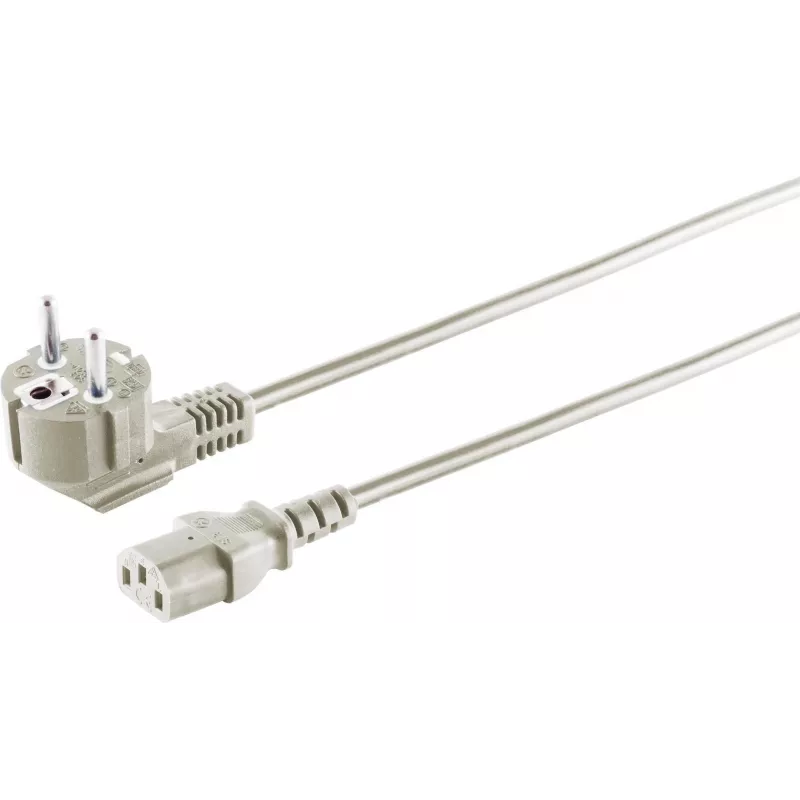
Power Cable S/CONN 60006 Black 1.8 m CEE 7/7 C13 Coupler

Power Cable S/CONN 60006 Black 1.8 m CEE 7/7 C13 Coupler
R572
The ShiverPeaks Power Cable S/CONN 60006 Black 1.8 m CEE 7/7 C13 Coupler is a mains lead designed to connect electrical equipment to a 230 V supply. One end features a CEE 7/7 plug compatible with many European wall outlets, while the other end provides an IEC C13 coupler commonly used for computers... Read More
Stock 208 Code 2352077 Brand SHIVERPEAKS Model 60006-5GR Warranty 2 Years

Shipping & Returns

Estimated delivery Tuesday, October 6
You will be kept updated through our detailed tracking system
Payment options
EFTPayFastBank CardSnapScanZapperGoogle PayApple PayMobicredMoreTymePay on Arrival

The ShiverPeaks Power Cable S/CONN 60006 Black 1.8 m CEE 7/7 C13 Coupler is a mains lead designed to connect electrical equipment to a 230 V supply. One end features a CEE 7/7 plug compatible with many European wall outlets, while the other end provides an IEC C13 coupler commonly used for computers, monitors, printers and other IT or consumer electronics. The cable length of 1.8 m balances reach and cable management for desktop and office setups.

Advantages

The cable provides a reliable conductive path for appliances rated for 230 V, with a standardized IEC C13 coupler for broad device compatibility. Its 1.8 m length offers flexibility without excessive slack, and the black jacket delivers basic protection against abrasion and everyday wear. The molded connectors ensure a secure fit into sockets and equipment in home and office environments.

Suitable for

  • Connecting desktop PCs and workstations to mains power
  • Powering monitors, printers and external drives
  • Replacing a lost or damaged IEC C13 mains lead
  • Use in home offices, corporate offices, server rooms and classrooms

Key specifications

  • Cable length: 1.8 m
  • Plug type (mains): CEE 7/7 (European compatible)
  • Coupler type (equipment): IEC C13
  • Nominal input voltage: 230 V
  • Color: Black

How to use

Insert the CEE 7/7 plug into a compatible 230 V wall outlet, ensuring the socket is switched off or the device is powered down before connecting. Attach the IEC C13 coupler firmly to the appliance’s inlet until it seats securely. Route the cable to avoid sharp bends, pinching or contact with hot surfaces. When disconnecting, pull the connector body rather than the cable to avoid strain on the conductors.

Recommendations

Use the cable indoors and in dry locations only. Verify that the device rated current and power are compatible with standard 230 V mains supply and with the cable’s intended use. Replace the cable if the outer jacket, connectors, or conductors show visible damage. Do not modify the cable or use it with adapters that alter grounding or safety features.

Key Highlights
  • Connecting desktop PCs and workstations to mains power
  • Powering monitors, printers and external drives
  • Replacing a lost or damaged IEC C13 mains lead
  • Use in home offices, corporate offices, server rooms and classrooms
  • Cable length: 1.8 m
  • Plug type (mains): CEE 7/7 (European compatible)
  • Coupler type (equipment): IEC C13
  • Nominal input voltage: 230 V
  • Color: Black
Specifications
Cable length
1.8 m
Conductor cross section
0.75
Conductor material
Copper
Connector 1
CEE 7/7
Connector 1 form factor
Angled
Connector 1 gender
Male
Connector 2
C13 coupler
Connector 2 form factor
Straight
Connector 2 gender
Female
Connector contacts plating
Nickel
Input voltage
230
Number of conductors
3
Product colour
Black
Quantity per pack
1 pc(s)
Price history over the last 6 months
Power Cable S/CONN 60006 Black 1.8 m CEE 7/7 C13 Coupler
Current
R572
Lowest
R562
Highest
R572
Change 24H
+R9   +2%
Week
—   
Month
—   

Popular products in this category

WhatsApp
Hi, I’m DistriNode’s AI assistant. I can help you find products, compare options, create quote PDFs, or open support requests.