Account Contact
Your Cart
Pay the courier with no extra fees.
Need help? DistriNode AI can handle any task on our site.

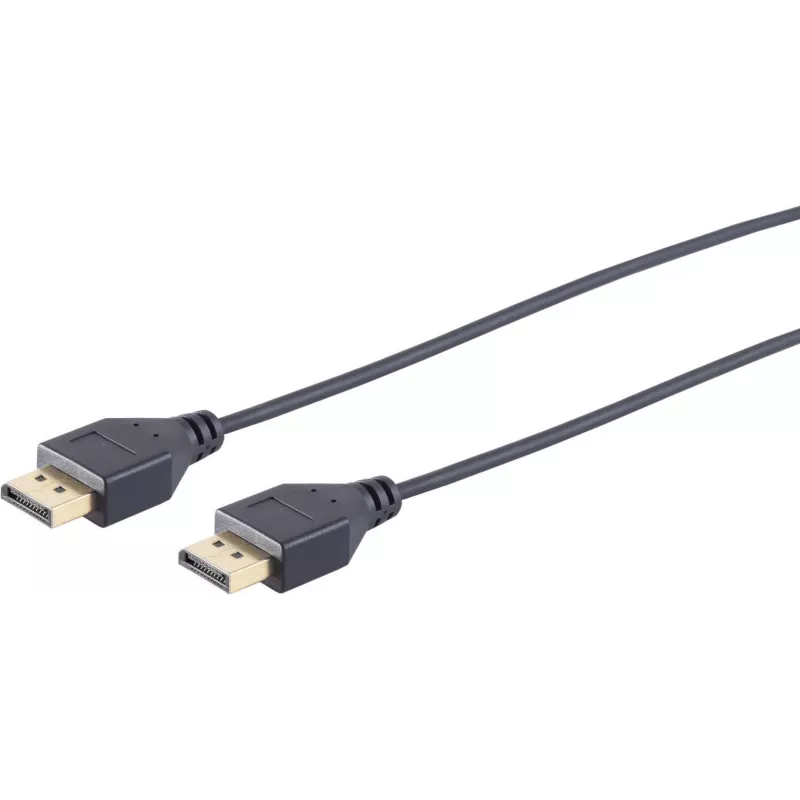
DisplayPort cable S/CONN 10-49025 1 m Black

DisplayPort cable S/CONN 10-49025 1 m Black
R355
The S/CONN 10-49025 DisplayPort cable by ShiverPeaks is a 1 m black cable with DisplayPort connectors on both ends. With a 3.8 mm diameter conductor assembly, it is designed to transmit high-definition video and audio between DisplayPort-equipped devices. The cable provides a straightforward connect... Read More
Stock 310 Code 2352244 Brand SHIVERPEAKS Model 10-49025 Warranty 2 Years

Shipping & Returns

Estimated delivery Tuesday, October 6
You will be kept updated through our detailed tracking system
Payment options
EFTPayFastBank CardSnapScanZapperGoogle PayApple PayMobicredMoreTymePay on Arrival

The S/CONN 10-49025 DisplayPort cable by ShiverPeaks is a 1 m black cable with DisplayPort connectors on both ends. With a 3.8 mm diameter conductor assembly, it is designed to transmit high-definition video and audio between DisplayPort-equipped devices. The cable provides a straightforward connection for monitors, projectors and PCs where a short, reliable link is required.

Advantages

This DisplayPort cable offers plug-and-play compatibility with DisplayPort ports, a compact 1 m length suitable for desk setups, and a slim 3.8 mm profile that reduces cable clutter. The dual DisplayPort connectors ensure direct digital signal transfer for video and audio without adapters, while the black jacket provides a neutral appearance that integrates with most equipment.

Suitable for

  • Connecting a computer or laptop to a DisplayPort monitor
  • Linking a PC to a projector with a DisplayPort input
  • Short-range connections in desktop workstations or multimedia setups
  • Replacing an existing 1 m DisplayPort cable

Key specifications

  • Cable length: 1 m
  • Connector type: DisplayPort to DisplayPort
  • Cable diameter: 3.8 mm
  • Colour: Black
  • Signal support: digital video and audio transmission

How to use

Connect one DisplayPort connector to the source device (PC, laptop or media player) and the other connector to the DisplayPort input on the monitor or projector. Ensure connectors are fully seated until the latch clicks if present. Select the appropriate input on the display and configure display settings on the source device as required for resolution and refresh rate.

Recommendations

Use this 1 m DisplayPort cable for close-range connections where a tidy cable run is preferred; avoid excessive bending near the connectors and keep the cable away from strong electromagnetic sources to maintain signal integrity.
Key Highlights
  • Connecting a computer or laptop to a DisplayPort monitor
  • Linking a PC to a projector with a DisplayPort input
  • Short-range connections in desktop workstations or multimedia setups
  • Replacing an existing 1 m DisplayPort cable
  • Cable length: 1 m
  • Connector type: DisplayPort to DisplayPort
  • Cable diameter: 3.8 mm
  • Colour: Black
  • Signal support: digital video and audio transmission
Specifications
3D
Yes
AWG wire size
34
Cable diameter
3.8 mm
Cable length
1 m
Cable material
Copper
Cable type
Round cable
Colour sampling
4:2:2, 4:4:4, 4:2:0
Connector 1
DisplayPort
Connector 1 form factor
Straight
Connector 1 gender
Male
Connector 2
DisplayPort
Connector 2 form factor
Straight
Connector 2 gender
Male
Connector contacts plating
Gold
Data transfer rate
21.6 Gbit/s
DisplayPort version
1.2
HDCP
Yes
HDCP version
1.3
Jacket material
Polyvinyl chloride (PVC)
Maximum refresh rate
60 Hz
Maximum resolution
3840 x 2160
Product colour
Black
Quantity per pack
1 pc(s)
Supported graphics resolutions
3840 x 2160, 2560 x 1440
Supported video modes
2160p, 1440p
Price history over the last 6 months
DisplayPort cable S/CONN 10-49025 1 m Black
Current
R355
Lowest
R345
Highest
R355
Change 24H
+R9   +3%
Week
—   
Month
—   

Popular products in this category

WhatsApp
Hi, I’m DistriNode’s AI assistant. I can help you find products, compare options, create quote PDFs, or open support requests.