Account Contact
Your Cart
Pay the courier with no extra fees.
Need help? DistriNode AI can handle any task on our site.

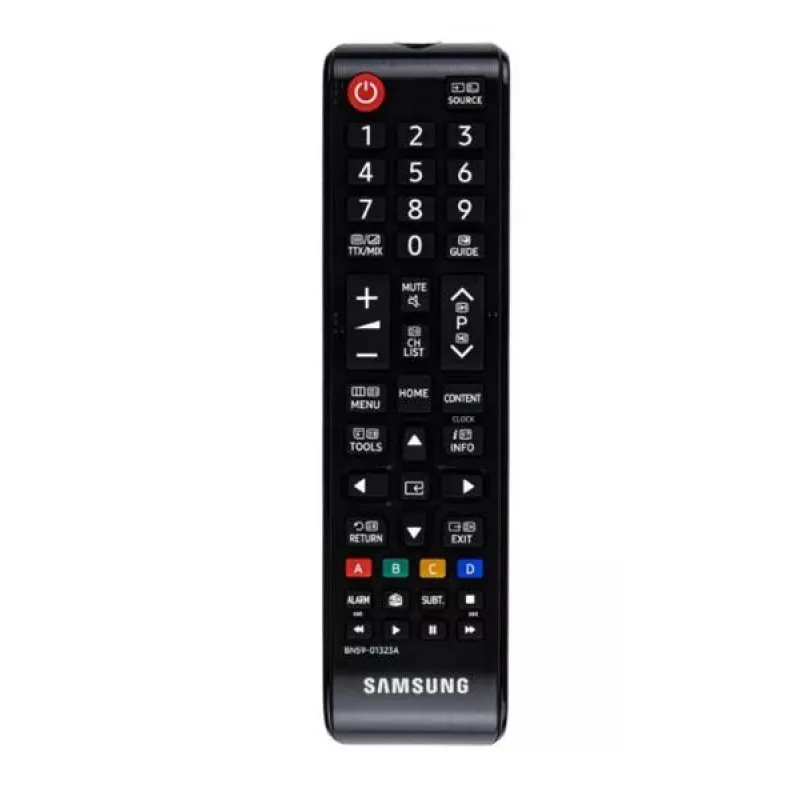
Samsung VG-TM1240BH remote control IR Wireless TV Press buttons

Samsung VG-TM1240BH remote control IR Wireless TV Press buttons
R797
Replacement remote control VG-TM1240BH/EN for Samsung 690 series televisions provides standard infrared (IR) wireless control functions for everyday TV operation. The unit mirrors basic keys found on original remotes—power, volume, channel selection and menu navigation—allowing straightforward repla... Read More
Stock 50 Code 2412219 Brand SAMSUNG Model VG-TM1240BH/EN Warranty 2 Years

Shipping & Returns

Estimated delivery Tuesday, October 6
You will be kept updated through our detailed tracking system
Payment options
EFTPayFastBank CardSnapScanZapperGoogle PayApple PayMobicredMoreTymePay on Arrival

Replacement remote control VG-TM1240BH/EN for Samsung 690 series televisions provides standard infrared (IR) wireless control functions for everyday TV operation. The unit mirrors basic keys found on original remotes—power, volume, channel selection and menu navigation—allowing straightforward replacement of a lost or damaged original controller. The remote is intended for home TV use and for situations where a compatible Samsung 690-series set requires immediate, no‑programming replacement.

Advantages

The remote offers a compact layout with clearly labelled buttons to simplify common TV tasks such as switching channels, adjusting audio level and accessing on‑screen menus. Because it uses standard IR signals compatible with Samsung 690‑series sets, installation is limited to inserting batteries and pointing the remote at the TV. Its form and button arrangement are designed to match the functions of the original remote, making transition seamless for users familiar with the factory controller.

Suitable for

Key specifications

How to use

Install the required batteries in the battery compartment following the polarity markings, then point the remote toward the Samsung 690‑series TV and press the power button to switch the set on. Use the volume and channel keys for immediate control; access the TV menu and navigate using the directional and OK buttons. No pairing procedure is necessary for compatible sets; the IR commands are recognized by the TV when the remote is aimed at the front sensor within the typical operational range.

Recommendations

Place the remote on a flat surface when not in use to avoid accidental button presses. Replace batteries promptly when response becomes slow or inconsistent, and avoid exposing the remote to moisture or direct heat to preserve button responsiveness and IR emitter function.

Key Highlights
  • Owners of Samsung 690-series televisions needing a direct replacement remote
  • Home users who require basic TV control: power, volume, channel and menu navigation
  • Situations where quick, no-setup replacement is preferred after loss or damage of the original remote
  • Control type: Infrared (IR) wireless
  • Primary functions: power on/off, volume up/down, channel up/down, menu navigation and selection
  • Compatibility: designed for use with Samsung 690-series televisions
  • Power source: standard replaceable batteries (not included)
  • Physical: lightweight handheld form factor with tactile rubber/plastic buttons
Specifications
Backlight buttons
No
Battery type
AAA
Brand compatibility
Samsung
Depth
13 mm
Height
120 mm
Housing material
Plastic
Input type
Press buttons
Interface
IR Wireless
Number of batteries supported
2
Number of devices supported
1
Product colour
Black
Rechargeable
No
Remote control proper use
TV
Width
56 mm

Leaflet

Open Leaflet
Price history over the last 6 months
Samsung VG-TM1240BH remote control IR Wireless TV Press buttons
Current
R797
Lowest
R764
Highest
R805
Change 24H
+R24   +3%
Week
+R31   +4%
Month
+R30   +4%

Popular products in this category

WhatsApp
Hi, I’m DistriNode’s AI assistant. I can help you find products, compare options, create quote PDFs, or open support requests.