Account Contact
Your Cart
Pay the courier with no extra fees.
Need help? DistriNode AI can handle any task on our site.

Power cord MicroConnect UK Type G to IEC C13 plug — mains lead for computers and peripherals

Power cord MicroConnect UK Type G to IEC C13 plug — mains lead for computers and peripherals
R366
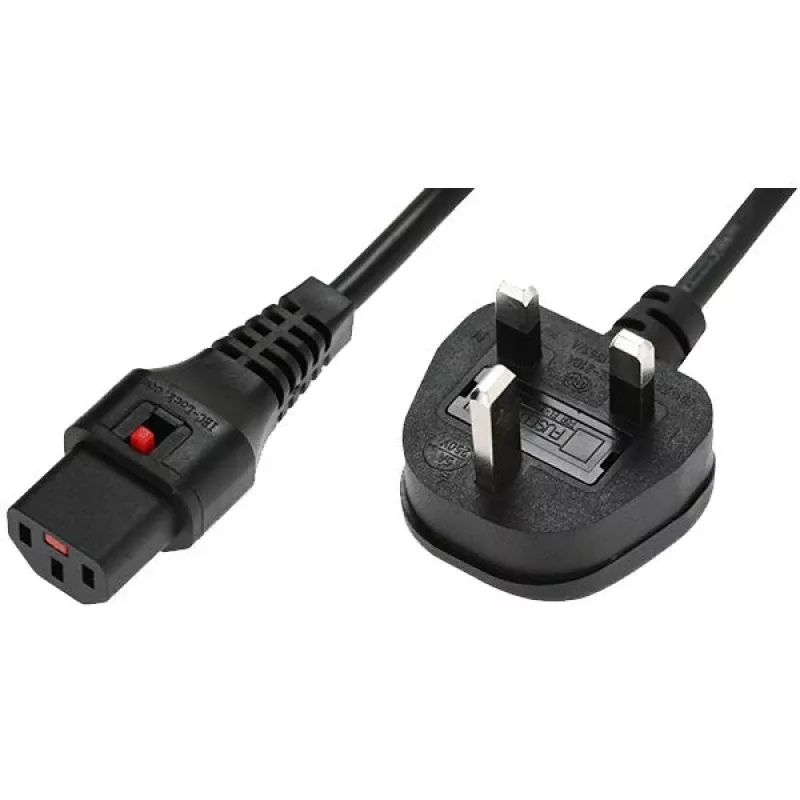
MicroConnect power cord with a UK Type G mains plug and an IEC C13 connector provides a standard mains connection for computers, monitors, printers and other IT peripherals. Designed as a replacement or spare lead, this cable is intended for office and home use where devices with a C13 inlet require... Read More
Stock 83 Code 2445535 Brand MICROCONNECT Model MC-UKC132B Warranty 2 Years

Shipping & Returns

Estimated delivery Tuesday, October 6
You will be kept updated through our detailed tracking system
Payment options
EFTPayFastBank CardSnapScanZapperGoogle PayApple PayMobicredMoreTymePay on Arrival

MicroConnect power cord with a UK Type G mains plug and an IEC C13 connector provides a standard mains connection for computers, monitors, printers and other IT peripherals. Designed as a replacement or spare lead, this cable is intended for office and home use where devices with a C13 inlet require connection to UK mains outlets. The cable combines a right-angled mains plug form factor for space-saving installation with a secure IEC C13 connector to maintain reliable contact during normal operation.

Advantages

The cable offers a common C13 interface that fits most desktop PCs, monitors and small office equipment, simplifying compatibility across devices. A locking IEC C13 connector reduces the risk of accidental disconnection, helping to maintain uninterrupted power delivery to critical equipment. The right-angle mains plug design allows installation in locations with limited clearance behind furniture or equipment, and the lead is suitable as a straightforward replacement for worn or missing mains leads.

Suitable for

  • Connecting desktop computers to UK mains outlets
  • Powering monitors and printers with IEC C13 inlets
  • Replacing lost or damaged mains leads for office equipment
  • Use in home offices and small business workstations

Key specifications

  • UK Type G mains plug (right-angle format)
  • IEC C13 connector with locking feature
  • Designed for use with computers, monitors, printers and similar IT equipment
  • Suitable for standard UK mains outlets and compatible territories

How to use

Insert the right-angle UK Type G plug into a compatible mains socket. Align the IEC C13 connector with the device inlet and push firmly until the locking mechanism engages. Ensure the connector is secure before powering the device on. To disconnect, press the release on the IEC connector (if present) and pull evenly to avoid strain on the cable or device inlet.

Recommendations

Use the cable only with equipment rated for the local mains voltage and within the device manufacturer’s instructions. Avoid routing the cable where it may be pinched or exposed to heavy foot traffic. Inspect the lead periodically for damage and replace if insulation or connectors show wear.

Key Highlights
  • Connecting desktop computers to UK mains outlets
  • Powering monitors and printers with IEC C13 inlets
  • Replacing lost or damaged mains leads for office equipment
  • Use in home offices and small business workstations
  • UK Type G mains plug (right-angle format)
  • IEC C13 connector with locking feature
  • Designed for use with computers, monitors, printers and similar IT equipment
  • Suitable for standard UK mains outlets and compatible territories

Leaflet

Open Leaflet
Price history over the last 6 months
Power cord MicroConnect UK Type G to IEC C13 plug — mains lead for computers and peripherals
Current
R366
Lowest
R353
Highest
R366
Change 24H
+R10   +3%
Week
+R13   +4%
Month
+R12   +3%

Popular products in this category

WhatsApp
Hi, I’m DistriNode’s AI assistant. I can help you find products, compare options, create quote PDFs, or open support requests.