Account Contact
Your Cart
Pay the courier with no extra fees.
Need help? DistriNode AI can handle any task on our site.

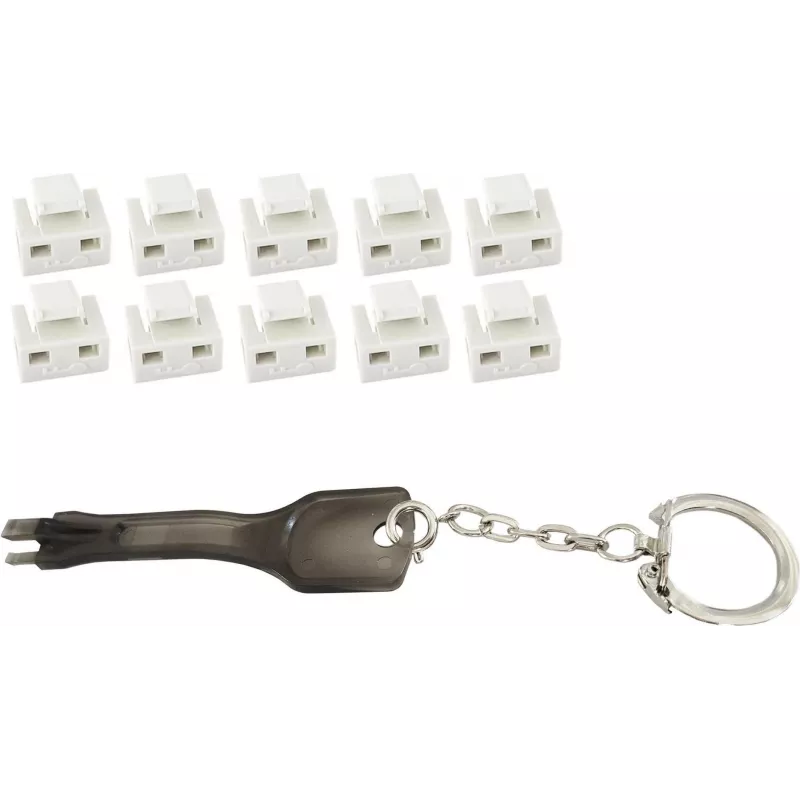
Port blocker ShiverPeaks 08-01036 RJ-45 White with Key

Port blocker ShiverPeaks 08-01036 RJ-45 White with Key
R349
The ShiverPeaks 08-01036 RJ-45 port blocker in white is a hardware accessory designed to protect ethernet ports from unauthorized access and accidental use. It physically covers the RJ-45 jack and comes with a matching key that allows authorized personnel to unlock and remove the blocker when needed... Read More
Stock 873 Code 2350523 Brand SHIVERPEAKS Model 08-01036 Warranty 2 Years

Shipping & Returns

Estimated delivery Tuesday, October 6
You will be kept updated through our detailed tracking system
Payment options
EFTPayFastBank CardSnapScanZapperGoogle PayApple PayMobicredMoreTymePay on Arrival

The ShiverPeaks 08-01036 RJ-45 port blocker in white is a hardware accessory designed to protect ethernet ports from unauthorized access and accidental use. It physically covers the RJ-45 jack and comes with a matching key that allows authorized personnel to unlock and remove the blocker when needed. Intended for network security in shared or public spaces, the blocker reduces the risk of tampering, unauthorized connections, and casual cable insertion.

Advantages

This port blocker provides a simple physical barrier for RJ-45 network ports without requiring software configuration. The included removable key enables controlled access while keeping unused ports sealed. Its compact white design blends with standard faceplates and patch panels, offering a discreet security measure. Installation and removal are quick and tool-free for authorized users.

Suitable for

  • Office environments and open-plan workspaces
  • Server rooms and equipment cabinets with unused ports
  • Public areas, meeting rooms, and reception desks
  • Schools, libraries, and shared facilities
  • Temporary installations where port access must be restricted

Key specifications

  • Connector compatibility: RJ-45 ethernet ports
  • Color: White
  • Includes: One port blocker and one removable key
  • Material: Durable plastic housing suitable for repeated use
  • Form factor: Low-profile insert for faceplates and patch panels

How to use

Insert the port blocker into the RJ-45 jack until it seats securely to prevent cable insertion. To grant access, insert the provided key and turn or pull as required by the design to release the blocker. After removal, replace the blocker to reseal the port. No software or network changes are required; the device functions purely as a mechanical deterrent. Keep the key in a controlled location to maintain access control.

Recommendations

Use the blocker on ports that are not needed for daily operation and store the key under restricted access. Periodically inspect the blocker and key for wear and replace if the fit becomes loose. Combine physical port blocking with network-level controls for comprehensive security.

Key Highlights
  • Office environments and open-plan workspaces
  • Server rooms and equipment cabinets with unused ports
  • Public areas, meeting rooms, and reception desks
  • Schools, libraries, and shared facilities
  • Temporary installations where port access must be restricted
  • Connector compatibility: RJ-45 ethernet ports
  • Color: White
  • Includes: One port blocker and one removable key
  • Material: Durable plastic housing suitable for repeated use
  • Form factor: Low-profile insert for faceplates and patch panels
Specifications
Compatible ports/slots
RJ-45
Number of port blocker keys
1
Number of port blockers
10
Product colour
White
Product type
Port blocker + key
Quantity per pack
1 pc(s)
Price history over the last 6 months
Port blocker ShiverPeaks 08-01036 RJ-45 White with Key
Current
R349
Lowest
R340
Highest
R349
Change 24H
+R10   +3%
Week
—   
Month
—   

Popular products in this category

WhatsApp
Hi, I’m DistriNode’s AI assistant. I can help you find products, compare options, create quote PDFs, or open support requests.