Account Contact
Your Cart
Pay the courier with no extra fees.
Need help? DistriNode AI can handle any task on our site.

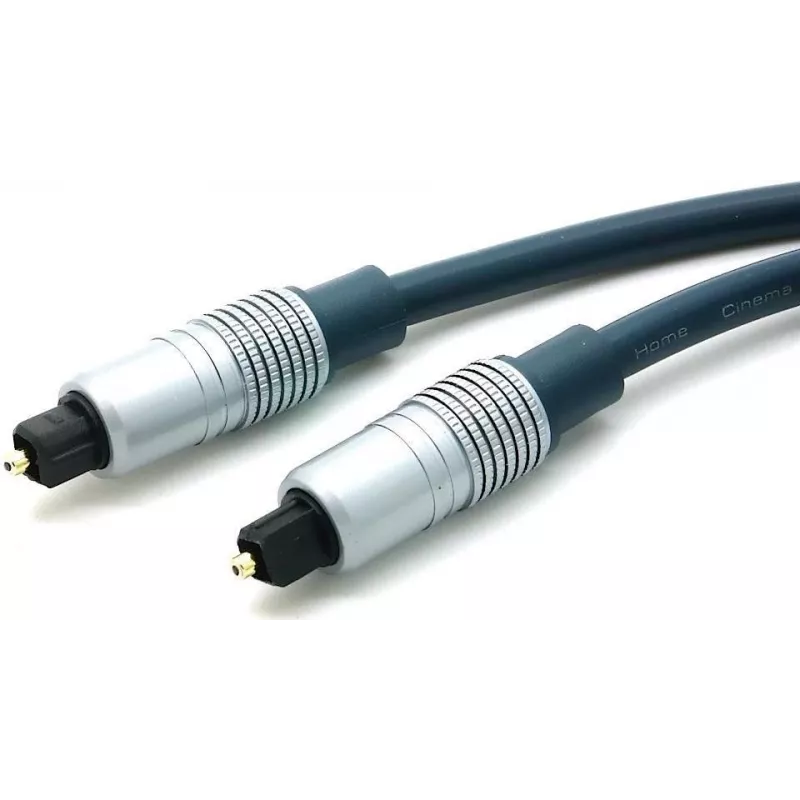
Optical Audio Cable ShiverPeaks 69006-10MHQ TosLink 10.0 m

Optical Audio Cable ShiverPeaks 69006-10MHQ TosLink 10.0 m
R505
The ShiverPeaks Optical Audio Cable 69006-10MHQ TosLink 10.0 m is a fiber-optic digital audio connection cable designed to transmit stereo or multichannel PCM audio between compatible devices. It uses TosLink (optical) connectors on both ends and a 10.0 metre length to bridge components in home cine... Read More
Stock 43 Code 2353090 Brand SHIVERPEAKS Model 69006-10MHQ Warranty 2 Years

Shipping & Returns

Estimated delivery Tuesday, October 6
You will be kept updated through our detailed tracking system
Payment options
EFTPayFastBank CardSnapScanZapperGoogle PayApple PayMobicredMoreTymePay on Arrival

The ShiverPeaks Optical Audio Cable 69006-10MHQ TosLink 10.0 m is a fiber-optic digital audio connection cable designed to transmit stereo or multichannel PCM audio between compatible devices. It uses TosLink (optical) connectors on both ends and a 10.0 metre length to bridge components in home cinema and hi‑fi setups while avoiding electromagnetic interference common to copper cabling.

Advantages

This optical audio cable provides galvanic isolation between source and receiver, eliminating issues from ground loops and reducing susceptibility to EMI or RFI. The cable features chrome-plated metal connector housings and gold-plated contacts for improved mechanical durability and consistent optical alignment. With a 10.0 m length, it allows flexible placement of TVs, soundbars, AV receivers and optical-capable players without signal degradation associated with longer copper runs.

Suitable for

  • Connecting TV to soundbar or home theatre receiver via TosLink
  • Linking CD/DVD/Blu‑ray players or set-top boxes to audio systems
  • Home cinema and hi‑fi setups requiring a 10 m optical connection
  • Environments where electromagnetic interference must be minimized

Key specifications

  • Connector type: TosLink (optical) on both ends
  • Cable type: optical fiber audio (TosLink)
  • Length: 10.0 m
  • Connector housing: chrome-plated metal
  • Contacts/terminations: gold-plated optical ferrules/contacts
  • Application: digital audio transmission for home cinema and hi‑fi

How to use

Ensure both devices have TosLink optical ports and are powered off before connecting. Remove any protective caps from the TosLink connectors, align the keyed connector and insert it gently into the optical port until it seats. Repeat for the other end. Power on the devices and select the optical digital audio input on the receiving device. Adjust audio output settings on the source device if necessary to enable optical output (for example selecting PCM or digital output in the audio menu).

Recommendations

Avoid bending the cable sharply; maintain gentle curves to protect the internal fiber. Keep the optical connectors free from dust and replace protective caps when not in use. If the signal is not detected, check that both device settings permit optical output and verify connectors are fully inserted and clean.

Key Highlights
  • Connecting TV to soundbar or home theatre receiver via TosLink
  • Linking CD/DVD/Blu‑ray players or set-top boxes to audio systems
  • Home cinema and hi‑fi setups requiring a 10 m optical connection
  • Environments where electromagnetic interference must be minimized
  • Connector type: TosLink (optical) on both ends
  • Cable type: optical fiber audio (TosLink)
  • Length: 10.0 m
  • Connector housing: chrome-plated metal
  • Contacts/terminations: gold-plated optical ferrules/contacts
  • Application: digital audio transmission for home cinema and hi‑fi
Price history over the last 6 months
Optical Audio Cable ShiverPeaks 69006-10MHQ TosLink 10.0 m
Current
R505
Lowest
R494
Highest
R505
Change 24H
+R9   +2%
Week
—   
Month
—   

Popular products in this category

WhatsApp
Hi, I’m DistriNode’s AI assistant. I can help you find products, compare options, create quote PDFs, or open support requests.