Account Contact
Your Cart
Pay the courier with no extra fees.
Need help? DistriNode AI can handle any task on our site.

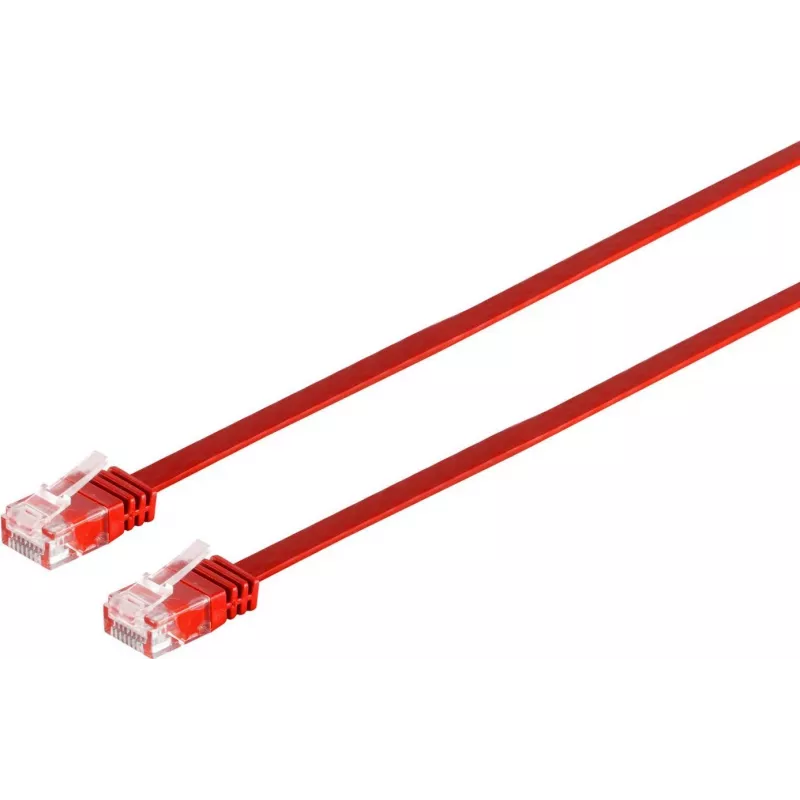
Networking Cable Tecline 10m Cat.6 Red

Networking Cable Tecline 10m Cat.6 Red
R335
The Tecline 10m Cat.6 networking cable in red is a 10-metre Ethernet cable designed for reliable wired connections in home and office networks. It features U/UTP construction and RJ-45 connectors on both ends, delivering performance suitable for Gigabit Ethernet and standard network applications. Th... Read More
Stock 111 Code 2351146 Brand TECLINE Model 77810r Warranty 2 Years

Shipping & Returns

Estimated delivery Tuesday, October 6
You will be kept updated through our detailed tracking system
Payment options
EFTPayFastBank CardSnapScanZapperGoogle PayApple PayMobicredMoreTymePay on Arrival

The Tecline 10m Cat.6 networking cable in red is a 10-metre Ethernet cable designed for reliable wired connections in home and office networks. It features U/UTP construction and RJ-45 connectors on both ends, delivering performance suitable for Gigabit Ethernet and standard network applications. The bright red jacket provides easy visual identification in cable runs and patch panels while maintaining flexibility for routing and installation.

Advantages

This Cat.6 cable supports data transfer speeds up to 1 Gbps and is built with twisted-pair conductors and U/UTP shielding to minimise interference on typical LAN environments. The moulded RJ-45 plugs ensure stable connector seating and simplified plug-and-play installation. Its 10 m length covers common distances between network devices without the need for additional extensions.

Suitable for

  • Connecting desktop PCs, laptops, and network printers to a switch or router
  • Wired connections for VoIP phones and conferencing equipment
  • Home and small office network cabling, including structured patching
  • Temporary or permanent connections where cable visibility aids identification

Key specifications

  • Cable category: Cat.6
  • Length: 10 metres
  • Shielding: U/UTP (unshielded overall, twisted pairs)
  • Connectors: RJ-45 on both ends
  • Maximum supported speed: up to 1 Gbps (Gigabit Ethernet)
  • Colour: red
  • Conductor type: twisted pair copper

How to use

Plug one RJ-45 connector into the Ethernet port of your source device (router, switch or modem) and the other connector into the target device (PC, NAS, printer or IP phone). Ensure connectors click into place for a secure connection. Route the cable to avoid sharp bends and places with heavy foot traffic; secure with cable ties or clips if necessary. For best results, keep the cable away from strong electromagnetic sources and high-voltage power lines.

Recommendations

Use the cable for Gigabit Ethernet links within the specified 10 m span and replace if the outer jacket or connectors show visible damage. For environments with high electromagnetic interference or where greater shielding is required, consider using shielded or higher-category cabling.

Key Highlights
  • Connecting desktop PCs, laptops, and network printers to a switch or router
  • Wired connections for VoIP phones and conferencing equipment
  • Home and small office network cabling, including structured patching
  • Temporary or permanent connections where cable visibility aids identification
  • Cable category: Cat.6
  • Length: 10 metres
  • Shielding: U/UTP (unshielded overall, twisted pairs)
  • Connectors: RJ-45 on both ends
  • Maximum supported speed: up to 1 Gbps (Gigabit Ethernet)
  • Colour: red
  • Conductor type: twisted pair copper
Specifications
Cable length
10 m
Cable shielding
U/UTP (UTP)
Cable standard
Cat6
Connector 1
RJ-45
Connector 1 gender
Male
Connector 2
RJ-45
Connector 2 gender
Male
Product colour
Red
Price history over the last 6 months
Networking Cable Tecline 10m Cat.6 Red
Current
R335
Lowest
R325
Highest
R335
Change 24H
+R9   +3%
Week
—   
Month
—   

Popular products in this category

WhatsApp
Hi, I’m DistriNode’s AI assistant. I can help you find products, compare options, create quote PDFs, or open support requests.