Account Contact
Your Cart
Pay the courier with no extra fees.
Need help? DistriNode AI can handle any task on our site.

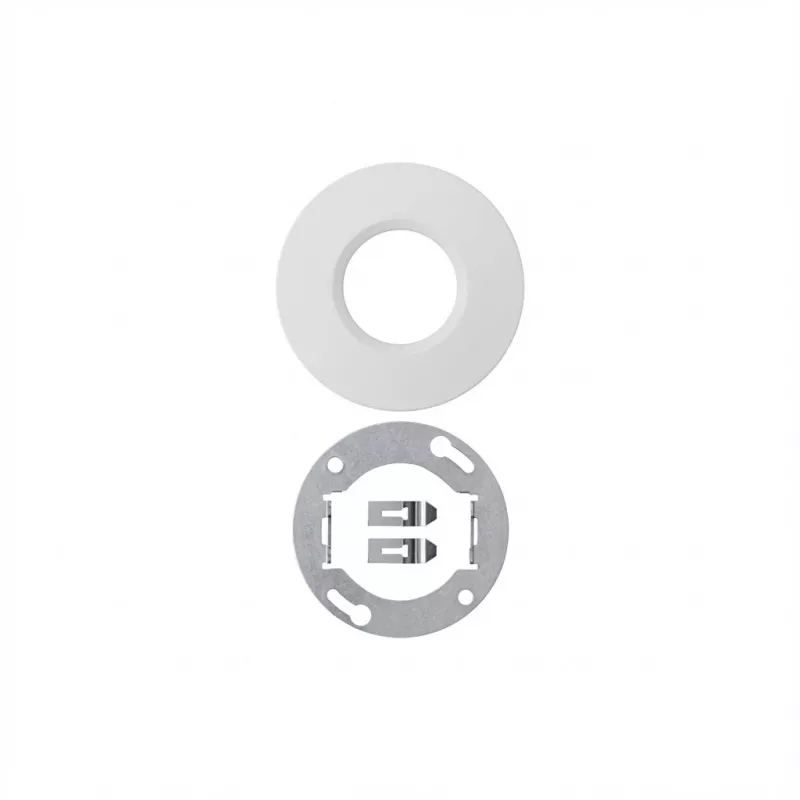
Mounting kit Gira 224100 for UP-mount KNX presence detector, flush-mount installation accessories

Mounting kit Gira 224100 for UP-mount KNX presence detector, flush-mount installation accessories
R882
Mounting kit Gira 224100 for UP-mount KNX presence detector provides the mechanical components required for a clean flush installation of compatible KNX presence sensors. The kit is intended to fit standard recessed mounting boxes and secures the detector so that it sits reliably and aligned with th... Read More
Stock 19 Code 1733737 Brand GIRA Model 224100 Warranty 2 Years

Shipping & Returns

Estimated delivery Tuesday, October 6
You will be kept updated through our detailed tracking system
Payment options
EFTPayFastBank CardSnapScanZapperGoogle PayApple PayMobicredMoreTymePay on Arrival

Mounting kit Gira 224100 for UP-mount KNX presence detector provides the mechanical components required for a clean flush installation of compatible KNX presence sensors. The kit is intended to fit standard recessed mounting boxes and secures the detector so that it sits reliably and aligned with the finished wall surface. Designed for professional electrical installations, the mounting kit simplifies assembly and ensures stable positioning of the sensor module within the wall cavity.

Advantages

The mounting kit offers precise alignment and consistent fit for UP-mount KNX presence detectors, reducing installation time and on-site adjustments. Durable materials and a purpose-built design improve long-term stability and minimize the risk of sensor movement after installation. The kit's components are compatible with standard recessed mounting boxes, making it suitable for retrofit and new-build projects where flush mounting and neat aesthetics are required.

Suitable for

Key specifications

How to use

Install the mounting kit by placing its frame and fixing elements into the prepared recessed mounting box, then position the KNX presence detector into the kit so that the sensor housing aligns with the finished wall surface. Fasten the fixing elements according to the kit design to achieve a tight and stable fit. After mechanical fixation, complete the electrical connection and test the presence detector according to the sensor manufacturer's instructions to confirm correct operation and alignment.

Recommendations

Verify compatibility between the mounting kit and the specific KNX presence detector model before installation. Use appropriate tools and observe local electrical codes; electrical connections should be performed by a qualified electrician. Check that the detector aperture is unobstructed after installation to ensure reliable detection performance.

Key Highlights
  • Flush (UP) installation of KNX presence detectors in residential and commercial buildings
  • Professional electrical installations requiring recessed mounting and clean wall finish
  • Retrofit jobs where existing mounting boxes are used for sensor replacement
  • New construction projects with KNX-based presence detection systems
  • Application: mechanical mounting kit for flush installation of KNX presence sensors
  • Compatibility: designed for use with UP-mount KNX presence detectors (ensure model compatibility before installation)
  • Material: robust plastic and metal fixing elements for secure attachment
  • Installation type: recessed (flush) mounting into standard wall-mounted mounting boxes
  • Function: ensures proper alignment, secure fixation, and stable positioning of the detector module
Price history over the last 6 months
Mounting kit Gira 224100 for UP-mount KNX presence detector, flush-mount installation accessories
Current
R882
Lowest
R794
Highest
R990
Change 24H
+R13   +1%
Week
+R86   +11%
Month
+R86   +11%

Popular products in this category

WhatsApp
Hi, I’m DistriNode’s AI assistant. I can help you find products, compare options, create quote PDFs, or open support requests.