Account Contact
Your Cart
Pay the courier with no extra fees.
Need help? DistriNode AI can handle any task on our site.

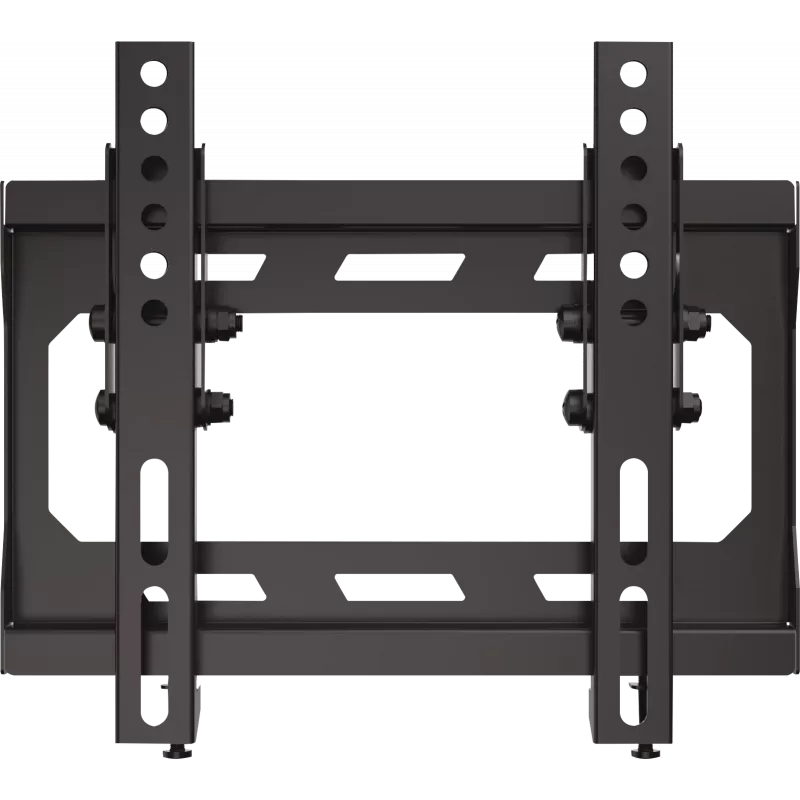
Mounting Bracket TechniSat Technimount Isi 139.7 cm (55 inch) Black

Mounting Bracket TechniSat Technimount Isi 139.7 cm (55 inch) Black
R881
The TechniSat Technimount Isi mounting bracket is designed to hold flat-panel screens from 22" to 55" with a maximum load of 20 kg. With support for VESA patterns from 75x75 mm up to 200x200 mm and a low-profile design that protrudes only 2.5 cm from the wall, this black bracket provides a compact a... Read More
Stock 8 Code 2220826 Brand TechniSat Model 2020/2764 Warranty 2 Years

Shipping & Returns

Estimated delivery Tuesday, October 6
You will be kept updated through our detailed tracking system
Payment options
EFTPayFastBank CardSnapScanZapperGoogle PayApple PayMobicredMoreTymePay on Arrival

The TechniSat Technimount Isi mounting bracket is designed to hold flat-panel screens from 22" to 55" with a maximum load of 20 kg. With support for VESA patterns from 75x75 mm up to 200x200 mm and a low-profile design that protrudes only 2.5 cm from the wall, this black bracket provides a compact and practical solution for mounting TVs and monitors in residential or commercial interiors.

Advantages

The bracket offers a slim, space-saving profile suitable for close-to-wall installations while maintaining secure support for screens up to 20 kg. Compatibility with a wide range of VESA patterns ensures easy installation across many TV and monitor models. Its black finish integrates unobtrusively into modern interiors and reduces visual distraction behind the screen.

Suitable for

  • Mounting 22"–55" flat-panel TVs and monitors
  • Close-to-wall installations in living rooms, bedrooms, meeting rooms
  • Wall mounting where a slim, low-profile appearance is desired

Key specifications

  • Screen size compatibility: 22"–55"
  • Maximum load capacity: 20 kg
  • VESA compatibility: 75x75 mm to 200x200 mm
  • Distance from wall: 2.5 cm (low-profile)
  • Finish: black
  • Type: fixed/wall-mount bracket

How to use

Determine a suitable mounting height and mark the wall according to the bracket template. Secure the wall plate using appropriate anchors or screws for your wall type, then attach the mounting arms to the screen using the matching VESA holes. Lift the screen and hang it on the wall plate, ensuring the fixture engages and the screen is level. Confirm all fasteners are tightened and that the screen sits securely on the bracket before release.

Recommendations

Verify the screen weight and VESA pattern before installation. Use suitable wall anchors for the underlying wall material (drywall, concrete, brick) and, if unsure, consult a qualified installer. Avoid exceeding the maximum load and allow sufficient ventilation around the screen.

Key Highlights
  • Mounting 22"–55" flat-panel TVs and monitors
  • Close-to-wall installations in living rooms, bedrooms, meeting rooms
  • Wall mounting where a slim, low-profile appearance is desired
  • Screen size compatibility: 22"–55"
  • Maximum load capacity: 20 kg
  • VESA compatibility: 75x75 mm to 200x200 mm
  • Distance from wall: 2.5 cm (low-profile)
  • Finish: black
  • Type: fixed/wall-mount bracket
Specifications
Depth (max)
50 mm
Distance to the wall (max)
25 mm
Height
260 mm
Maximum screen size
55 "
Maximum VESA mount
200 x 200
Maximum weight capacity
20 kg
Minimum screen size
22 "
Minimum VESA mount
75 x 75
Mounting type
Wall
Number of displays supported
1
Package depth
32 mm
Package height
105 mm
Package weight
840 g
Package width
270 mm
Panel mounting interface
200 x 200, 200 x 100, 100 x 100, 75 x 75
Product colour
Black
Weight
0.594 kg
Width
230 mm
Price history over the last 6 months
Mounting Bracket TechniSat Technimount Isi 139.7 cm (55 inch) Black
Current
R881
Lowest
R839
Highest
R881
Change 24H
+R39   +5%
Week
—   
Month
—   

Popular products in this category

WhatsApp
Hi, I’m DistriNode’s AI assistant. I can help you find products, compare options, create quote PDFs, or open support requests.