Account Contact
Your Cart
Pay the courier with no extra fees.
Need help? DistriNode AI can handle any task on our site.

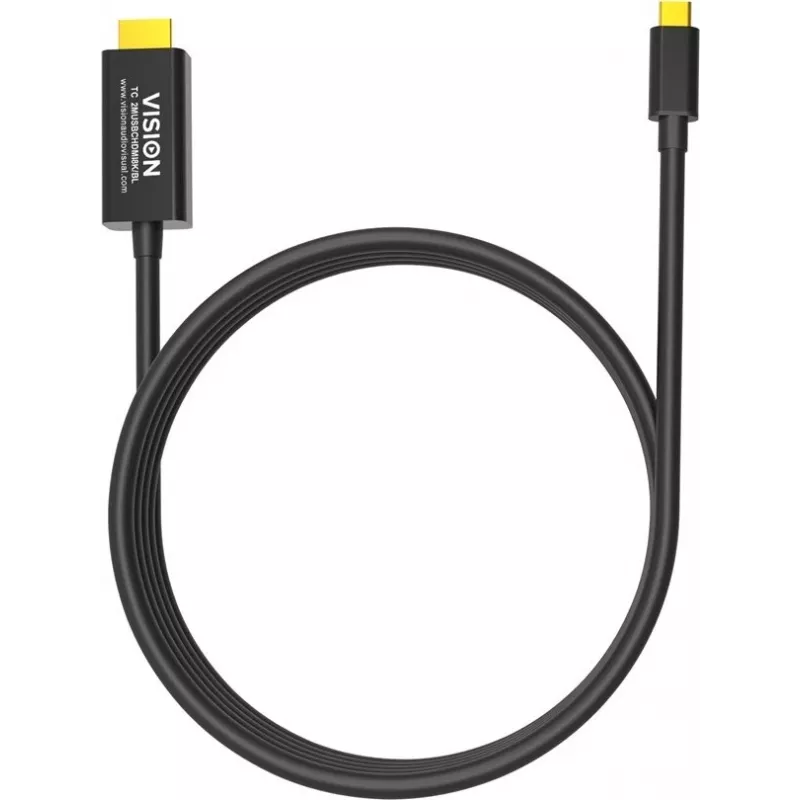
Mobile phone cable Vision TC 2MUSBCHDMI8K/BL Black 2 m USB C

Mobile phone cable Vision TC 2MUSBCHDMI8K/BL Black 2 m USB C
R721
The Vision TC 2MUSBCHDMI8K/BL is a 2 m black mobile phone cable with a USB‑C connector on one end and an HDMI plug on the other. It supports USB 3.2 Gen 2 (also known as USB 3.1 Gen 2) signal for high‑speed data transfer and is designed for charging, syncing and connecting USB‑C devices to HDMI disp... Read More
Stock 80 Code 2342638 Brand VISION Model TC 2MUSBCHDMI8K/BL Warranty 2 Years

Shipping & Returns

Estimated delivery Thursday, October 8
You will be kept updated through our detailed tracking system
Payment options
EFTPayFastBank CardSnapScanZapperGoogle PayApple PayMobicredMoreTymePay on Arrival

The Vision TC 2MUSBCHDMI8K/BL is a 2 m black mobile phone cable with a USB‑C connector on one end and an HDMI plug on the other. It supports USB 3.2 Gen 2 (also known as USB 3.1 Gen 2) signal for high‑speed data transfer and is designed for charging, syncing and connecting USB‑C devices to HDMI displays.

Advantages

The cable combines a reversible USB‑C connector and a standard HDMI plug, offering reliable connectivity for compatible devices. At 2 m length and with USB 3.2 Gen 2 support, it provides fast data transfer and convenient reach for everyday use. The black jacket enhances durability and resists wear from regular handling.

Suitable for

  • Connecting USB‑C smartphones, tablets or laptops to HDMI displays or TVs
  • Mirroring or extending screens for presentations and media playback
  • Charging and data syncing of USB‑C devices while connected to displays that support power delivery

Key specifications

  • Connector 1: USB C
  • Connector 2: HDMI
  • USB version: USB 3.2 Gen 2 (3.1 Gen 2)
  • Cable length: 2 m
  • Product colour: Black
  • Brand: VISION
  • MPN: TC 2MUSBCHDMI8K/BL

How to use

Plug the HDMI end into the display device (monitor, TV or projector) and connect the USB‑C end to your smartphone, tablet or laptop that supports video output over USB‑C. Select the appropriate input on the display. If necessary, enable screen mirroring or external display mode on the source device. For best performance, ensure the source device supports USB 3.2 Gen 2 video output.

Recommendations

Use the cable without excessive bending near the connectors and avoid pulling on the cord. If the connected device requires power delivery, ensure the display or an external power source provides adequate power. Store the cable coiled loosely to prolong its service life.
Key Highlights
  • Connecting USB‑C smartphones, tablets or laptops to HDMI displays or TVs
  • Mirroring or extending screens for presentations and media playback
  • Charging and data syncing of USB‑C devices while connected to displays that support power delivery
  • Connector 1: USB C
  • Connector 2: HDMI
  • USB version: USB 3.2 Gen 2 (3.1 Gen 2)
  • Cable length: 2 m
  • Product colour: Black
  • Brand: VISION
  • MPN: TC 2MUSBCHDMI8K/BL
Specifications
AWG wire size
32
Cable length
2 m
Compatibility
iPad / iPhone
Compliance certificates
CE, Federal Communications Commission (FCC), RoHS
Connector 1
USB C
Connector 1 form factor
Straight
Connector 1 gender
Male
Connector 2 form factor
Straight
Connector 2 gender
Male
Connector contacts plating
Gold
Jacket material
Polyvinyl chloride (PVC)
Maximum data transfer rate
48 Mbit/s
Package depth
160 mm
Package height
43 mm
Package weight
70 g
Package width
160 mm
Plug and Play
Yes
Product colour
Black
Quantity per pack
1 pc(s)
USB version
USB 3.2 Gen 2 (3.1 Gen 2)

Leaflet

Open Leaflet
Price history over the last 6 months
Mobile phone cable Vision TC 2MUSBCHDMI8K/BL Black 2 m USB C
Current
R721
Lowest
R667
Highest
R721
Change 24H
+R46   +7%
Week
+R54   +8%
Month
+R47   +7%

Popular products in this category

WhatsApp
Hi, I’m DistriNode’s AI assistant. I can help you find products, compare options, create quote PDFs, or open support requests.