Account Contact
Your Cart
Pay the courier with no extra fees.
Need help? DistriNode AI can handle any task on our site.

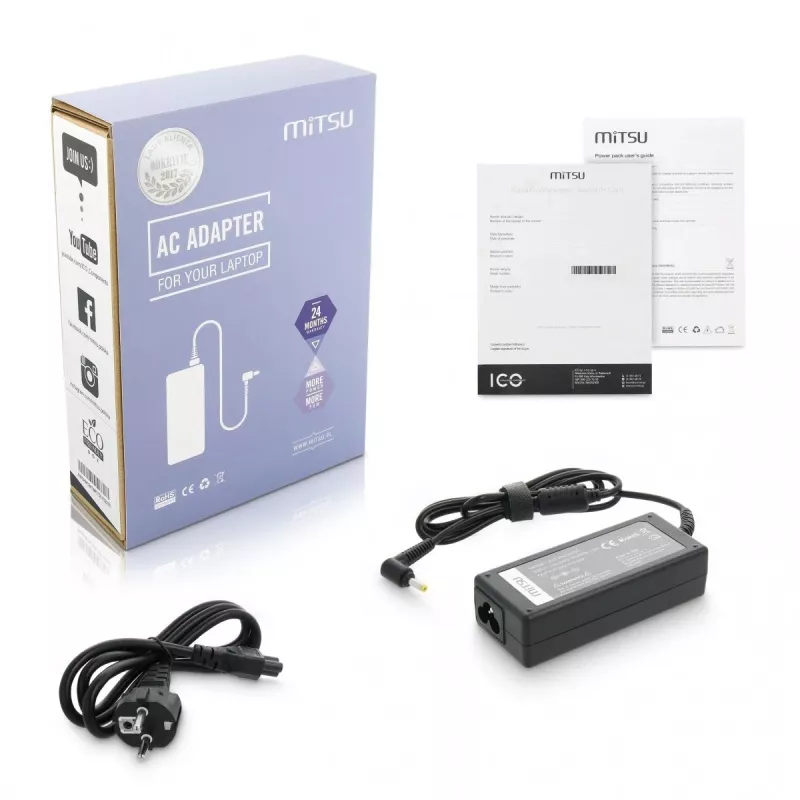
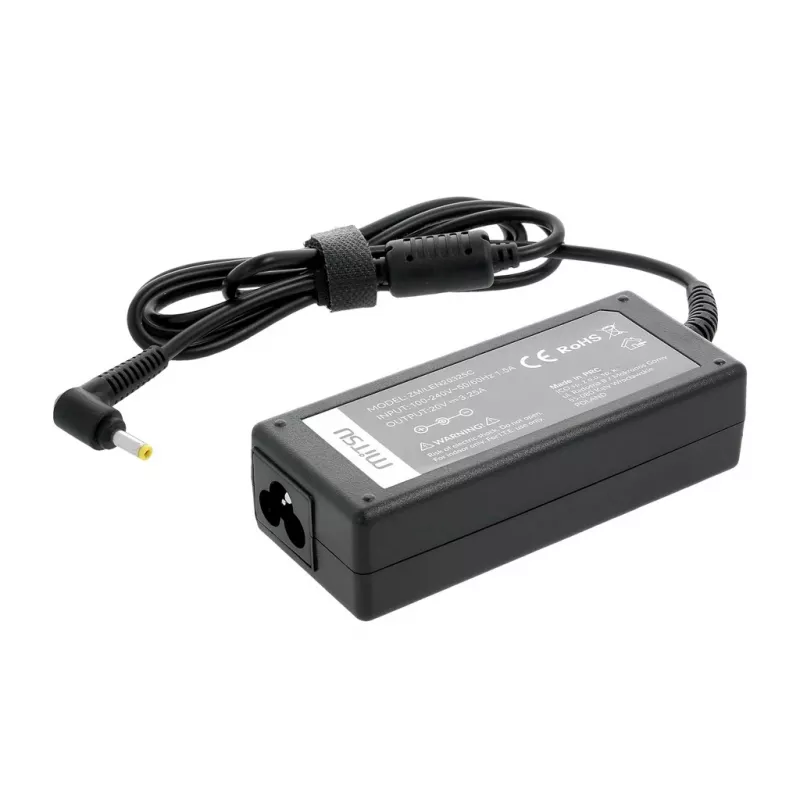
MITSU Power Supply 20V 3.25A for Lenovo laptops, model 5ZM038

MITSU Power Supply 20V 3.25A for Lenovo laptops, model 5ZM038
R402
Description: The new IBM Lenovo Mitsu laptop power supply is equipped with a ferrite filter and excellent protection against overvoltage, overheating, overload and overcharging. IBM Lenovo laptop chargers are aimed at the most demanding users, who appreciate stress-free and comfortable work. The qua... Read More
Stock 18 Code 1714021 Brand MITSU Model ZM/LEN20325C Warranty 2 Years

Shipping & Returns

Estimated delivery Thursday, October 1
You will be kept updated through our detailed tracking system
Payment options
EFTPayFastBank CardSnapScanZapperGoogle PayApple PayMobicredMoreTymePay on Arrival
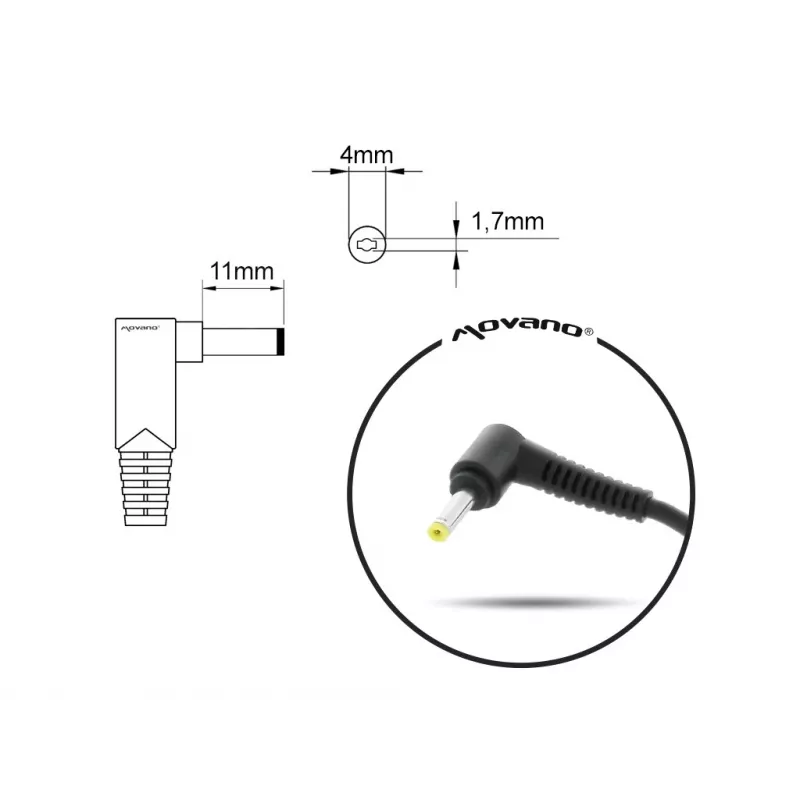
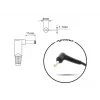
Description: The new IBM Lenovo Mitsu laptop power supply is equipped with a ferrite filter and excellent protection against overvoltage, overheating, overload and overcharging. IBM Lenovo laptop chargers are aimed at the most demanding users, who appreciate stress-free and comfortable work. The quality of the product is confirmed by the following certificates: CE, ROHS, FCC and strict quality control eliminating possible defects.QUALITY BEFORE EVERYTHING Temperature resistance - The influence of high and low temperatures on the resistance of the protection systems and the electrical parameters of the PSU is tested. Electrical test - Testing the correctness of electrical connections between individual components of the PSU. Short-circuit and over-voltage test - The reaction of the PSU protection systems due to a short circuit and a sudden voltage jump simulated by supplying a high-voltage pulse at the input of the PSU is tested. Final test - The output voltage level of the UPS is tested by subjecting it to an hour-long continuous load. | Use: network | Output voltage: 20 | Output current (max): 3.25 | Power supply output current: 65 | Plug: The outer diameter of 4.0 mm Inner diameter 1.7 mm Length 11 mm | In box: Power Supply Power cable User manual Warranty Card | Compatible with: Huawei Lenovo B50-10, B50-50, B50-50 80S2, FLEX4-1570, V145, seria IdeaPad 100 100-14, 100-14IBD, 100-14IBY, 100-15, 100-151IBD, 100-15IBD, 100-15IBY, 100-15IBY 80MJ, 100S, 100S CHROMEBOOK, 100S-14IBR, 110, 110-15ISK, 310, 310-14, 310-14IKB, 310-14IKB 80TU, 310-14ISK, 310-15, 310-15ABR, 310-15IAP, 310-15ISK, 310S, 310S-14, 310S-15IKB, 320-14AST, 320-14IAP, 320-14IKB, 320-14IKB 80XK, 320-14ISK, 320-15IKB, 320-15IKB 80YH, 320-15IKB 81BG, 320-15ISK, 320-17ABR, 320-17ABR 80YN, 320-17AST, 320-17IKB, 320-17ISK, 320C-15IKB, 320S-13IKB, 320S-14IKB, 330-14IGM, 330-14IKBR, 330-15ARR, 330-15IGM, 330-15IKB, 330-15IKB 81DE, 330-15IKBR, 330-17AST, 330-17AST 81D7, 330-17IKB, 330-17IKB 81DK, 330-17IKBR, 330S-14AST, 330S-14IKB, 330S-15ARR, 330S-15AST, 330S-15IKB, 330S-15IKB 81F5, 510, 510-15IKB, 510S-13IKB, 520-15IKB, 530S-14ARR, 530S-14IKB, 530S-15IKB, 710S PLUS, 710S-13IKB, 710S, 710S-13ISK, 720S-14IKB, 730S-13IWL, 81W6AC, C340-14API, C340-14IML, C340-14IWL, C340-15IML, C340-15IWL, D330-10IGM, L340, L340-15, L340-15API, L340-15IWL, L340-17, L340-17API, S145, S145-14API, S145-14AST, S145-14IIL, S145-14IKB, S145-14IWL, S145-15API, S145-15IIL, S145-15IWL, S340-14API, S340-14IWL, S340-15API, S340-15IWL, S540-15IML, S540-15IWL, V110, seria Flex 14, 4 1130, 5 1470, 6-14IKB 81EM, seria Chromebook N22, seria Yoga 310, 510, 520, 530-14IKB, 710, 710-14IKB, 710-15ISK, 720-12IKB, seria Flex 4 4-1130, 4-1435, 4-1470, 4-1480, 4-1570, 4-1580, seria Miix 510, 510-12IKB, 510-12ISK, 520-12IKB, seria Winbook N22, seria Touch N22-20, seria Flex 6 6-14IKB, seria Flex 14 81SS, seria IdeaPad 3 17ADA05, | Other features: Convertible from: 01FR159, 5A10K78738, 5A10K78739, 5A10K78745, ADLX65CCGA2A, ADLX65CCGB2A, ADLX65CCGC2A, ADLX65CCGE2A, ADLX65CCGG2A, ADLX65CCGI2A, ADLX65CCGK2A, ADLX65CCGR2A, ADLX65CCGU2A, ADLX65CDGA2A, ADLX65CDGB2A, ADLX65CDGC2A, ADLX65CDGE2A, ADLX65CDGG2A, ADLX65CDGI2A, ADLX65CLGC2A, ADLX65CLGE2A, ADLX65CLGK2A, ADLX65CLGU2A, PA-1650-20LL, SA10M42769, Model ZM/LEN20325C

How to use

Connect the adapter to an appropriate AC mains outlet using the supplied mains lead, then plug the DC connector into the laptop power inlet until it seats securely. Ensure the laptop is turned off or in a stable power state when first connecting. Verify that charging indicator lights or on-screen battery icons confirm charging. Disconnect the adapter by removing the DC connector first, then unplugging from the mains outlet.

Recommendations

Confirm connector compatibility with your Lenovo model before use and avoid using adapters that do not match the required voltage and current. Use the adapter in a well-ventilated area and avoid covering it during operation to prevent overheating. If the adapter becomes very hot, noisy, or emits unusual odors, disconnect it and replace it with a compatible unit.

Key Highlights
  • Replacing a damaged or missing Lenovo laptop adapter that requires 20V and 3.25A
  • Keeping an extra charger at home, office, or in luggage for travel
  • Powering a compatible Lenovo notebook during extended use away from its primary charger
  • Output voltage: 20 V DC
  • Maximum output current: 3.25 A
  • Power output: 65 W (approx.) based on voltage and current
  • Form factor: external AC adapter (wall-mounted with DC output cable)
  • Intended device type: compatible Lenovo portable computers requiring 20V/3.25A
Price history over the last 6 months
MITSU Power Supply 20V 3.25A for Lenovo laptops, model 5ZM038
Current
R402
Lowest
R341
Highest
R419
Change 24H
+R57   +16%
Week
+R59   +17%
Month
+R58   +17%

Popular products in this category

WhatsApp
Hi, I’m DistriNode’s AI assistant. I can help you find products, compare options, create quote PDFs, or open support requests.