Account Contact
Your Cart
Pay the courier with no extra fees.
Need help? DistriNode AI can handle any task on our site.

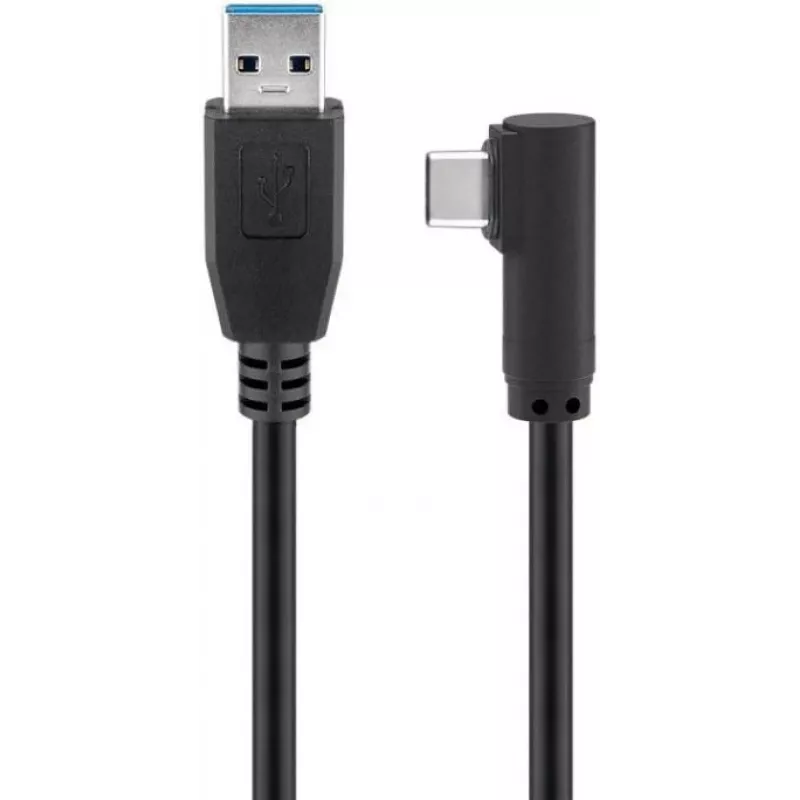
Microconnect USB3.1CA2A USB cable USB 3.2 Gen 1 (3.1 Gen 1) 2 m USB A USB C Black

Microconnect USB3.1CA2A USB cable USB 3.2 Gen 1 (3.1 Gen 1) 2 m USB A USB C Black
R682
The Microconnect USB3.1CA2A is a 2 m USB data cable with a USB A plug on one end and a USB C plug on the other. It supports USB 3.2 Gen 1 (also known as USB 3.1 Gen 1) with data transfer rates up to 5 Gbit/s and features nickel‑plated connectors and a black jacket for everyday connection of compatib... Read More
Stock 270 Code 1165346 Brand MICROCONNECT Model USB3.1CA2A Warranty 2 Years

Shipping & Returns

Estimated delivery Tuesday, October 6
You will be kept updated through our detailed tracking system
Payment options
EFTPayFastBank CardSnapScanZapperGoogle PayApple PayMobicredMoreTymePay on Arrival

The Microconnect USB3.1CA2A is a 2 m USB data cable with a USB A plug on one end and a USB C plug on the other. It supports USB 3.2 Gen 1 (also known as USB 3.1 Gen 1) with data transfer rates up to 5 Gbit/s and features nickel‑plated connectors and a black jacket for everyday connection of compatible devices.

Advantages

The cable provides high-speed data transfer up to 5 Gbit/s for file exchange and peripheral connection between devices with USB-C and hosts with USB-A. Nickel-plated connectors improve contact reliability and corrosion resistance, while the 2 m length offers extended reach for desktop or charging setups.

Suitable for

  • Connecting laptops or smartphones with USB-C to computers, USB hubs or chargers with USB-A
  • Transferring data between external drives and hosts that support USB 3.2 Gen 1
  • Charging devices from USB-A power sources (charging speed depends on the host)

Key specifications

  • Connectors: USB A (male) to USB C (male)
  • USB version: USB 3.2 Gen 1 (USB 3.1 Gen 1)
  • Maximum data rate: up to 5 Gbit/s
  • Cable length: 2 m
  • Connector plating: nickel
  • Colour: Black
  • Weight: 0.05 kg

How to use

Insert the USB A plug into a USB-A host port (computer, USB hub or wall charger) and insert the USB C plug into the device with a USB-C socket (laptop, smartphone, external drive). Ensure both devices support the required USB version for maximum transfer speeds. Disconnect by gently pulling the connector, avoiding excessive force or lateral stress on the cable.

Recommendations

For optimal performance, use with hosts and devices that support USB 3.2 Gen 1. Avoid bending the cable sharply near the connectors and keep the connectors dry and free of debris to maintain reliable data transfer and connection quality.
Key Highlights
  • For super-fast synching and charging at up to 60 W
  • SuperSpeed data transmission up to 10 Gbs
  • Backwards compatibility to USB2.0 and 1.1
  • USB 3.2 Gen 1, offering data transfer speeds of up to 10 Gbps.
  • 2 m
  • USB A Straight Male
  • USB C Angled Male
  • USB 3.2 Gen 1 (3.1 Gen 1) 5000 Mbit/s
  • Black
  • 1 pc(s)
Specifications
Cable jacket material
Polyvinyl chloride (PVC)
Cable length
2 m
Compliance certificates
RoHS
Conductor material
Copper
Connector 1
USB A
Connector 1 form factor
Straight
Connector 1 gender
Male
Connector 2
USB C
Connector 2 form factor
Angled
Connector 2 gender
Male
Connector contacts plating
Nickel
Country of origin
China
Harmonized System (HS) code
84733080
Maximum data transfer rate
5 Gbit/s
Package depth
178 mm
Package height
19 mm
Package weight
78 g
Package width
198 mm
Plug and Play
Yes
Product colour
Black
Quantity per pack
1 pc(s)
USB version
USB 3.2 Gen 1 (3.1 Gen 1)
Weight
0.05 kg

Leaflet

Open Leaflet
Price history over the last 6 months
Microconnect USB3.1CA2A USB cable USB 3.2 Gen 1 (3.1 Gen 1) 2 m USB A USB C Black
Current
R682
Lowest
R196
Highest
R682
Change 24H
+R31   +5%
Week
+R485   +247%
Month
+R485   +245%

Popular products in this category

WhatsApp
Hi, I’m DistriNode’s AI assistant. I can help you find products, compare options, create quote PDFs, or open support requests.