Account Contact
Your Cart
Pay the courier with no extra fees.
Need help? DistriNode AI can handle any task on our site.

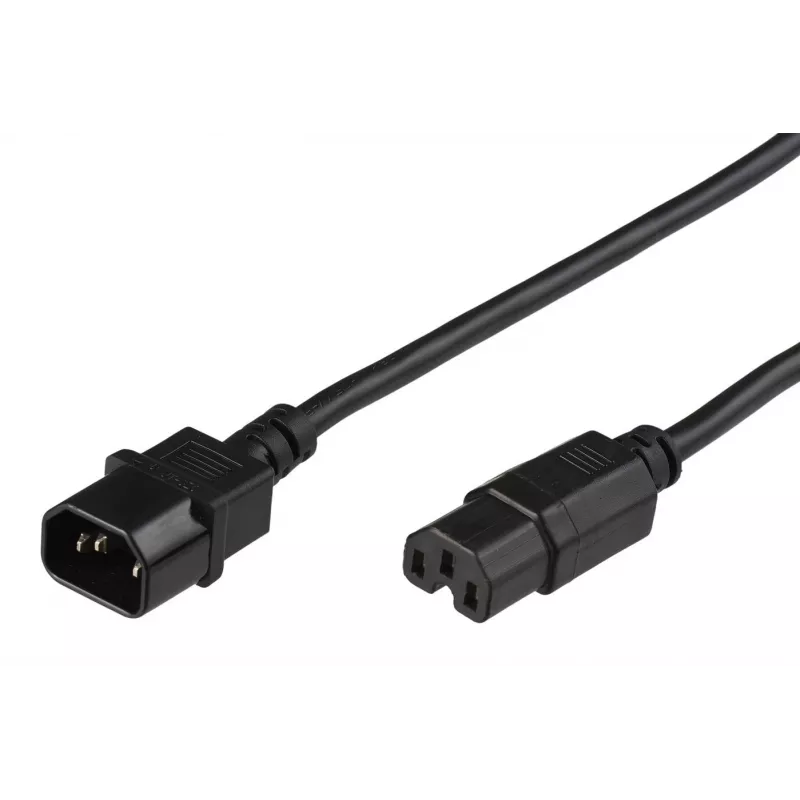
Microconnect PE011400 power cable Black 2.5 m C14 coupler C15 coupler

Microconnect PE011400 power cable Black 2.5 m C14 coupler C15 coupler
R386
The Microconnect PE011400 power cable is a 2.5 m black extension cord with a C14 plug on one end and a C15 coupler on the other. It uses H05V2V2-F cable type and is rated for 250 V and 10 A, making it suitable for connecting servers, PDUs and computer power supplies where a short, reliable connectio... Read More
Stock 332 Code 1185243 Brand MICROCONNECT Model PE011400 Warranty 2 Years

Shipping & Returns

Estimated delivery Tuesday, October 6
You will be kept updated through our detailed tracking system
Payment options
EFTPayFastBank CardSnapScanZapperGoogle PayApple PayMobicredMoreTymePay on Arrival

The Microconnect PE011400 power cable is a 2.5 m black extension cord with a C14 plug on one end and a C15 coupler on the other. It uses H05V2V2-F cable type and is rated for 250 V and 10 A, making it suitable for connecting servers, PDUs and computer power supplies where a short, reliable connection is required.

Advantages

The cable provides a standardized C14–C15 connection compatible with many datacenter PDUs and server power inputs. Its 2.5 m length offers flexibility for rack and desktop arrangements while the H05V2V2-F construction meets common safety and insulation requirements. The black outer jacket resists visible wear and integrates unobtrusively into most cable management setups.

Suitable for

  • Connecting a server to a PDU in datacenter racks
  • Powering a computer power supply from a UPS or PDU
  • Linking monitors or other IT equipment that accept C15 inlets

Key specifications

  • Connectors: C14 (plug) to C15 (coupler)
  • Cable length: 2.5 m
  • Rated voltage: 250 V
  • Rated current: 10 A
  • Cable type: H05V2V2-F
  • Colour: Black
  • Weight: 0.3 kg
  • Brand: MicroConnect, MPN: PE011400, EAN: 5704327968603

How to use

Inspect both connectors and the cable for visible damage before use. Insert the C14 plug into the device or power source with the matching inlet and connect the C15 coupler to the equipment requiring power. Ensure connections are secure and avoid kinking the cable. Use appropriate cable management to prevent tension on the connectors and maintain ventilation around powered equipment.

Recommendations

Use this cable within its rated limits (250 V, 10 A) and replace it if the insulation or connectors show wear. For permanent installations in datacenters, route the cable according to local safety standards and avoid running it alongside high-heat sources or sharp edges.

Key Highlights
  • Connecting a server to a PDU in datacenter racks
  • Powering a computer power supply from a UPS or PDU
  • Linking monitors or other IT equipment that accept C15 inlets
  • Connectors: C14 (plug) to C15 (coupler)
  • Cable length: 2.5 m
  • Rated voltage: 250 V
  • Rated current: 10 A
  • Cable type: H05V2V2-F
  • Colour: Black
  • Weight: 0.3 kg
  • Brand: MicroConnect, MPN: PE011400, EAN: 5704327968603
Specifications
Cable length
2.5 m
Cable type
H05V2V2-F
Compliance certificates
RoHS
Conductor material
Copper
Connector 1
C14 coupler
Connector 1 form factor
Straight
Connector 1 gender
Male
Connector 2
C15 coupler
Connector 2 form factor
Straight
Connector 2 gender
Female
Core size
1.5 mm²
Country of origin
China
Input current
10 A
Input voltage
250 V
Jacket material
Polyvinyl chloride (PVC)
Maximum current
10 A
Package depth
201 mm
Package height
77 mm
Package weight
306 g
Package width
240 mm
Product colour
Black
Weight
300 g

Leaflet

Open Leaflet
Price history over the last 6 months
Microconnect PE011400 power cable Black 2.5 m C14 coupler C15 coupler
Current
R386
Lowest
R201
Highest
R448
Change 24H
+R134   +53%
Week
+R137   +55%
Month
+R136   +54%

Popular products in this category

WhatsApp
Hi, I’m DistriNode’s AI assistant. I can help you find products, compare options, create quote PDFs, or open support requests.