Account Contact
Your Cart
Pay the courier with no extra fees.
Need help? DistriNode AI can handle any task on our site.

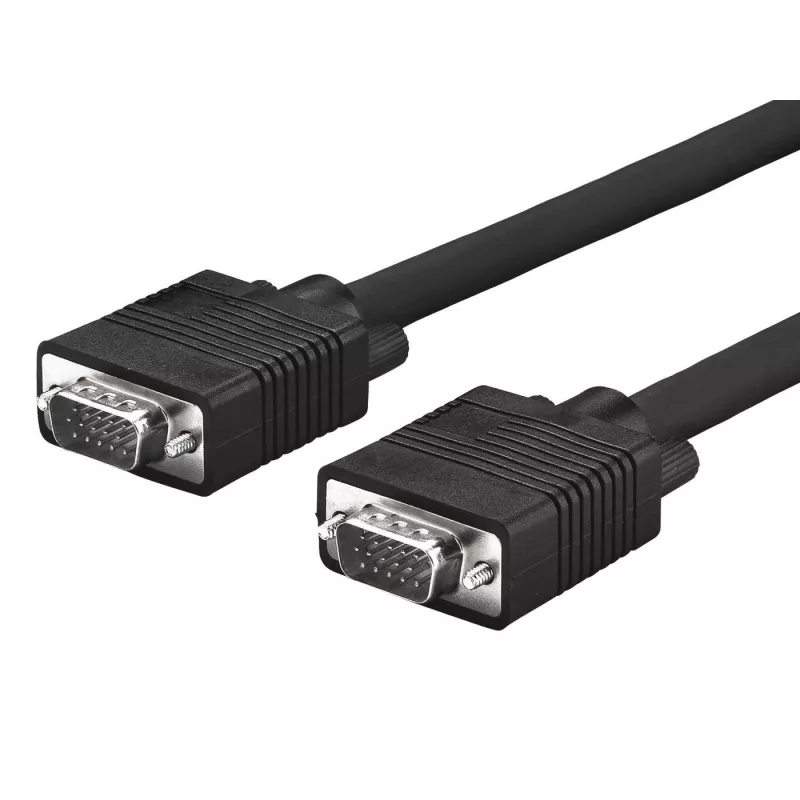
Microconnect MONGG2B VGA cable 2 m VGA (D-Sub) Black

Microconnect MONGG2B VGA cable 2 m VGA (D-Sub) Black
R320
The MicroConnect MONGG2B is a 2-meter VGA (D-Sub) cable for connecting a PC or laptop to a monitor or projector with a VGA input. It provides a straightforward analogue video connection with two VGA (D-Sub) connectors and comes in a compact, lightweight design that is RoHS compliant.AdvantagesThe ca... Read More
Stock 602 Code 1183644 Brand MICROCONNECT Model MONGG2B Warranty 2 Years

Shipping & Returns

Estimated delivery Tuesday, October 6
You will be kept updated through our detailed tracking system
Payment options
EFTPayFastBank CardSnapScanZapperGoogle PayApple PayMobicredMoreTymePay on Arrival

The MicroConnect MONGG2B is a 2-meter VGA (D-Sub) cable for connecting a PC or laptop to a monitor or projector with a VGA input. It provides a straightforward analogue video connection with two VGA (D-Sub) connectors and comes in a compact, lightweight design that is RoHS compliant.

Advantages

The cable offers a standard VGA interface suitable for many legacy and current display devices. At 2 m length it balances reach and signal stability while remaining lightweight (0.07 kg) and easy to route. The black finish is discreet for home or office setups, and RoHS compliance ensures the product meets common environmental and safety directives.

Suitable for

  • Connecting desktop PCs to VGA monitors
  • Connecting laptops to VGA projectors for presentations
  • Extending VGA connections between AV equipment in classrooms or meeting rooms

Key specifications

  • Cable length: 2 m
  • Connector 1: VGA (D-Sub)
  • Connector 2: VGA (D-Sub)
  • Weight: 0.07 kg
  • Product colour: Black
  • Brand: MicroConnect
  • Model / MPN: MONGG2B
  • EAN: 5705965856185

How to use

Connect one VGA (D-Sub) connector to the VGA output on your PC or laptop and the other connector to the VGA input on the monitor or projector. Secure the connectors by tightening the thumb screws to ensure a stable connection. Select the appropriate input source on the display device and adjust resolution settings on the computer if necessary to match the monitor or projector capabilities.

Recommendations

For best results, keep cable runs as short as practical to reduce potential signal degradation. Avoid tight bends and heavy kinks; route the cable away from sources of strong electromagnetic interference such as large power supplies or unshielded mains cables.
Key Highlights
  • Connecting desktop PCs to VGA monitors
  • Connecting laptops to VGA projectors for presentations
  • Extending VGA connections between AV equipment in classrooms or meeting rooms
  • Cable length: 2 m
  • Connector 1: VGA (D-Sub)
  • Connector 2: VGA (D-Sub)
  • Weight: 0.07 kg
  • Product colour: Black
  • Brand: MicroConnect
  • Model / MPN: MONGG2B
  • EAN: 5705965856185
Specifications
AWG wire size
28
Cable length
2 m
Compatible products
- HP/Compaq Projector: MP3220, MP-3222, MP-3320, MP-3800, VP6100, VP6110, VP6111, VP6120, VP6121, XP7010, XP7030 - LG Projector: DX130, DX325 - Samsung SyncMaster: 206BW, 226BW, 244T, 245B, 245T, 2493HM, 2693HM, 275T
Compliance certificates
RoHS
Connector 1
VGA (D-Sub)
Connector 1 form factor
Straight
Connector 1 gender
Male
Connector 2
VGA (D-Sub)
Connector 2 form factor
Straight
Connector 2 gender
Male
Connector contacts plating
Gold
Harmonized System (HS) code
84733080
Package depth
159 mm
Package height
39 mm
Package weight
170 g
Package width
273 mm
Plug and Play
Yes
Product colour
Black
Supported graphics resolutions
1920 x 1080 (HD 1080)
Weight
70 g

Leaflet

Open Leaflet
Price history over the last 6 months
Microconnect MONGG2B VGA cable 2 m VGA (D-Sub) Black
Current
R320
Lowest
R250
Highest
R347
Change 24H
+R66   +26%
Week
+R69   +28%
Month
+R68   +27%

Popular products in this category

WhatsApp
Hi, I’m DistriNode’s AI assistant. I can help you find products, compare options, create quote PDFs, or open support requests.