Account Contact
Your Cart
Pay the courier with no extra fees.
Need help? DistriNode AI can handle any task on our site.

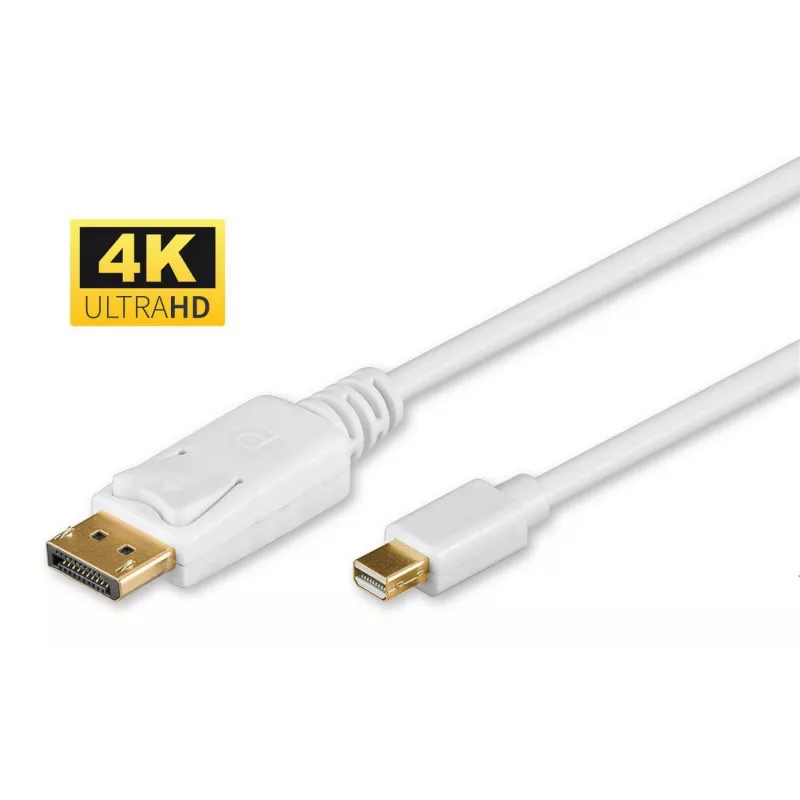
Microconnect DP-MMG-180M DisplayPort cable 2 m Mini DisplayPort White

Microconnect DP-MMG-180M DisplayPort cable 2 m Mini DisplayPort White
R261
The Microconnect DP-MMG-180M is a 2 m DisplayPort to Mini DisplayPort cable designed for high-quality digital video and audio transmission. It connects computers such as MacBook and MacBook Air with Mini DisplayPort output to monitors, projectors, or other displays with a DisplayPort input. The cabl... Read More
Stock 261 Code 1179220 Brand MICROCONNECT Model DP-MMG-180M Warranty 2 Years

Shipping & Returns

Estimated delivery Tuesday, October 6
You will be kept updated through our detailed tracking system
Payment options
EFTPayFastBank CardSnapScanZapperGoogle PayApple PayMobicredMoreTymePay on Arrival

The Microconnect DP-MMG-180M is a 2 m DisplayPort to Mini DisplayPort cable designed for high-quality digital video and audio transmission. It connects computers such as MacBook and MacBook Air with Mini DisplayPort output to monitors, projectors, or other displays with a DisplayPort input. The cable has a 6 mm diameter, is RoHS compliant and weighs approximately 70 g, providing a balance of durability and light handling.

Advantages

This DisplayPort cable supports high-performance HD digital video and audio transfer between devices with DisplayPort and Mini DisplayPort interfaces. The 2 m length offers flexibility for typical desktop and meeting-room setups, while the compact 6 mm diameter and 70 g weight make it easy to route and carry. RoHS compliance ensures it meets common environmental and material safety standards.

Suitable for

  • Connecting MacBook or MacBook Air with Mini DisplayPort to a DisplayPort monitor or projector
  • Desktop setups requiring a 2 m DisplayPort to Mini DisplayPort connection
  • Presentations and meeting rooms where reliable video/audio transmission is needed

Key specifications

  • Cable length: 2 m
  • Connector 1: DisplayPort
  • Connector 2: Mini DisplayPort
  • Weight: 0.07 kg
  • Product colour: White
  • Diameter: 6 mm (approx.)
  • Standards: RoHS compliant

How to use

Connect the Mini DisplayPort end to the Mini DisplayPort output on your computer and plug the DisplayPort end into the monitor or projector input. Ensure both devices are powered on and select the appropriate input source on the display. Configure display settings (resolution, refresh rate, extended/duplicate desktop) in your operating system if needed.

Recommendations

Avoid sharp bends near the connectors and do not place heavy objects on the cable. For best performance, use the cable within its 2 m length without excessive stretching and keep connectors clean and free of dust.

Key Highlights
  • 4K Ultra HD 2160p (60 Hz)
  • Plug with lock for secure connections
  • Gold-plated connectors for improved signal transmission
  • Supporting : 1080P@144Hz, 2K@144Hz
  • 2 m
  • DisplayPort
  • Mini DisplayPort
  • DisplayPort version: 1.2
  • 4096 x 2160 pixels 21.6 Gbit/s
  • HDCP 3D
  • White
Specifications
3D
Yes
AWG wire size
28
Cable diameter
6 mm
Cable length
2 m
Cable material
Copper
Compliance certificates
RoHS
Connector 1
DisplayPort
Connector 2
Mini DisplayPort
Connector contacts plating
Gold
Connector gender
Male/Male
Data transfer rate
21.6 Gbit/s
DisplayPort Content Protection (DPCP)
Yes
DisplayPort version
1.2
HDCP
Yes
Jacket material
Polyvinyl chloride (PVC)
Latching connectors
Yes
Maximum resolution
4096 x 2160 pixels
Package depth
177 mm
Package height
22 mm
Package weight
74 g
Package width
198 mm
Product colour
White
Quantity per pack
1 pc(s)
Weight
70 g

Leaflet

Open Leaflet
Price history over the last 6 months
Microconnect DP-MMG-180M DisplayPort cable 2 m Mini DisplayPort White
Current
R261
Lowest
R223
Highest
R270
Change 24H
+R35   +16%
Week
+R38   +17%
Month
+R37   +16%

Popular products in this category

WhatsApp
Hi, I’m DistriNode’s AI assistant. I can help you find products, compare options, create quote PDFs, or open support requests.