Account Contact
Your Cart
Pay on delivery – no extra fees
Need help? Ask our AI

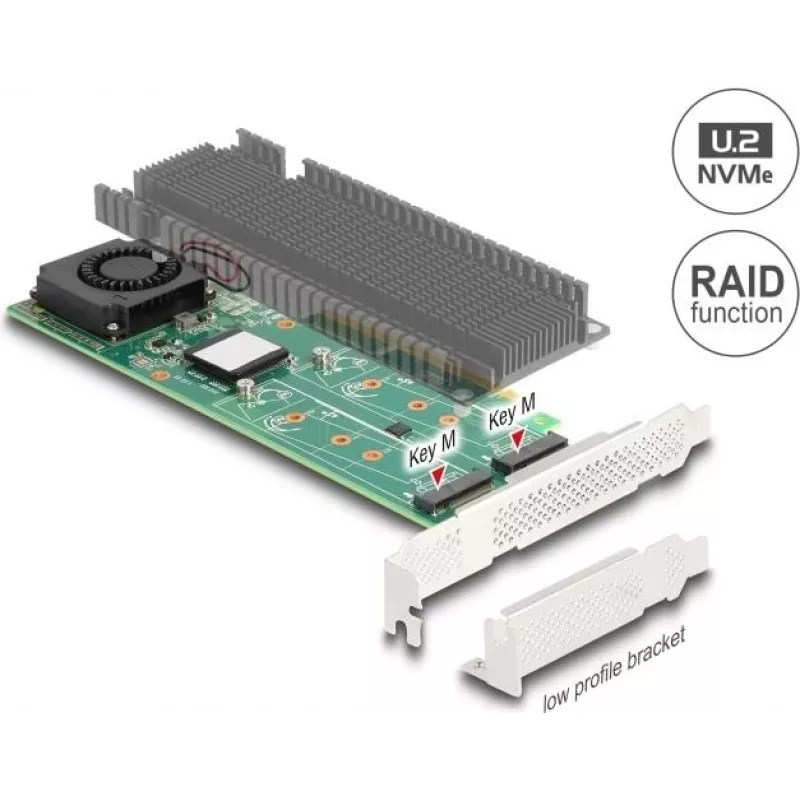
M.2 NVMe Card DELOCK 90123 Low-Profile — RAID 0/1/JBOD, PCIe 3.0 x8

M.2 NVMe Card DELOCK 90123 Low-Profile — RAID 0/1/JBOD, PCIe 3.0 x8
R8,218
DELOCK M.2 NVMe Card 90123 Low-Profile is a compact PCIe expansion card designed to host multiple M.2 NVMe SSDs and provide hardware RAID functionality. The card connects via PCIe 3.0 x8 and supports RAID 0, RAID 1 and JBOD modes, allowing configuration for increased throughput, data redundancy or i... Read More
Stock Out Of StockNo Stock Code 1739695 Brand DELOCK Model 90123 Warranty 2 Years

Shipping & Returns

DELOCK M.2 NVMe Card 90123 Low-Profile is a compact PCIe expansion card designed to host multiple M.2 NVMe SSDs and provide hardware RAID functionality. The card connects via PCIe 3.0 x8 and supports RAID 0, RAID 1 and JBOD modes, allowing configuration for increased throughput, data redundancy or independent storage volumes in space-constrained systems and workstations.

Advantages

The low-profile form factor makes the card compatible with small chassis while the PCIe 3.0 x8 interface provides sufficient lanes for high-bandwidth NVMe operation. Built-in hardware RAID support simplifies setup of RAID 0 for performance, RAID 1 for mirroring, or JBOD for separate drives without requiring host-based software RAID. The design targets compact systems that need NVMe RAID capabilities without occupying a full-height slot or additional external enclosures.

Suitable for

Key specifications

How to use

Install the DELOCK M.2 NVMe Card into a free PCIe x8 or larger slot on the system motherboard, ensuring the low-profile bracket fits the chassis. Mount compatible M.2 NVMe SSDs to the card following the card’s mounting points and secure them with the appropriate standoffs and screws. Configure the desired RAID mode (RAID 0, RAID 1 or JBOD) through the card’s management interface or BIOS/firmware utility according to the provided manual, then initialize and format the resulting logical volume in the operating system.

Recommendations

Use identical or similar-capacity NVMe SSDs when creating RAID arrays for predictable performance and capacity. Ensure the system BIOS and motherboard provide sufficient PCIe lane allocation for optimal operation. Maintain backups for RAID 0 configurations, as they increase performance but do not provide redundancy.

Key Highlights
  • Compact desktops and small-form-factor workstations requiring NVMe RAID performance
  • Systems where a low-profile PCIe card is needed to add multiple M.2 NVMe drives
  • Environments that require either increased I/O throughput, mirrored redundancy, or independent volumes
  • Interface: PCIe 3.0 x8
  • Supported drive type: M.2 NVMe SSDs
  • Hardware RAID modes: RAID 0, RAID 1, JBOD
  • Form factor: Low-profile expansion card
Price history is not available yet
We are still collecting enough daily price data for this product.

Popular products in this category

WhatsApp
Hi, I’m DistriNode’s AI assistant. I can help you find products, compare options, create quote PDFs, or open support requests.