Account Contact
Your Cart
Pay the courier with no extra fees.
Need help? DistriNode AI can handle any task on our site.

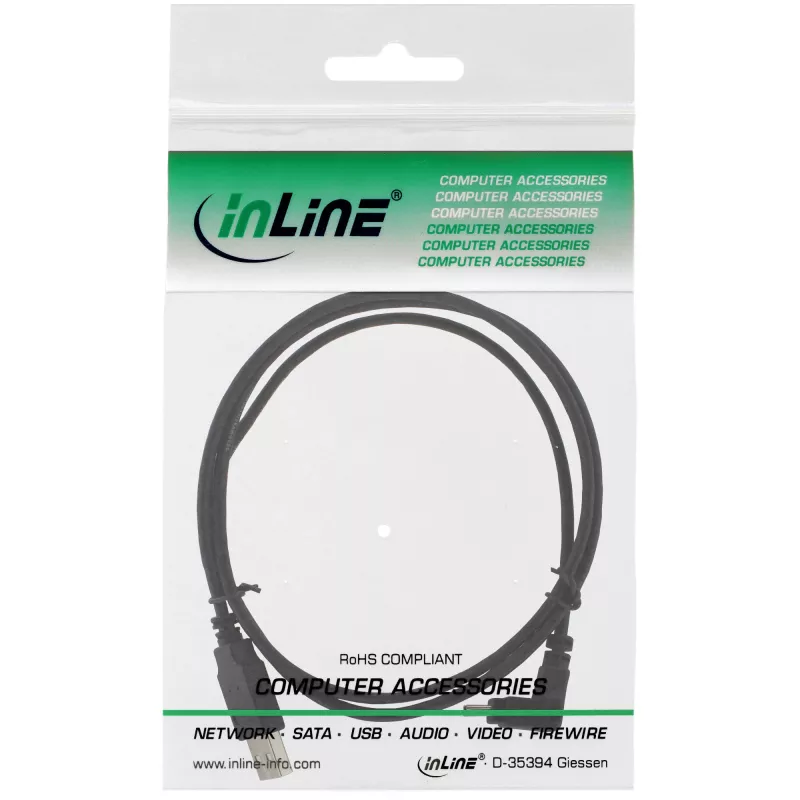
InLine USB Type A male / Mini-USB male 5 Pin down angled 90° black 3m

InLine USB Type A male / Mini-USB male 5 Pin down angled 90° black 3m
R138
InLine USB Type A male to Mini-USB male cable, 3 m length, with a 90° downward angled Mini-USB connector. The cable supports USB 2.0 data transfer and is designed to connect USB devices such as hubs, card readers, digital cameras and similar peripherals to a PC or Mac. The compact 5-pin Mini-USB con... Read More
Stock 1102 Code 1432892 Brand INLINE Model 34230 Warranty 2 Years

Shipping & Returns

Estimated delivery Tuesday, October 6
You will be kept updated through our detailed tracking system
Payment options
EFTPayFastBank CardSnapScanZapperGoogle PayApple PayMobicredMoreTymePay on Arrival

InLine USB Type A male to Mini-USB male cable, 3 m length, with a 90° downward angled Mini-USB connector. The cable supports USB 2.0 data transfer and is designed to connect USB devices such as hubs, card readers, digital cameras and similar peripherals to a PC or Mac. The compact 5-pin Mini-USB connector and black finish suit installations where space is limited.

Advantages

The angled 90° Mini-USB connector enables easier connection in tight spaces and reduces stress on the connector. USB 2.0 compatibility provides reliable data transfer for most peripherals. The 3 m length offers extended reach between devices and host, while the male-to-male wiring ensures straightforward plug-and-play connection.

Suitable for

  • Connecting digital cameras and camcorders to a computer
  • Connecting external card readers or USB hubs
  • Linking older smartphones and portable devices with Mini-USB ports
  • Situations where a low-profile, angled connector is required

Key specifications

  • Connector 1: USB A (male)
  • Connector 2: Mini-USB B 5-pin (male), 90° down angled
  • USB version: USB 2.0
  • Cable length: 3 m
  • Colour: Black
  • Brand: InLine, MPN: 34230, EAN: 4043718208302

How to use

Insert the USB Type A male connector into the host computer or powered USB hub and plug the 90° Mini-USB male connector into the peripheral device’s Mini-USB port. Ensure connectors are aligned before applying gentle pressure; the angled Mini-USB connector helps orient the cable in confined spaces. The cable supports standard USB 2.0 device recognition without additional drivers on most operating systems.

Recommendations

To avoid strain on device ports, route the cable so the angled connector sits naturally without bending the cable sharply. Do not use the cable in environments with excessive moisture or heat, and disconnect before transporting devices.
Key Highlights
  • Connecting digital cameras and camcorders to a computer
  • Connecting external card readers or USB hubs
  • Linking older smartphones and portable devices with Mini-USB ports
  • Situations where a low-profile, angled connector is required
  • Connector 1: USB A (male)
  • Connector 2: Mini-USB B 5-pin (male), 90° down angled
  • USB version: USB 2.0
  • Cable length: 3 m
  • Colour: Black
  • Brand: InLine, MPN: 34230, EAN: 4043718208302
Specifications
Cable length
3 m
Connector 1
USB A
Connector 1 gender
Male
Connector 2
Mini-USB B
Connector 2 gender
Male
Connector gender
Male/Male
Package depth
135 mm
Package height
22 mm
Package volume
400 cm³
Package weight
68 g
Package width
135 mm
Product colour
Black
USB version
USB 2.0
Weight
68 g

Leaflet

Open Leaflet

Document

Open Document
Price history over the last 6 months
InLine USB Type A male / Mini-USB male 5 Pin down angled 90° black 3m
Current
R138
Lowest
R114
Highest
R198
Change 24H
+R23   +20%
Week
+R24   +21%
Month
-R37   -21%

Popular products in this category

WhatsApp
Hi, I’m DistriNode’s AI assistant. I can help you find products, compare options, create quote PDFs, or open support requests.