Account Contact
Your Cart
Pay the courier with no extra fees.
Need help? DistriNode AI can handle any task on our site.

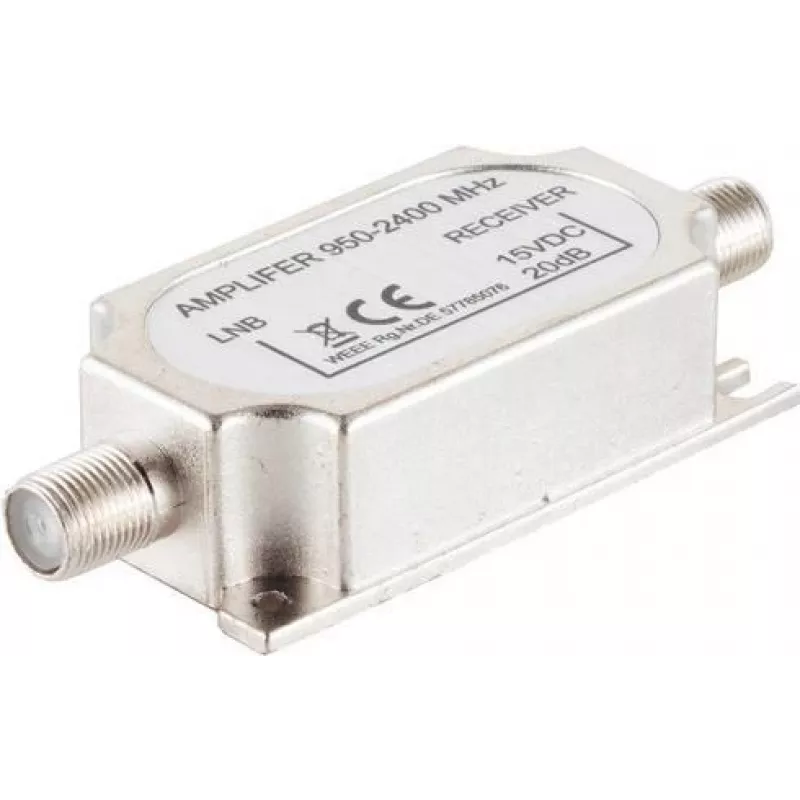
In-line RF Signal Amplifier ShiverPeaks 86310-85A 950–2400 MHz 16–20 dB

In-line RF Signal Amplifier ShiverPeaks 86310-85A 950–2400 MHz 16–20 dB
R383
The ShiverPeaks 86310-85A in-line RF signal amplifier operates across a 950–2400 MHz frequency range with a gain range of 16–20 dB. Designed to be installed inline between an antenna and a receiver, it increases the strength and stability of satellite L‑band signals and terrestrial RF links such as ... Read More
Stock 416 Code 2353113 Brand SHIVERPEAKS Model 86310-85A Warranty 2 Years

Shipping & Returns

Estimated delivery Tuesday, October 6
You will be kept updated through our detailed tracking system
Payment options
EFTPayFastBank CardSnapScanZapperGoogle PayApple PayMobicredMoreTymePay on Arrival

The ShiverPeaks 86310-85A in-line RF signal amplifier operates across a 950–2400 MHz frequency range with a gain range of 16–20 dB. Designed to be installed inline between an antenna and a receiver, it increases the strength and stability of satellite L‑band signals and terrestrial RF links such as GSM, 3G and 4G within the specified band. The amplifier accepts DC supply suitable for LNB feeding and is intended for use where weak or variable signals reduce reception quality.

Advantages

The amplifier delivers a moderate, controllable gain of 16–20 dB over a wide 950–2400 MHz band, improving signal-to-noise ratio and reducing dropouts in weak-signal conditions. Inline installation keeps the antenna-to-receiver connection simple while permitting LNB power pass-through. Its frequency coverage makes it compatible with common satellite L‑band and cellular-related RF services without requiring multiple devices for different bands.

Suitable for

  • Boosting weak satellite L‑band reception (e.g., small-dish or mobile installations)
  • Improving GSM/3G/4G terrestrial RF links within 950–2400 MHz
  • Inline use between antenna and receiver to stabilize reception where cable losses or distance reduce signal
  • Applications requiring LNB power pass-through with an inline amplifier

Key specifications

  • Frequency range: 950–2400 MHz
  • Gain: 16–20 dB
  • Designed for inline installation between antenna and receiver
  • Supports DC feed for LNB supply

How to use

Install the amplifier inline on the coaxial feed between the antenna and receiver, observing correct connector orientation and cable polarity. Ensure the device receives the required DC power if LNB supply is needed; follow the receiver or power inserter instructions for safe power routing. After installation, verify signal levels on the receiver and adjust antenna alignment or cable connections as necessary to achieve optimal reception. Avoid placing the amplifier in areas with excessive moisture or mechanical stress on the cable runs.

Recommendations

Place the amplifier as close to the antenna as practical to reduce cable loss upstream of the amplifier; confirm compatibility with your receiver's LNB power scheme before applying DC feed. Check local regulations and operator requirements when amplifying cellular signals.

Key Highlights
  • Boosting weak satellite L‑band reception (e.g., small-dish or mobile installations)
  • Improving GSM/3G/4G terrestrial RF links within 950–2400 MHz
  • Inline use between antenna and receiver to stabilize reception where cable losses or distance reduce signal
  • Applications requiring LNB power pass-through with an inline amplifier
  • Frequency range: 950–2400 MHz
  • Gain: 16–20 dB
  • Designed for inline installation between antenna and receiver
  • Supports DC feed for LNB supply
Price history over the last 6 months
In-line RF Signal Amplifier ShiverPeaks 86310-85A 950–2400 MHz 16–20 dB
Current
R383
Lowest
R373
Highest
R383
Change 24H
+R10   +3%
Week
—   
Month
—   

Popular products in this category

WhatsApp
Hi, I’m DistriNode’s AI assistant. I can help you find products, compare options, create quote PDFs, or open support requests.