Account Contact
Your Cart
Pay the courier with no extra fees.
Need help? DistriNode AI can handle any task on our site.

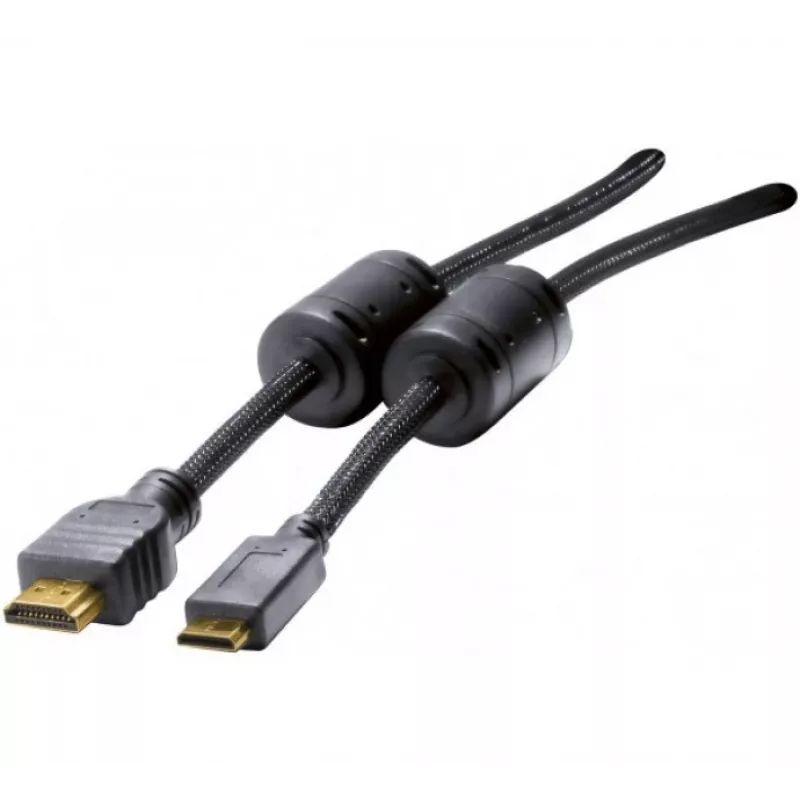
Hypertec 128271-HY HDMI cable 2 m HDMI Type A (Standard) HDMI Type C (Mini) Black

Hypertec 128271-HY HDMI cable 2 m HDMI Type A (Standard) HDMI Type C (Mini) Black
R322
The Hypertec 128271-HY 2m HDMI cable connects devices with a standard HDMI Type A port to devices with a mini HDMI Type C port. The cable is two metres long and finished in black, with gold-plated male contacts on both ends to improve contact reliability and signal transmission. It supports Audio Re... Read More
Stock 24 Code 2396409 Brand Hypertec Model 128271-HY Warranty 2 Years

Shipping & Returns

Estimated delivery Tuesday, October 6
You will be kept updated through our detailed tracking system
Payment options
EFTPayFastBank CardSnapScanZapperGoogle PayApple PayMobicredMoreTymePay on Arrival

The Hypertec 128271-HY 2m HDMI cable connects devices with a standard HDMI Type A port to devices with a mini HDMI Type C port. The cable is two metres long and finished in black, with gold-plated male contacts on both ends to improve contact reliability and signal transmission. It supports Audio Return Channel (ARC) functionality for compatible devices, making it suitable for routing audio between displays and audio systems without separate cables.

Advantages

This HDMI Type A to Type C cable offers a balanced combination of length and flexibility for typical home and professional setups. Gold-plated contacts reduce oxidation and maintain a stable connection over time. The cable's 2 m length provides convenient reach without excess slack, and the compact mini HDMI connector allows connection to cameras, tablets, or portable devices that use Type C while the Type A end connects to TVs, monitors, and AV receivers.

Suitable for

Key specifications

How to use

Connect the HDMI Type A (standard) end to the HDMI input on your TV, monitor, AV receiver or other display device. Insert the HDMI Type C (mini) end into the HDMI output on your camera, tablet, laptop or portable media player. Ensure both devices are powered on and set to the correct input or output source. If using ARC, enable ARC settings in both the display and the audio device menus according to the devices' instructions. Avoid forcing connectors; they should insert smoothly into the ports.

Recommendations

For reliable performance, route the cable away from large power cables and avoid tight bends near the connector ends. When using ARC, verify that HDMI control (CEC) or ARC settings are enabled on both connected devices. Store the cable coiled loosely to prevent kinks and disconnect gently by pulling the connector body rather than the cable jacket.

Key Highlights
  • Connecting cameras or action cams with mini HDMI to TVs or monitors
  • Linking tablets or laptops with mini HDMI ports to external displays
  • Connecting media players and portable devices to AV receivers or soundbars supporting ARC
  • Use in meeting rooms and small studios for display and audio routing
  • Cable length: 2 m
  • Connector 1: HDMI Type A (Standard), male
  • Connector 2: HDMI Type C (Mini), male
  • Contact plating: gold-plated contacts
  • Color: Black
  • Supports: Audio Return Channel (ARC)
Specifications
Audio Return Channel (ARC)
Yes
AWG wire size
30
Bandwidth
340 MHz
Cable length
2 m
Connector 1
HDMI Type A (Standard)
Connector 1 form factor
Straight
Connector 1 gender
Male
Connector 2
HDMI Type C (Mini)
Connector 2 form factor
Straight
Connector 2 gender
Male
Connector contacts plating
Gold
Ferrite bead
Yes
HDMI Ethernet channel
Yes
Product colour
Black
Quantity per pack
1 pc(s)

Leaflet

Open Leaflet
Price history over the last 6 months
Hypertec 128271-HY HDMI cable 2 m HDMI Type A (Standard) HDMI Type C (Mini) Black
Current
R322
Lowest
R312
Highest
R322
Change 24H
+R9   +3%
Week
—   
Month
—   

Popular products in this category

WhatsApp
Hi, I’m DistriNode’s AI assistant. I can help you find products, compare options, create quote PDFs, or open support requests.