Account Contact
Your Cart
Pay the courier with no extra fees.
Need help? DistriNode AI can handle any task on our site.

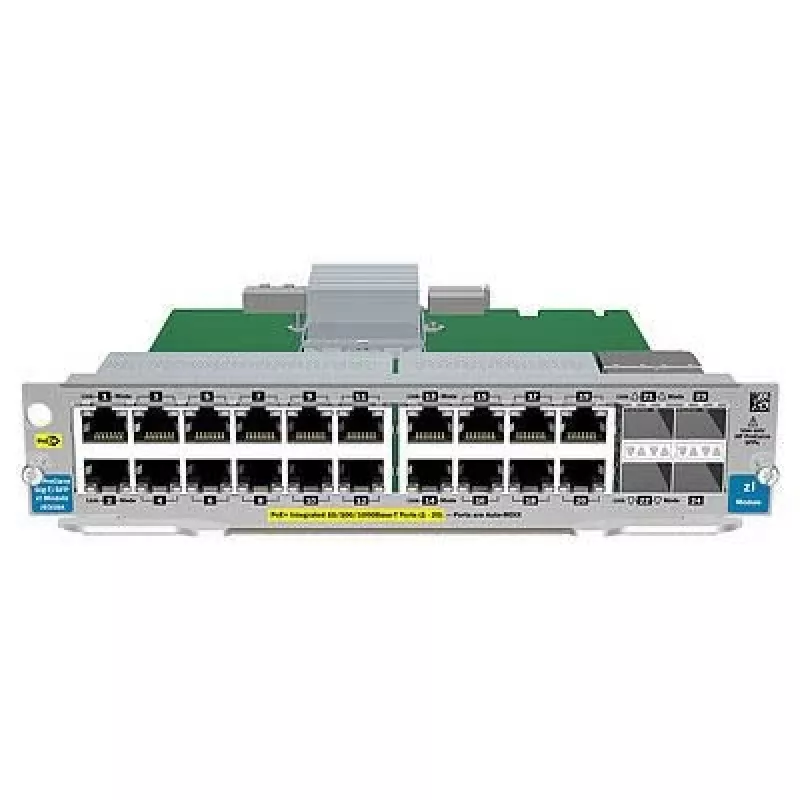
PoE Network Switch HP Enterprise 20-port Gigabit with 4 uplink ports J9535A-RFB

PoE Network Switch HP Enterprise 20-port Gigabit with 4 uplink ports J9535A-RFB
R1,912
HP Enterprise PoE Network Switch J9535A-RFB is a managed network switch offering 20 Gigabit Ethernet downlink ports with Power over Ethernet functionality and four uplink ports. Designed for small to medium business networks, the J9535A-RFB facilitates centralized power delivery to edge devices such... Read More
Stock 2 Code 1207482 Brand HPE Model J9535A-RFB Warranty 2 Years

Shipping & Returns

Estimated delivery Wednesday, October 7
You will be kept updated through our detailed tracking system
Payment options
EFTPayFastBank CardSnapScanZapperGoogle PayApple PayMobicredMoreTymePay on Arrival

HP Enterprise PoE Network Switch J9535A-RFB is a managed network switch offering 20 Gigabit Ethernet downlink ports with Power over Ethernet functionality and four uplink ports. Designed for small to medium business networks, the J9535A-RFB facilitates centralized power delivery to edge devices such as IP phones, security cameras and wireless access points while providing managed switching features for traffic control and network segmentation.

Advantages

The HP Enterprise 20-port Gigabit switch J9535A-RFB integrates PoE power delivery with full Gigabit connectivity across 20 ports and dedicated uplinks, reducing the need for separate power supplies for connected devices and simplifying cable management. As a managed switch, it allows configuration of VLANs, QoS and port settings to optimize performance and security. The form factor and port density suit network expansion while maintaining centralized administration and monitoring capabilities.

Suitable for

  • Small and medium business LAN deployments
  • Powering IP phones, PoE access points and network cameras
  • Network edge aggregation and segmentation
  • Branch office connectivity with managed switching features

Key specifications

  • Brand: HP Enterprise
  • Model / MPN: J9535A-RFB
  • EAN: 5706998774408
  • Ports: 20 × Gigabit Ethernet with PoE (downlink)
  • Uplink ports: 4 × uplink ports (Gigabit)
  • Type: Managed PoE network switch

How to use

Install the HP Enterprise J9535A-RFB in a rack or on a shelf near your network core or distribution point. Connect uplink ports to your router or core switch to integrate the device into the existing network. Attach powered devices such as IP phones, wireless access points or PoE cameras to the Gigabit PoE ports; the switch will supply power and data over a single Ethernet cable. Use the management interface to configure VLANs, QoS, port security and PoE power settings based on your network design and device power requirements.

Recommendations

Verify the total available PoE budget and the power class requirements of connected devices before deployment. Reserve uplink capacity for anticipated traffic and configure VLANs and QoS to separate voice, video and data traffic. Regularly update switch firmware and monitor port status through the management interface to maintain stable operation.

Key Highlights
  • Small and medium business LAN deployments
  • Powering IP phones, PoE access points and network cameras
  • Network edge aggregation and segmentation
  • Branch office connectivity with managed switching features
  • Brand: HP Enterprise
  • Model / MPN: J9535A-RFB
  • EAN: 5706998774408
  • Ports: 20 × Gigabit Ethernet with PoE (downlink)
  • Uplink ports: 4 × uplink ports (Gigabit)
  • Type: Managed PoE network switch
Price history over the last 6 months
PoE Network Switch HP Enterprise 20-port Gigabit with 4 uplink ports J9535A-RFB
Current
R1,912
Lowest
R1,874
Highest
R1,975
Change 24H
+R16   +1%
Week
+R34   +2%
Month
+R20   +1%

Popular products in this category

WhatsApp
Hi, I’m DistriNode’s AI assistant. I can help you find products, compare options, create quote PDFs, or open support requests.