Account Contact
Your Cart
Pay on delivery – no extra fees
Need help? Ask our AI

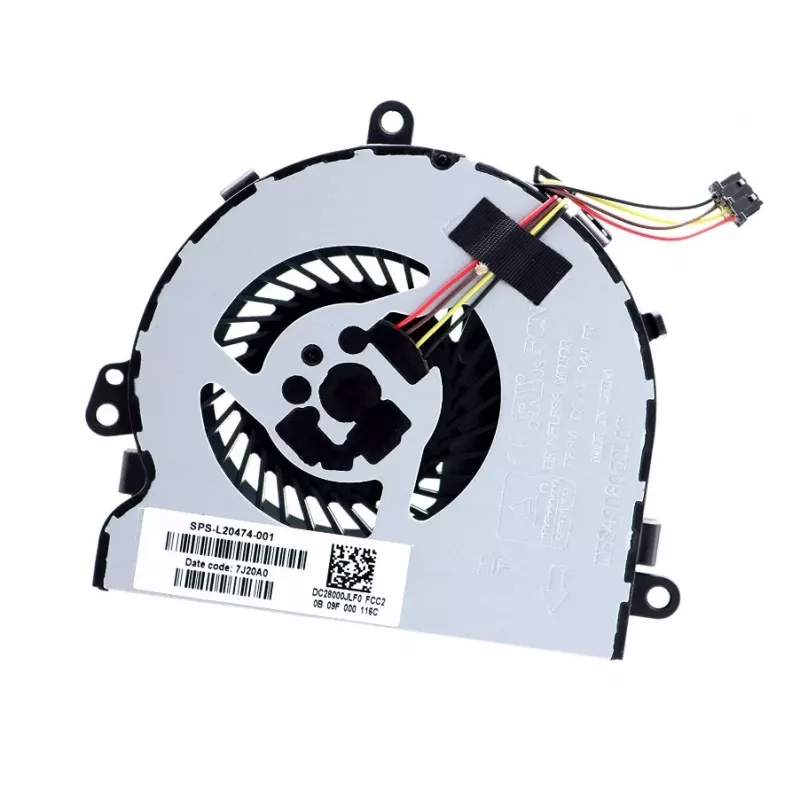
HP L20474-001 laptop spare part Fan

HP L20474-001 laptop spare part Fan
R1,329
The HP L20474-001 fan is a laptop cooling component engineered to restore effective thermal management in compatible HP notebooks. It promotes steady airflow across internal heat-generating components to reduce thermal throttling and decrease the risk of spontaneous shutdowns caused by overheating. ... Read More
Stock Out Of StockNo Stock Code 1521989 Brand HP Model L20474-001 Warranty 2 Years

Shipping & Returns

The HP L20474-001 fan is a laptop cooling component engineered to restore effective thermal management in compatible HP notebooks. It promotes steady airflow across internal heat-generating components to reduce thermal throttling and decrease the risk of spontaneous shutdowns caused by overheating. This replacement fan is intended for users who need a direct-fit cooling solution to maintain system stability and consistent performance during everyday use.

Advantages

This cooling fan delivers focused airflow to dissipate heat efficiently while maintaining quiet operation at typical load levels. Designed for form-fit compatibility with intended HP models, it simplifies replacement and minimizes the need for modifications. The fan's construction supports long-term operation under normal laptop usage conditions and helps preserve internal component longevity by maintaining lower operating temperatures.

Suitable for

  • Replacing a damaged or noisy laptop fan in compatible HP notebooks
  • Restoring adequate cooling to reduce thermal throttling during CPU or GPU load
  • Routine maintenance to prolong laptop hardware life and improve stability

Key specifications

  • Component type: internal laptop cooling fan
  • Cooling method: active forced-air cooling
  • Form factor: compact axial fan designed for specific laptop chassis
  • Connection: board-mounted connector compatible with supported HP mainboards
  • Acoustic profile: engineered for low to moderate noise under normal operation

How to use

Power off the laptop, disconnect the power adapter and remove the battery if the model allows. Access the fan by opening the service panel or bottom cover following the manufacturer's service manual instructions for the specific HP model. Remove the faulty fan by unplugging its connector and detaching any securing screws or clips, then install the replacement fan in the same orientation, secure it, reconnect the fan cable to the board, reassemble the chassis, and power on the system to verify correct operation.

Recommendations

Use appropriate ESD precautions during installation, avoid touching circuitry with bare hands, and ensure vents are clear of dust. If unfamiliar with laptop disassembly, consult a qualified technician or official service guide to prevent damage. Periodic cleaning of cooling channels and ensuring up-to-date firmware or BIOS can further improve thermal performance.

Key Highlights
  • Replacing a damaged or noisy laptop fan in compatible HP notebooks
  • Restoring adequate cooling to reduce thermal throttling during CPU or GPU load
  • Routine maintenance to prolong laptop hardware life and improve stability
  • Component type: internal laptop cooling fan
  • Cooling method: active forced-air cooling
  • Form factor: compact axial fan designed for specific laptop chassis
  • Connection: board-mounted connector compatible with supported HP mainboards
  • Acoustic profile: engineered for low to moderate noise under normal operation
Specifications
Brand compatibility
HP
Quantity per pack
1 pc(s)
Type
Fan
Weight
0.1 kg

Leaflet

Open Leaflet
Price history is not available yet
We are still collecting enough daily price data for this product.

Popular products in this category

WhatsApp
Hi, I’m DistriNode’s AI assistant. I can help you find products, compare options, create quote PDFs, or open support requests.