Account Contact
Your Cart
Pay the courier with no extra fees.
Need help? DistriNode AI can handle any task on our site.

HDMI Connector S/CONN ShiverPeaks 77409

HDMI Connector S/CONN ShiverPeaks 77409
R213
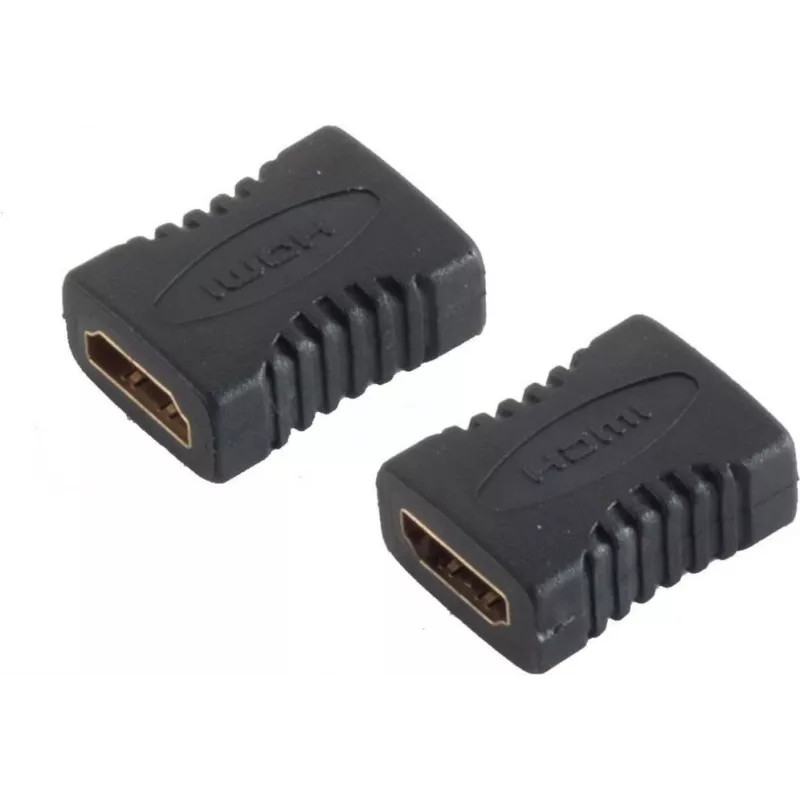
The ShiverPeaks HDMI Connector S/CONN 77409 is a compact HDMI-to-HDMI coupling device designed to join two HDMI cables or to extend an HDMI connection without signal adapters. The connector uses gold-plated contacts to maintain reliable electrical contact and reduced signal loss. Its black housing w... Read More
Stock 10 Code 2351999 Brand SHIVERPEAKS Model 77409 Warranty 2 Years

Shipping & Returns

Estimated delivery Tuesday, October 6
You will be kept updated through our detailed tracking system
Payment options
EFTPayFastBank CardSnapScanZapperGoogle PayApple PayMobicredMoreTymePay on Arrival

The ShiverPeaks HDMI Connector S/CONN 77409 is a compact HDMI-to-HDMI coupling device designed to join two HDMI cables or to extend an HDMI connection without signal adapters. The connector uses gold-plated contacts to maintain reliable electrical contact and reduced signal loss. Its black housing with gold accents provides a discreet appearance suited to home entertainment systems and professional AV setups.

Advantages

The connector's gold-plated contacts improve conductivity and corrosion resistance, supporting stable audio and video transmission. Its compact form factor allows installation in tight spaces behind TVs, monitors, or AV racks. The sturdy housing offers mechanical protection for cable ends and helps maintain connector alignment for consistent performance.

Suitable for

  • Extending HDMI cable runs in home theater systems
  • Joining two HDMI cables to reach distant displays or projectors
  • Temporary or permanent connections in AV cabinets and media centers
  • Professional installations where a low-profile HDMI coupling is required

Key specifications

  • Connector type: HDMI female to HDMI female coupling
  • Contact plating: gold-plated contacts for improved conductivity
  • Housing color and finish: black body with gold-colored accents
  • Form factor: compact inline coupler suitable for tight spaces
  • Compatible signals: standard HDMI audio and video signals

How to use

Attach one HDMI cable plug into each side of the S/CONN HDMI connector until fully seated. Ensure both cable ends are inserted straight to avoid stressing the connector. After connecting, gently route and secure the HDMI cables to prevent excessive bending at the connector interface. The device requires no power or configuration and functions immediately once cables are connected.

Recommendations

For best signal integrity, use high-quality HDMI cables and avoid combining very long or low-specification cables. When routing cables behind equipment, allow slight slack and avoid tight bends at the connector. Regularly inspect the contacts for debris and keep the connector dry and free from physical damage to maintain long-term performance.

Key Highlights
  • Extending HDMI cable runs in home theater systems
  • Joining two HDMI cables to reach distant displays or projectors
  • Temporary or permanent connections in AV cabinets and media centers
  • Professional installations where a low-profile HDMI coupling is required
  • Connector type: HDMI female to HDMI female coupling
  • Contact plating: gold-plated contacts for improved conductivity
  • Housing color and finish: black body with gold-colored accents
  • Form factor: compact inline coupler suitable for tight spaces
  • Compatible signals: standard HDMI audio and video signals
Specifications
Connector 1
HDMI
Connector 1 gender
Female
Connector 2
HDMI
Connector 2 gender
Female
Connector contacts plating
Gold
Data transfer rate
8.16 Gbit/s
Product colour
Black, Gold
Price history over the last 6 months
HDMI Connector S/CONN ShiverPeaks 77409
Current
R213
Lowest
R203
Highest
R213
Change 24H
+R9   +4%
Week
—   
Month
—   

Popular products in this category

WhatsApp
Hi, I’m DistriNode’s AI assistant. I can help you find products, compare options, create quote PDFs, or open support requests.