Account Contact
Your Cart
Pay the courier with no extra fees.
Need help? DistriNode AI can handle any task on our site.

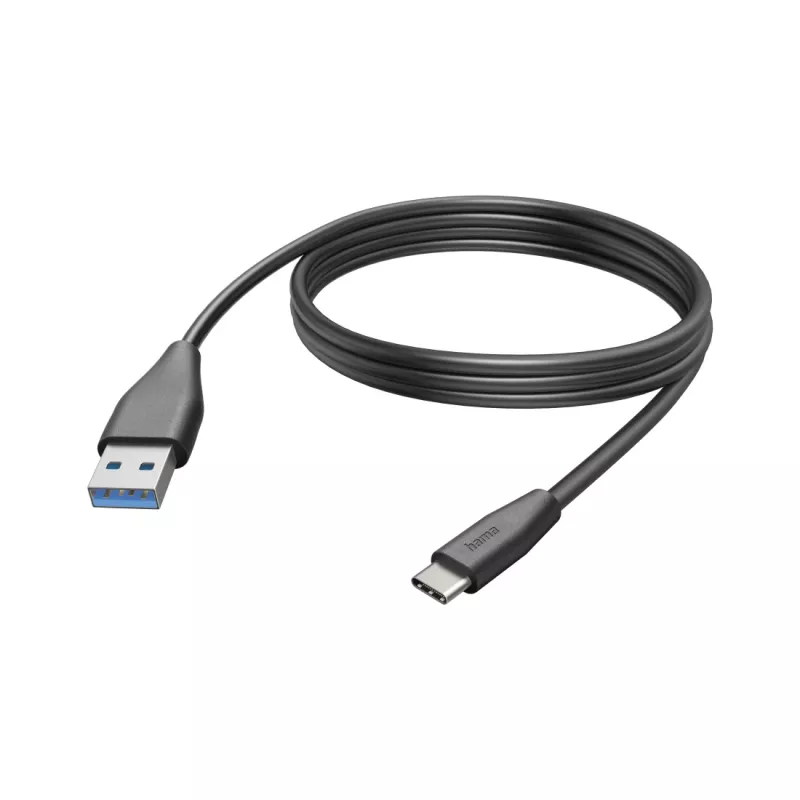
Hama 00201597 USB cable USB 2.0 3 m USB C USB A Black

Hama 00201597 USB cable USB 2.0 3 m USB C USB A Black
R384
The Hama USB cable (model 00201597) is a 3 m USB 2.0 cable with USB-C and USB-A connectors. It supports data transfer rates up to 0.48 Gbit/s (480 Mbit/s) and features nickel-plated contacts for improved contact reliability. Designed to connect devices with USB-C ports to standard USB-A hosts, it is... Read More
Stock 51 Code 978014 Brand HAMA Model 00201597 Warranty 2 Years

Shipping & Returns

Estimated delivery Tuesday, October 6
You will be kept updated through our detailed tracking system
Payment options
EFTPayFastBank CardSnapScanZapperGoogle PayApple PayMobicredMoreTymePay on Arrival

The Hama USB cable (model 00201597) is a 3 m USB 2.0 cable with USB-C and USB-A connectors. It supports data transfer rates up to 0.48 Gbit/s (480 Mbit/s) and features nickel-plated contacts for improved contact reliability. Designed to connect devices with USB-C ports to standard USB-A hosts, it is suitable for charging and data transfer between phones, tablets and other compatible devices.

Advantages

The cable offers a long 3 m length for flexible placement, broad compatibility with USB-C and USB-A devices, and USB 2.0 data transfer up to 480 Mbit/s. Nickel-plated contacts provide corrosion resistance and stable connections. When used with a suitable quick charger, the cable supports faster charging within the limits of USB 2.0 power specifications.

Suitable for

  • Charging smartphones and tablets with USB-C ports from USB-A chargers or power banks
  • Transferring data between USB-C devices and computers with USB-A ports
  • Connecting peripherals that use a USB-C to USB-A connection

Key specifications

  • Brand: HAMA
  • Model / MPN: 00201597
  • EAN: 4047443486745
  • Connectors: USB C ↔ USB A
  • USB version: USB 2.0
  • Max data rate: 0.48 Gbit/s (480 Mbit/s)
  • Cable length: 3 m
  • Colour: Black
  • Contacts: Nickel-plated

How to use

Plug the USB-A connector into a compatible host (computer, charger or power bank) and the USB-C connector into the device to be charged or accessed. For data transfer, wait for the host device to recognise the connected device and follow the operating system prompts to copy or sync files. For charging, use a charger or power source that provides the appropriate USB-A output; charging speed depends on the charger and the device's charging capabilities.

Recommendations

To maintain cable longevity, avoid sharp bends near the connectors, disconnect by pulling the plug (not the cable), and store the cable without tight knots. Use a USB-A quick charger compatible with your device to achieve higher charging rates within USB 2.0 limits.
Key Highlights
  • Charging smartphones and tablets with USB-C ports from USB-A chargers or power banks
  • Transferring data between USB-C devices and computers with USB-A ports
  • Connecting peripherals that use a USB-C to USB-A connection
  • Brand: HAMA
  • Model / MPN: 00201597
  • EAN: 4047443486745
  • Connectors: USB C ↔ USB A
  • USB version: USB 2.0
  • Max data rate: 0.48 Gbit/s (480 Mbit/s)
  • Cable length: 3 m
  • Colour: Black
  • Contacts: Nickel-plated
Specifications
Cable jacket material
Polyvinyl chloride (PVC)
Cable length
3 m
Connector 1
USB C
Connector 1 form factor
Straight
Connector 1 gender
Male
Connector 2
USB A
Connector 2 form factor
Straight
Connector 2 gender
Male
Connector contacts plating
Nickel
Maximum data transfer rate
0.48 Gbit/s
Output current (max)
3 A
Product colour
Black
Quantity per pack
1 pc(s)
USB version
USB 2.0

Leaflet

Open Leaflet
Price history over the last 6 months
Hama 00201597 USB cable USB 2.0 3 m USB C USB A Black
Current
R384
Lowest
R352
Highest
R385
Change 24H
+R26   +7%
Week
+R31   +9%
Month
+R27   +8%

Popular products in this category

WhatsApp
Hi, I’m DistriNode’s AI assistant. I can help you find products, compare options, create quote PDFs, or open support requests.