Account Contact
Your Cart
Pay the courier with no extra fees.
Need help? DistriNode AI can handle any task on our site.

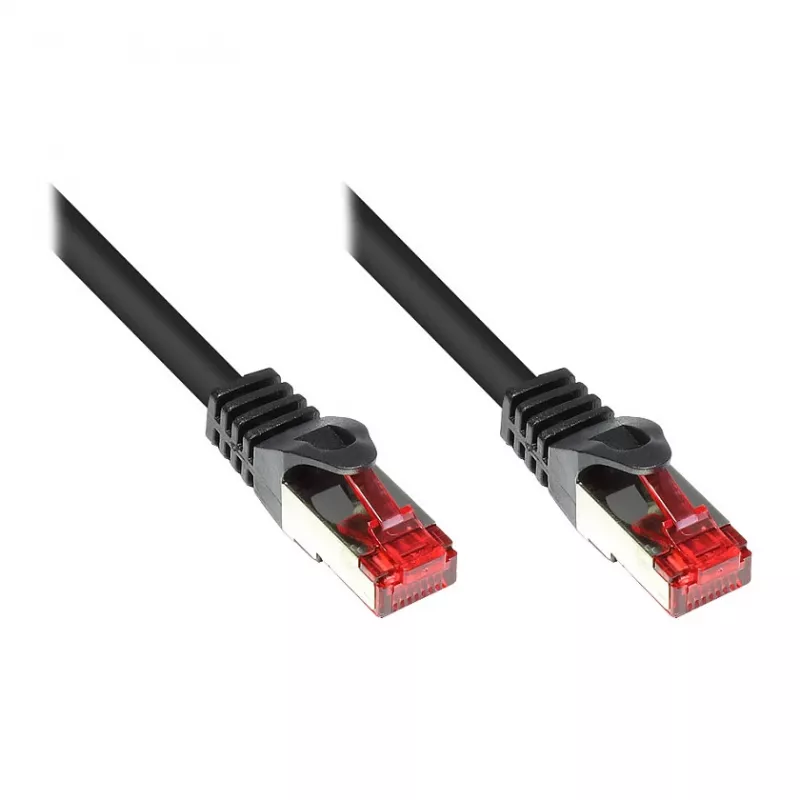
Networking Cable Alcasa 8060-020S RJ-45 Cat6 2m Black

Networking Cable Alcasa 8060-020S RJ-45 Cat6 2m Black
R135
The Networking Cable Alcasa 8060-020S RJ-45 Cat6 2m Black is a 2-meter Cat6 patch cable designed for wired Ethernet connections. It uses S/FTP shielding to reduce electromagnetic interference and crosstalk, and features RJ-45 connectors on both ends for compatibility with network switches, routers, ... Read More
Stock 500 Code 1468457 Brand GoodConnections Model 8060-020S Warranty 2 Years

Shipping & Returns

Estimated delivery Thursday, October 1
You will be kept updated through our detailed tracking system
Payment options
EFTPayFastBank CardSnapScanZapperGoogle PayApple PayMobicredMoreTymePay on Arrival

The Networking Cable Alcasa 8060-020S RJ-45 Cat6 2m Black is a 2-meter Cat6 patch cable designed for wired Ethernet connections. It uses S/FTP shielding to reduce electromagnetic interference and crosstalk, and features RJ-45 connectors on both ends for compatibility with network switches, routers, modems, computers and other Ethernet-enabled devices. The black jacket offers a discreet appearance suitable for home and office installations.

Advantages

S/FTP shielding provides improved protection against external interference compared with unshielded cables, helping to maintain signal integrity over the cable length. The Cat6 specification supports higher data rates and bandwidth than Cat5e in comparable conditions. A 2 m length gives a balance between reach and tidy cable management in desktop and rack setups. Standard RJ-45 connectors ensure plug-and-play compatibility with common network hardware.

Suitable for

  • Connecting desktop PCs or laptops to a router or switch
  • Patch connections in small office or home network racks
  • Wired connections for media players, smart TVs or gaming consoles
  • Temporary cabling during network troubleshooting or setup

Key specifications

  • Cable standard: Cat6
  • Shielding: S/FTP (shielded foiled twisted pair)
  • Connector type: RJ-45 to RJ-45
  • Cable length: 2 m
  • Color: Black

How to use

Identify the devices you wish to connect and insert each RJ-45 connector into the Ethernet ports of the respective devices until the connector latches. Ensure both ends are firmly seated and check link/activity LEDs on your network equipment to confirm connection. Route the cable to avoid sharp bends and place it where it will not be pinched by furniture or doors. For rack installations, use cable management clips or ties to keep the run neat and reduce strain on connectors.

Recommendations

For optimal performance, avoid running the S/FTP cable in parallel with high-voltage power lines and maintain gentle bend radii. Inspect connectors periodically for dust and damage; replace the cable if outer jacket or shielding is compromised. Use the 2 m length when a short to medium reach is sufficient to reduce excess cable slack.

Key Highlights
  • Connecting desktop PCs or laptops to a router or switch
  • Patch connections in small office or home network racks
  • Wired connections for media players, smart TVs or gaming consoles
  • Temporary cabling during network troubleshooting or setup
  • Cable standard: Cat6
  • Shielding: S/FTP (shielded foiled twisted pair)
  • Connector type: RJ-45 to RJ-45
  • Cable length: 2 m
  • Color: Black
Specifications
Cable length
2 m
Cable shielding
S/FTP (S-STP)
Cable standard
Cat6
Connector 1
RJ-45
Connector 1 gender
Male
Connector 2
RJ-45
Connector 2 gender
Male
Frequency
250 MHz
Jacket material
Polyvinyl chloride (PVC)
Product colour
Black
Price history over the last 6 months
Networking Cable Alcasa 8060-020S RJ-45 Cat6 2m Black
Current
R135
Lowest
R123
Highest
R135
Change 24H
+R10   +8%
Week
+R11   +9%
Month
+R11   +9%

Popular products in this category

WhatsApp
Hi, I’m DistriNode’s AI assistant. I can help you find products, compare options, create quote PDFs, or open support requests.