Account Contact
Your Cart
Pay the courier with no extra fees.
Need help? DistriNode AI can handle any task on our site.

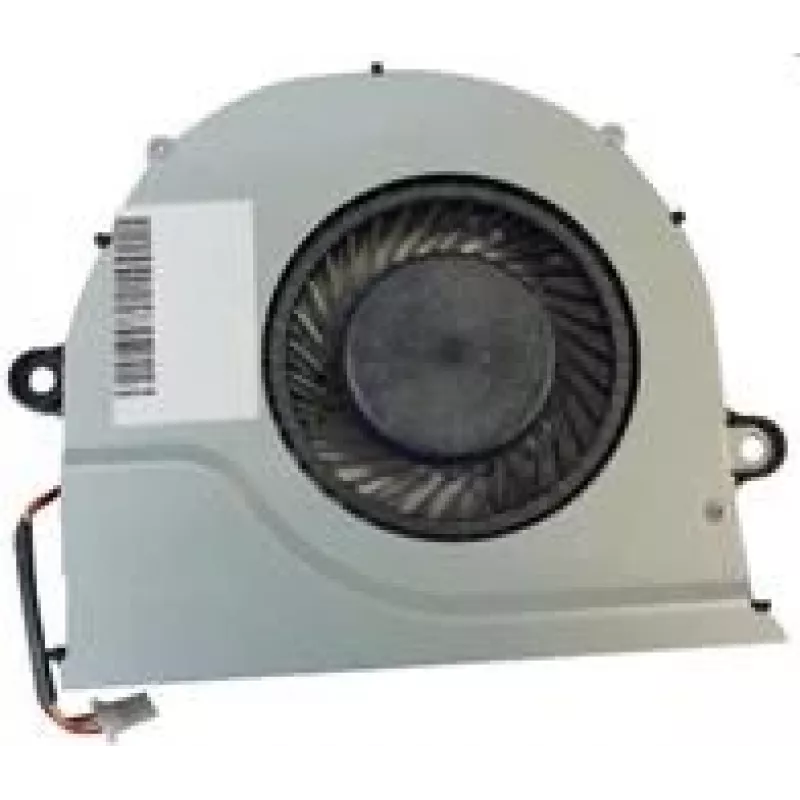
Fan Acer 23.QB9N2.001 Laptop Spare Part

Fan Acer 23.QB9N2.001 Laptop Spare Part
R482
The Acer 23.QB9N2.001 Laptop Spare Part fan is a purpose-built cooling component for compatible Acer laptop models. Designed to regulate internal temperature, this fan helps prevent overheating and supports stable system performance under varying workloads. It is intended as a direct replacement par... Read More
Stock 15 Code 1464076 Brand ACER Model 23.QB9N2.001 Warranty 2 Years

Shipping & Returns

Estimated delivery Tuesday, October 6
You will be kept updated through our detailed tracking system
Payment options
EFTPayFastBank CardSnapScanZapperGoogle PayApple PayMobicredMoreTymePay on Arrival

The Acer 23.QB9N2.001 Laptop Spare Part fan is a purpose-built cooling component for compatible Acer laptop models. Designed to regulate internal temperature, this fan helps prevent overheating and supports stable system performance under varying workloads. It is intended as a direct replacement part to restore proper airflow and thermal management when the original cooling fan is worn, noisy, or has failed.

Advantages

This laptop cooling fan provides consistent airflow and reduced operating noise compared with degraded fans. It helps maintain thermally safe operating temperatures for CPU and GPU components, which contributes to sustained performance and can reduce the risk of thermal throttling. The replacement unit is compact and compatible with the original mounting points and connector type used in the target laptop models, making installation straightforward for technicians or experienced users.

Suitable for

  • Repairing a laptop that exhibits overheating or frequent shutdowns
  • Replacing a loud or failing cooling fan to reduce noise
  • Restoring proper cooling after liquid or dust damage that affected the original fan
  • Routine maintenance upgrades to keep thermal performance within manufacturer specifications

Key specifications

  • Form factor: internal laptop cooling fan sized for specific Acer models
  • Function: active cooling for CPU/GPU and internal components
  • Airflow characteristic: engineered for balanced airflow and static pressure suitable for laptop chassis
  • Noise level: designed for low operational noise compared to worn fans
  • Connector type: matching multi-pin laptop motherboard connector for direct replacement
  • Mounting: compatible mounting points and screw positions for intended laptop series

How to use

Power down the laptop, disconnect any external power sources and remove the battery if possible before beginning work. Access the internal compartment by removing the service panel or bottom cover following the laptop manufacturer’s disassembly instructions. Disconnect the existing fan’s cable from the motherboard, unfasten its mounting screws, and remove the old fan assembly. Install the replacement fan by aligning it with the mounting points, secure it with screws, and reconnect the fan cable to the motherboard. Reassemble the laptop, restore power, and verify fan operation and thermal behavior in normal use.

Recommendations

When installing the replacement fan, use appropriate ESD precautions and suitable tools. Clean dust from heatsinks and air channels at the same time to maximize cooling efficiency. If you are not comfortable disassembling the laptop, seek service from an authorized repair center to avoid damaging delicate components.

Key Highlights
  • Repairing a laptop that exhibits overheating or frequent shutdowns
  • Replacing a loud or failing cooling fan to reduce noise
  • Restoring proper cooling after liquid or dust damage that affected the original fan
  • Routine maintenance upgrades to keep thermal performance within manufacturer specifications
  • Form factor: internal laptop cooling fan sized for specific Acer models
  • Function: active cooling for CPU/GPU and internal components
  • Airflow characteristic: engineered for balanced airflow and static pressure suitable for laptop chassis
  • Noise level: designed for low operational noise compared to worn fans
  • Connector type: matching multi-pin laptop motherboard connector for direct replacement
  • Mounting: compatible mounting points and screw positions for intended laptop series
Specifications
Brand compatibility
Acer
Quantity per pack
1 pc(s)
Type
Fan

Leaflet

Open Leaflet
Price history over the last 6 months
Fan Acer 23.QB9N2.001 Laptop Spare Part
Current
R482
Lowest
R460
Highest
R490
Change 24H
+R8   +2%
Week
+R14   +3%
Month
+R16   +3%

Popular products in this category

WhatsApp
Hi, I’m DistriNode’s AI assistant. I can help you find products, compare options, create quote PDFs, or open support requests.