Account Contact
Your Cart
Pay the courier with no extra fees.
Need help? DistriNode AI can handle any task on our site.

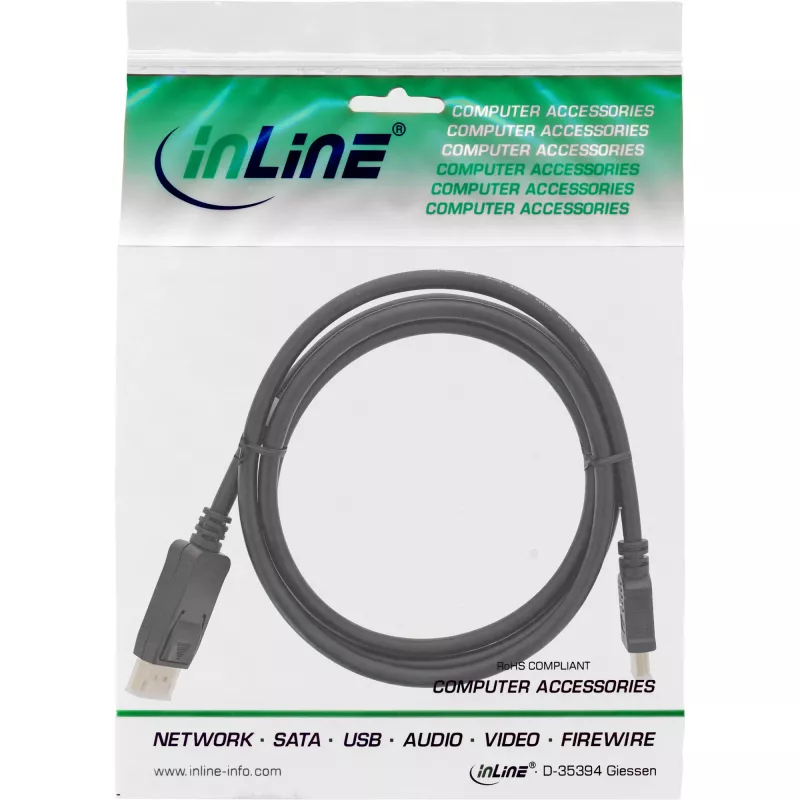
DisplayPort to HDMI converter cable InLine 17187 0.3m black

DisplayPort to HDMI converter cable InLine 17187 0.3m black
R386
The InLine 17187 DisplayPort to HDMI converter cable (0.3 m, black) enables connection of a DisplayPort-equipped PC or notebook to an HDMI monitor or TV. It has a DisplayPort plug on the source side and a standard HDMI Type A plug on the display side, supporting transmission of high-definition video... Read More
Stock 387 Code 1428215 Brand INLINE Model 17187 Warranty 2 Years

Shipping & Returns

Estimated delivery Tuesday, October 6
You will be kept updated through our detailed tracking system
Payment options
EFTPayFastBank CardSnapScanZapperGoogle PayApple PayMobicredMoreTymePay on Arrival

The InLine 17187 DisplayPort to HDMI converter cable (0.3 m, black) enables connection of a DisplayPort-equipped PC or notebook to an HDMI monitor or TV. It has a DisplayPort plug on the source side and a standard HDMI Type A plug on the display side, supporting transmission of high-definition video and audio over a short, flexible cable.

Advantages

The short 0.3 m cable reduces cable clutter and signal loss for close-range connections. It provides a direct, single-cable solution to convert a DisplayPort output to an HDMI input without extra adapters. Its compact form factor and black finish suit desktop and notebook setups where a neat appearance and minimal cable length are required.

Suitable for

  • Connecting a laptop or desktop DisplayPort output to an HDMI monitor
  • Linking a PC or notebook to an HDMI TV for video playback
  • Short-distance connections in desktop workspaces or meeting rooms

Key specifications

  • Brand: InLine
  • Model / MPN: 17187
  • EAN: 4043718275137
  • Cable length: 0.3 m
  • Connector 1: DisplayPort
  • Connector 2: HDMI Type A (Standard)
  • Colour: Black

How to use

Plug the DisplayPort connector into the DisplayPort output of your PC or notebook and insert the HDMI Type A connector into the HDMI input of the monitor or TV. Ensure both devices are powered on and set the display source to the corresponding HDMI input. No external power or drivers are required for standard display output; adjust resolution and audio settings in the operating system if necessary.

Recommendations

For optimal performance, use the cable for short-range connections (desk to monitor). If you need longer cable runs or active conversion for multiple displays or special resolutions, choose a longer cable or an active converter that specifies support for your desired resolution and refresh rate.
Key Highlights
  • DisplayPort male plug to HDMI male plug
  • With audio support
  • Compatible to the DisplayPort 1.1 specifications
  • Compatible with HDMI supports PC resolutions VGA, SVGA, XGA, SXGA and UXGA and HDTV resolutions 480i, 576i, 480p, 576p, 1080i, 1080p, 4K@30Hz(UHD)
  • Black cable with gold plated contacts
  • In resealable PE bag with barcode
  • 0.3 m
  • DisplayPort Straight Male
  • HDMI Type A (Standard) Straight Male
  • Black
Specifications
AWG wire size
28
Cable length
0.3 m
Connector 1
DisplayPort
Connector 1 form factor
Straight
Connector 1 gender
Male
Connector 2
HDMI Type A (Standard)
Connector 2 form factor
Straight
Connector 2 gender
Male
Depth
345 mm
Dimensions (WxDxH)
23 x 345 x 15 mm
DisplayPort version
1.1
Height
15 mm
Package depth
105 mm
Package height
25 mm
Package volume
500 cm³
Package weight
40 g
Package width
85 mm
Product colour
Black
Weight
36 g
Width
23 mm

Leaflet

Open Leaflet
Price history over the last 6 months
DisplayPort to HDMI converter cable InLine 17187 0.3m black
Current
R386
Lowest
R347
Highest
R389
Change 24H
+R17   +5%
Week
+R21   +6%
Month
+R8   +2%

Popular products in this category

WhatsApp
Hi, I’m DistriNode’s AI assistant. I can help you find products, compare options, create quote PDFs, or open support requests.