Account Contact
Your Cart
Pay the courier with no extra fees.
Need help? DistriNode AI can handle any task on our site.

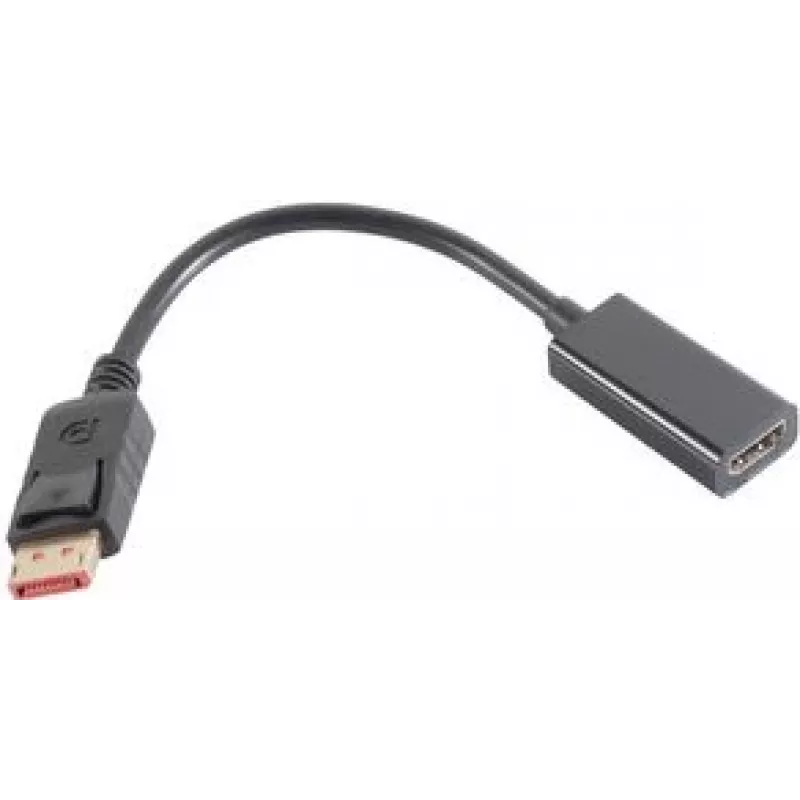
DisplayPort to HDMI Adapter ShiverPeaks BASIC S BS10-78001 Black

DisplayPort to HDMI Adapter ShiverPeaks BASIC S BS10-78001 Black
R496
The ShiverPeaks BASIC S BS10-78001 DisplayPort to HDMI adapter provides a simple solution for connecting devices with a DisplayPort output to HDMI displays. It has a DisplayPort plug on one end and an HDMI socket on the other, enabling high-definition video and audio transmission through a compact b... Read More
Stock 201 Code 1514701 Brand SHIVERPEAKS Model BS10-78001 Warranty 2 Years

Shipping & Returns

Estimated delivery Tuesday, October 6
You will be kept updated through our detailed tracking system
Payment options
EFTPayFastBank CardSnapScanZapperGoogle PayApple PayMobicredMoreTymePay on Arrival

The ShiverPeaks BASIC S BS10-78001 DisplayPort to HDMI adapter provides a simple solution for connecting devices with a DisplayPort output to HDMI displays. It has a DisplayPort plug on one end and an HDMI socket on the other, enabling high-definition video and audio transmission through a compact black adapter that blends into home, office, and mobile setups.

Advantages

This adapter supports straightforward signal conversion from DisplayPort to HDMI without the need for external power or drivers. Its compact form factor and durable housing make it convenient for frequent transport and everyday use. The passive design preserves audio and video quality for typical desktop and laptop connections, while the black finish reduces visual distraction in professional and consumer environments.

Suitable for

  • Connecting laptops with DisplayPort output to HDMI monitors or TVs
  • Linking desktop graphics cards to HDMI projectors and displays
  • Using with docking stations or adapters that provide a DisplayPort signal
  • Portable setups where a compact, plug-and-play adapter is needed

Key specifications

  • Input connector: DisplayPort
  • Output connector: HDMI
  • Supported signals: digital video and audio (DisplayPort to HDMI)
  • Colour: Black
  • Form factor: Compact, inline adapter

How to use

Insert the DisplayPort connector into the DisplayPort output on the source device until it clicks into place. Connect an HDMI cable from the adapter’s HDMI socket to the HDMI input of the display. Power on both devices; the display should detect the input automatically. Use the source device’s display settings to select resolution and audio output if adjustment is required.

Recommendations

For reliable performance, use high-quality HDMI cables and ensure the source device is configured to output via DisplayPort. If the display does not show an image, check cable seating, try a different HDMI cable, and verify that the source supports DisplayPort-to-HDMI signal conversion. Avoid excessive bending near the connectors to prolong adapter life.

Key Highlights
  • Connecting laptops with DisplayPort output to HDMI monitors or TVs
  • Linking desktop graphics cards to HDMI projectors and displays
  • Using with docking stations or adapters that provide a DisplayPort signal
  • Portable setups where a compact, plug-and-play adapter is needed
  • Input connector: DisplayPort
  • Output connector: HDMI
  • Supported signals: digital video and audio (DisplayPort to HDMI)
  • Colour: Black
  • Form factor: Compact, inline adapter
Specifications
AWG wire size
32
Connector 1
DisplayPort
Connector 1 form factor
Straight
Connector 1 gender
Male
Connector 2
HDMI
Connector 2 form factor
Straight
Connector 2 gender
Female
Data transfer rate
18 Gbit/s
DisplayPort version
1.4
Housing material
Acrylonitrile butadiene styrene (ABS)
Maximum resolution
3840 x 2160
Product colour
Black
Quantity per pack
1 pc(s)
Price history over the last 6 months
DisplayPort to HDMI Adapter ShiverPeaks BASIC S BS10-78001 Black
Current
R496
Lowest
R486
Highest
R496
Change 24H
+R9   +2%
Week
—   
Month
—   

Popular products in this category

WhatsApp
Hi, I’m DistriNode’s AI assistant. I can help you find products, compare options, create quote PDFs, or open support requests.