Account Contact
Your Cart
Pay the courier with no extra fees.
Need help? DistriNode AI can handle any task on our site.

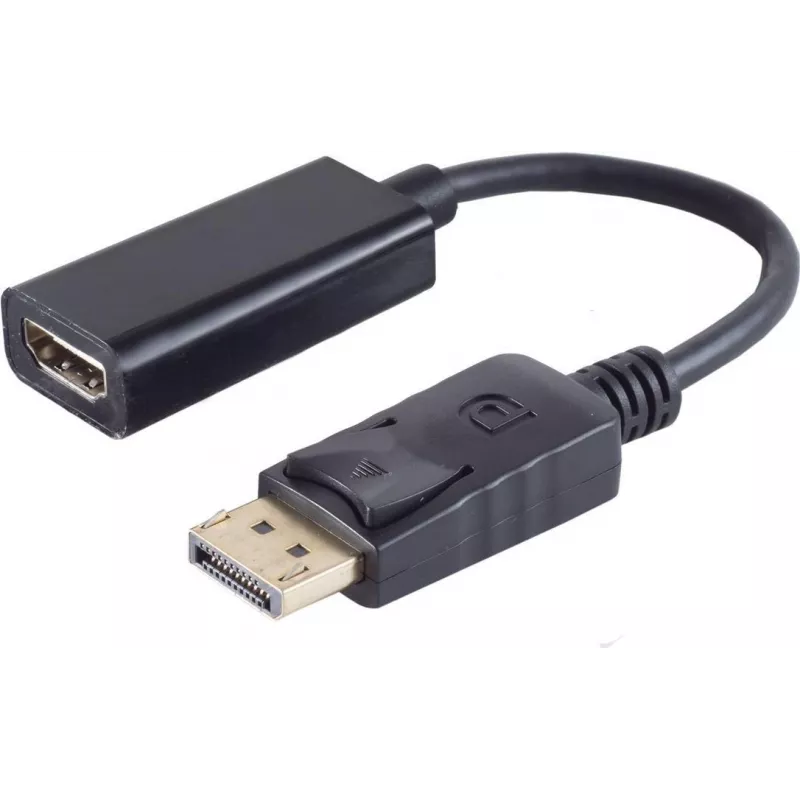
DisplayPort to HDMI adapter ShiverPeaks 14-05011 — DisplayPort 1.2 to HDMI converter

DisplayPort to HDMI adapter ShiverPeaks 14-05011 — DisplayPort 1.2 to HDMI converter
R388
The ShiverPeaks DisplayPort to HDMI adapter 14-05011 converts a DisplayPort 1.2 signal to an HDMI output, allowing a computer or laptop with DisplayPort to connect to HDMI monitors, TVs or projectors. The adapter is designed for plug-and-play operation and supports video transmission and audio pass-... Read More
Stock 281 Code 2351922 Brand SHIVERPEAKS Model 14-05011 Warranty 2 Years

Shipping & Returns

Estimated delivery Thursday, October 8
You will be kept updated through our detailed tracking system
Payment options
EFTPayFastBank CardSnapScanZapperGoogle PayApple PayMobicredMoreTymePay on Arrival

The ShiverPeaks DisplayPort to HDMI adapter 14-05011 converts a DisplayPort 1.2 signal to an HDMI output, allowing a computer or laptop with DisplayPort to connect to HDMI monitors, TVs or projectors. The adapter is designed for plug-and-play operation and supports video transmission and audio pass-through when the source device provides audio over DisplayPort. It is suitable for presentations, home media playback and extending single-display workstations to HDMI-equipped screens.

Advantages

This adapter offers a compact and passive conversion from DisplayPort 1.2 to HDMI without the need for external power or drivers. It preserves digital video quality and, where supported by the source, carries stereo audio to HDMI displays. The small form factor and standard connector interfaces make it easy to carry and install in a range of environments, from meeting rooms to home entertainment setups.

Key specifications

  • Input: DisplayPort 1.2 (male)
  • Output: HDMI (female)
  • Video compatibility: up to DisplayPort 1.2 feature set (digital video conversion)
  • Audio: supports audio pass-through if source provides audio over DisplayPort
  • Power: passive, no external power required
  • Form factor: compact inline adapter for direct connection

How to use

Insert the DisplayPort end of the adapter into the DisplayPort output on the computer or laptop until it seats securely. Connect an HDMI cable from the adapter’s HDMI female port to the HDMI input on the target display, TV or projector. Select the appropriate HDMI input on the display and set the computer’s display settings to extend or mirror the screen as required. If audio is expected, verify in the operating system’s sound settings that the HDMI output is selected as the playback device.

Recommendations

For stable operation, use a high-quality HDMI cable and ensure the source device supports audio over DisplayPort if audio output is needed. When using high resolutions or refresh rates, verify that both the source and the display support the desired settings and adjust the graphics output accordingly. Avoid excessive bending of connectors and keep the adapter free from mechanical strain.

Key Highlights
  • Показа презентаций с ноутбука на HDMI-проектор или экран
  • Подключения ПК с DisplayPort к телевизору или монитору HDMI для воспроизведения видео
  • Расширения рабочего стола на дополнительный экран с HDMI-входом
  • Input: DisplayPort 1.2 (male)
  • Output: HDMI (female)
  • Video compatibility: up to DisplayPort 1.2 feature set (digital video conversion)
  • Audio: supports audio pass-through if source provides audio over DisplayPort
  • Power: passive, no external power required
  • Form factor: compact inline adapter for direct connection
Price history over the last 6 months
DisplayPort to HDMI adapter ShiverPeaks 14-05011 — DisplayPort 1.2 to HDMI converter
Current
R388
Lowest
R377
Highest
R388
Change 24H
+R10   +3%
Week
—   
Month
—   

Popular products in this category

WhatsApp
Hi, I’m DistriNode’s AI assistant. I can help you find products, compare options, create quote PDFs, or open support requests.