Account Contact
Your Cart
Pay the courier with no extra fees.
Need help? DistriNode AI can handle any task on our site.

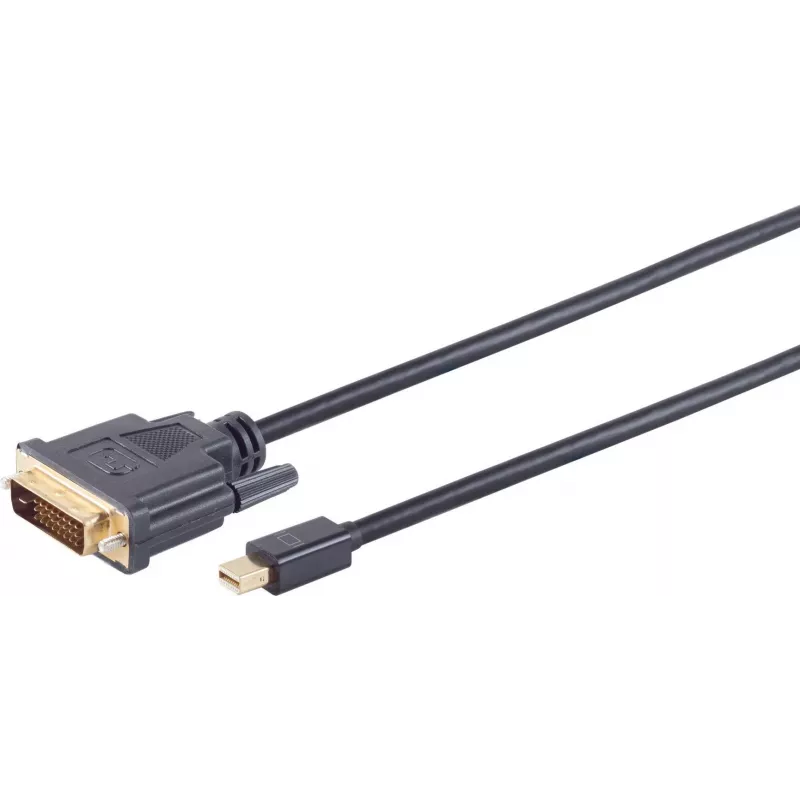
DisplayPort cable ShiverPeaks Mini 1.2, 5 m length, DisplayPort 1.2 support

DisplayPort cable ShiverPeaks Mini 1.2, 5 m length, DisplayPort 1.2 support
R455
The ShiverPeaks Mini DisplayPort 1.2 cable, 5 m length, is designed to connect monitors, laptops and graphics cards equipped with Mini DisplayPort or DisplayPort-compatible outputs. Compliant with the DisplayPort 1.2 standard, the cable transmits digital video and audio signals over a single connect... Read More
Stock 332 Code 2351850 Brand SHIVERPEAKS Model 10-55055 Warranty 2 Years

Shipping & Returns

Estimated delivery Tuesday, October 6
You will be kept updated through our detailed tracking system
Payment options
EFTPayFastBank CardSnapScanZapperGoogle PayApple PayMobicredMoreTymePay on Arrival

The ShiverPeaks Mini DisplayPort 1.2 cable, 5 m length, is designed to connect monitors, laptops and graphics cards equipped with Mini DisplayPort or DisplayPort-compatible outputs. Compliant with the DisplayPort 1.2 standard, the cable transmits digital video and audio signals over a single connection and supports use with high-resolution displays, multi-monitor configurations and general multimedia setups requiring a longer 5-metre run.

Advantages

This DisplayPort cable provides a single-cable solution for carrying digital video and audio according to the DisplayPort 1.2 specification. Its 5 m length allows flexible placement of displays and devices without needing repeaters or adapters for typical desktop and home-office distances. The cable is suitable for connecting Mini DisplayPort outputs to DisplayPort inputs where a standard-compliant connection is required.

Suitable for

  • Connecting laptops with Mini DisplayPort to external monitors
  • Linking graphics cards to displays in single- or multi-monitor setups
  • Home office and workstation layouts requiring a longer cable run
  • Multimedia playback where audio and video are transmitted over one cable

Key specifications

  • Standard support: DisplayPort 1.2 for digital video and audio transmission
  • Length: 5 metres
  • Connector type: Mini DisplayPort to DisplayPort compatible connection (as applicable to device ports)
  • Intended use: video and audio signal transmission between compatible devices

How to use

Connect the Mini DisplayPort end to the source device (for example, a laptop or graphics card with a Mini DisplayPort output) and the DisplayPort-compatible end to the display input. Ensure both devices are powered and set the display input to the corresponding DisplayPort source. Adjust resolution and refresh rate in the operating system or graphics driver settings to match the monitor capabilities and the DisplayPort 1.2 specification.

Recommendations

For reliable performance, avoid sharp bends and kinks in the cable and keep it away from strong electromagnetic interference sources. If higher resolutions or special features beyond DisplayPort 1.2 are required, verify device compatibility before use.

Key Highlights
  • Connecting laptops with Mini DisplayPort to external monitors
  • Linking graphics cards to displays in single- or multi-monitor setups
  • Home office and workstation layouts requiring a longer cable run
  • Multimedia playback where audio and video are transmitted over one cable
  • Standard support: DisplayPort 1.2 for digital video and audio transmission
  • Length: 5 metres
  • Connector type: Mini DisplayPort to DisplayPort compatible connection (as applicable to device ports)
  • Intended use: video and audio signal transmission between compatible devices
Price history over the last 6 months
DisplayPort cable ShiverPeaks Mini 1.2, 5 m length, DisplayPort 1.2 support
Current
R455
Lowest
R444
Highest
R455
Change 24H
+R10   +2%
Week
—   
Month
—   

Popular products in this category

WhatsApp
Hi, I’m DistriNode’s AI assistant. I can help you find products, compare options, create quote PDFs, or open support requests.