Account Contact
Your Cart
Pay the courier with no extra fees.
Need help? DistriNode AI can handle any task on our site.

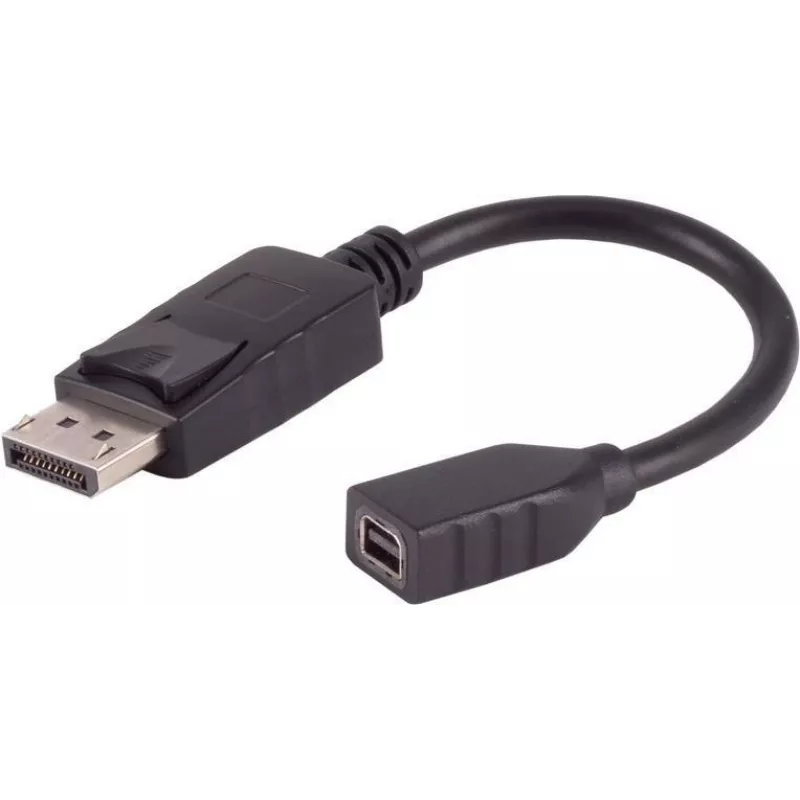
DisplayPort adapter ShiverPeaks BS10-01031, 4K support, 0.2 m cable

DisplayPort adapter ShiverPeaks BS10-01031, 4K support, 0.2 m cable
R375
The ShiverPeaks DisplayPort adapter BS10-01031 with a 0.2 m integrated cable provides a compact connection solution for devices with DisplayPort outputs. It supports 4K resolution, enabling high-definition video transmission in short cable runs. The adapter is intended for desktop computers, noteboo... Read More
Stock 15 Code 2254368 Brand SHIVERPEAKS Model BS10-01031 Warranty 2 Years

Shipping & Returns

Estimated delivery Tuesday, October 6
You will be kept updated through our detailed tracking system
Payment options
EFTPayFastBank CardSnapScanZapperGoogle PayApple PayMobicredMoreTymePay on Arrival

The ShiverPeaks DisplayPort adapter BS10-01031 with a 0.2 m integrated cable provides a compact connection solution for devices with DisplayPort outputs. It supports 4K resolution, enabling high-definition video transmission in short cable runs. The adapter is intended for desktop computers, notebooks, docking stations and AV equipment where a short, reliable DisplayPort link is required.

Advantages

The short 0.2 m cable reduces clutter and is convenient for tight desktop layouts or close-proximity connections. Support for 4K resolution ensures that high-definition content is transmitted without downscaling when used with compatible source and display devices. The integrated cable design reduces the number of separate components and simplifies installation in confined spaces.

Suitable for

  • Connecting a DisplayPort-equipped laptop or desktop to a nearby monitor or converter
  • Use with docking stations where space is limited and only short cable routing is needed
  • AV setups that require minimal cable length to avoid signal interference or cable management issues

Key specifications

  • Cable length: 0.2 m (integrated)
  • Connector type: DisplayPort interface
  • Maximum supported resolution: 4K (when used with compatible hardware)
  • Intended use: short-range video transmission between DisplayPort sources and displays/converters
  • Form factor: compact adapter with fixed cable for tidy installations

How to use

Connect the adapter’s DisplayPort plug to the DisplayPort output on your source device and attach the other end to the display or converter as applicable. Ensure both source and display devices are powered and set to the appropriate input. For best results, verify that connected devices support 4K output and that display settings on the source are configured for the desired resolution and refresh rate. Avoid sharp bends near the connector and route the cable to prevent strain.

Recommendations

Use the adapter for short-distance connections only; for longer runs, select a longer certified DisplayPort cable. Keep the connector contacts clean and avoid excessive mechanical stress on the integrated cable to maintain reliable 4K signal transmission.

Key Highlights
  • Connecting a DisplayPort-equipped laptop or desktop to a nearby monitor or converter
  • Use with docking stations where space is limited and only short cable routing is needed
  • AV setups that require minimal cable length to avoid signal interference or cable management issues
  • Cable length: 0.2 m (integrated)
  • Connector type: DisplayPort interface
  • Maximum supported resolution: 4K (when used with compatible hardware)
  • Intended use: short-range video transmission between DisplayPort sources and displays/converters
  • Form factor: compact adapter with fixed cable for tidy installations
Price history over the last 6 months
DisplayPort adapter ShiverPeaks BS10-01031, 4K support, 0.2 m cable
Current
R375
Lowest
R365
Highest
R375
Change 24H
+R9   +3%
Week
—   
Month
—   

Popular products in this category

WhatsApp
Hi, I’m DistriNode’s AI assistant. I can help you find products, compare options, create quote PDFs, or open support requests.