Account Contact
Your Cart
Pay on delivery – no extra fees
Need help? Ask our AI

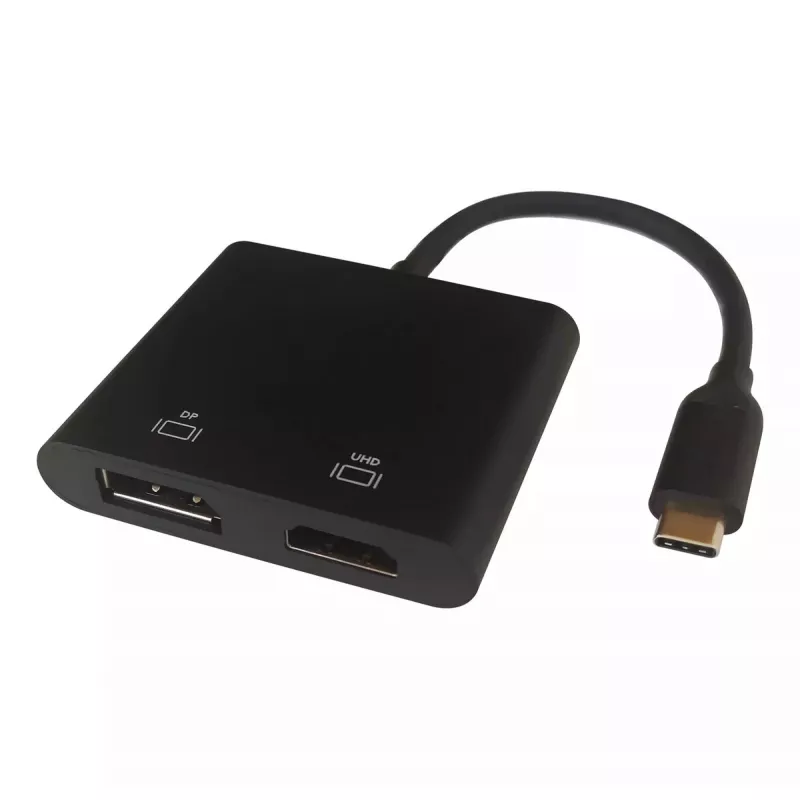
Deltaco USBC-HDDP video cable adapter 0.1 m USB Type-C HDMI DisplayPort Black

Deltaco USBC-HDDP video cable adapter 0.1 m USB Type-C HDMI DisplayPort Black
R1,143
The Deltaco USBC-HDDP is a 0.1 m video cable adapter that connects USB Type-C devices to HDMI and DisplayPort displays. Its compact 0.1 m length and black finish make it suitable for portable setups where a reliable video output from a USB-C port to either HDMI or DisplayPort is required.AdvantagesT... Read More
Stock Out Of StockNo Stock Code 2575995 Brand DELTACO Model USBC-HDDP Warranty 2 Years

Shipping & Returns

The Deltaco USBC-HDDP is a 0.1 m video cable adapter that connects USB Type-C devices to HDMI and DisplayPort displays. Its compact 0.1 m length and black finish make it suitable for portable setups where a reliable video output from a USB-C port to either HDMI or DisplayPort is required.

Advantages

The adapter provides dual output options — HDMI and DisplayPort — enabling connection to a wide range of monitors and TVs from a single USB-C source. Its short 0.1 m cable reduces clutter and is convenient for travel or compact workspaces while maintaining stable video transmission. The black housing offers a discreet appearance that fits most setups.

Suitable for

  • Connecting laptops or tablets with USB-C to HDMI monitors or TVs
  • Connecting USB-C devices to DisplayPort-equipped monitors
  • Portable setups and short-distance desk connections

Key specifications

  • Connector 1: USB Type-C
  • Connector 2: HDMI + DisplayPort
  • Cable length: 0.1 m
  • Product colour: Black
  • Brand: DELTACO, MPN: USBC-HDDP, EAN: 7333048057877

How to use

Plug the USB Type-C connector into the source device (laptop, tablet or smartphone with video-capable USB-C). Connect the HDMI or DisplayPort plug to the corresponding input on the display. Select the correct input on the display device if it does not switch automatically. Ensure the source device is configured to output video via USB-C in its display settings.

Recommendations

For best results, use the adapter for short-distance connections (desk or portable setups). Verify that your USB-C port supports video output (DisplayPort Alt Mode) before use. If the display does not receive a signal, check cable seating and input selection on the monitor or TV.
Key Highlights
  • Connecting laptops or tablets with USB-C to HDMI monitors or TVs
  • Connecting USB-C devices to DisplayPort-equipped monitors
  • Portable setups and short-distance desk connections
  • Connector 1: USB Type-C
  • Connector 2: HDMI + DisplayPort
  • Cable length: 0.1 m
  • Product colour: Black
  • Brand: DELTACO, MPN: USBC-HDDP, EAN: 7333048057877
Specifications
Cable length
0.1 m
Connector 1
USB Type-C
Connector 1 form factor
Straight
Connector 1 gender
Male
Connector 2
HDMI + DisplayPort
Connector 2 gender
Female
DisplayPort version
1.4
Maximum refresh rate
60 Hz
Maximum resolution
3840 x 2160
Product colour
Black
Supported graphics resolutions
3840 x 2160

Leaflet

Open Leaflet

Document

Open Document
Price history is not available yet
We are still collecting enough daily price data for this product.

Popular products in this category

WhatsApp
Hi, I’m DistriNode’s AI assistant. I can help you find products, compare options, create quote PDFs, or open support requests.