Account Contact
Your Cart
Pay the courier with no extra fees.
Need help? DistriNode AI can handle any task on our site.

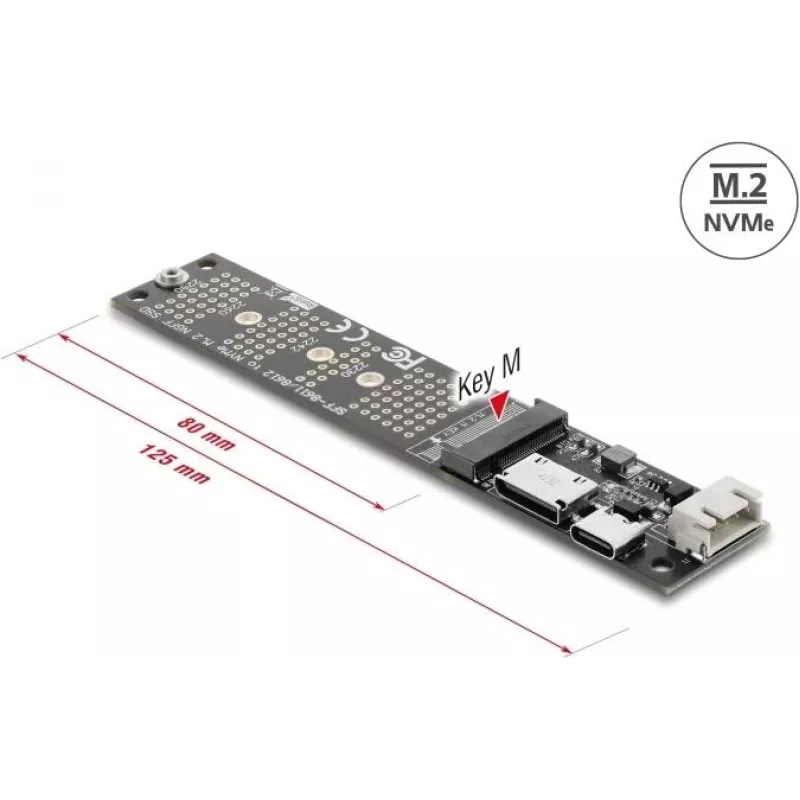
DELOCK OCuLink to M.2 Key M NVMe SSD Adapter Converter (model 64291)

DELOCK OCuLink to M.2 Key M NVMe SSD Adapter Converter (model 64291)
R1,010
DELOCK OCuLink to M.2 Key M NVMe SSD Adapter Converter (model 64291) is a compact adapter designed to connect an OCuLink interface to an M.2 Key M NVMe SSD. It enables the installation of M.2 NVMe drives in systems that provide OCuLink ports, allowing high-speed NVMe storage to be integrated into wo... Read More
Stock 25 Code 1740498 Brand DELOCK Model 64291 Warranty 2 Years

Shipping & Returns

Estimated delivery Thursday, October 1
You will be kept updated through our detailed tracking system
Payment options
EFTPayFastBank CardSnapScanZapperGoogle PayApple PayMobicredMoreTymePay on Arrival

DELOCK OCuLink to M.2 Key M NVMe SSD Adapter Converter (model 64291) is a compact adapter designed to connect an OCuLink interface to an M.2 Key M NVMe SSD. It enables the installation of M.2 NVMe drives in systems that provide OCuLink ports, allowing high-speed NVMe storage to be integrated into workstations, servers, test rigs or diagnostic setups without requiring a native M.2 slot.

Advantages

The adapter supports direct connection between OCuLink and M.2 Key M NVMe SSDs, preserving NVMe performance characteristics where the host controller and cabling support the interface. Its compact form factor simplifies installation in constrained spaces and test environments. The product is manufacturer-designed for reliable mechanical and electrical compatibility with standard M.2 Key M NVMe modules and OCuLink host ports, facilitating upgrades, diagnostics, and temporary drive mounting.

Suitable for

  • Upgrading or adding NVMe storage in systems with OCuLink ports
  • Diagnostic, QA and testing environments for NVMe drives
  • Temporary mounting of M.2 NVMe SSDs for data recovery or cloning
  • Workstation or server environments requiring flexible NVMe connectivity

Key specifications

  • Interface: OCuLink input to M.2 Key M NVMe socket output
  • Supported card type: M.2 Key M, NVMe protocol compatible
  • Form factor: compact adapter for inline connection
  • Use case: enables NVMe SSD connection where only OCuLink is available

How to use

Insert an M.2 Key M NVMe SSD into the adapter’s M.2 socket following the module’s orientation. Connect the adapter to the host system’s OCuLink port using the appropriate OCuLink cable and ensure the system is powered off during installation. After connection, power on the system and verify the NVMe device is detected by the host firmware or operating system. Follow standard platform procedures for formatting, partitioning, or initializing the drive as required.

Recommendations

Use the adapter with compatible OCuLink host ports and appropriate cabling to preserve signal integrity and NVMe performance. Confirm host firmware and driver support for NVMe over OCuLink before deployment. Handle the M.2 SSD by the edges and avoid excessive force when inserting or removing the module to prevent connector damage.

Key Highlights
  • Upgrading or adding NVMe storage in systems with OCuLink ports
  • Diagnostic, QA and testing environments for NVMe drives
  • Temporary mounting of M.2 NVMe SSDs for data recovery or cloning
  • Workstation or server environments requiring flexible NVMe connectivity
  • Interface: OCuLink input to M.2 Key M NVMe socket output
  • Supported card type: M.2 Key M, NVMe protocol compatible
  • Form factor: compact adapter for inline connection
  • Use case: enables NVMe SSD connection where only OCuLink is available
Price history over the last 6 months
DELOCK OCuLink to M.2 Key M NVMe SSD Adapter Converter (model 64291)
Current
R1,010
Lowest
R957
Highest
R1,010
Change 24H
+R32   +3%
Week
+R41   +4%
Month
+R39   +4%

Popular products in this category

WhatsApp
Hi, I’m DistriNode’s AI assistant. I can help you find products, compare options, create quote PDFs, or open support requests.