Account Contact
Your Cart
Pay on delivery – no extra fees
Need help? Ask our AI

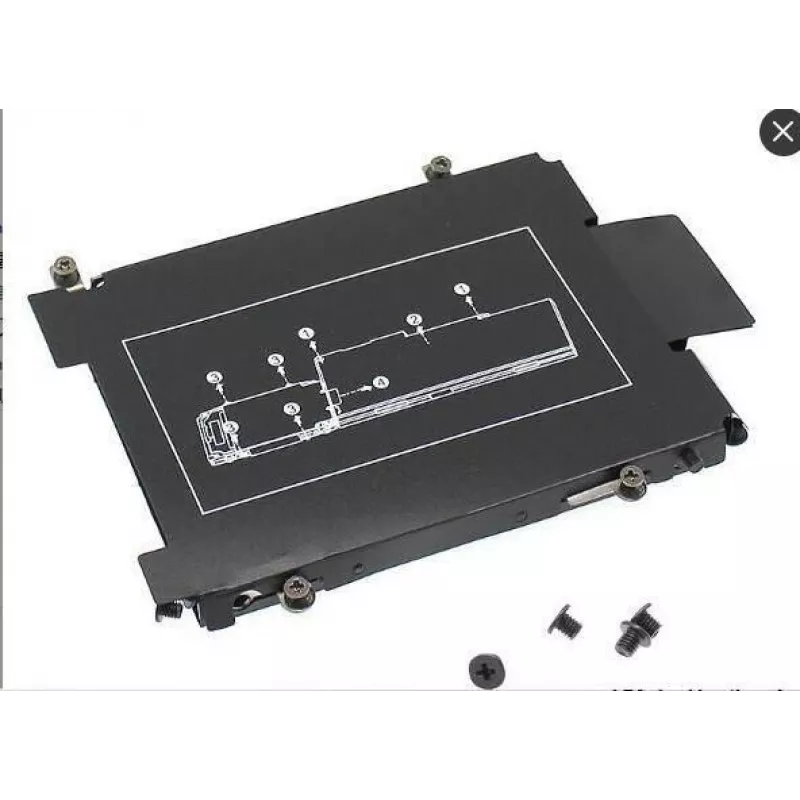
CoreParts KIT383 laptop accessory Laptop HDD/SSD caddy

CoreParts KIT383 laptop accessory Laptop HDD/SSD caddy
R536
The CoreParts Laptop HDD/SSD caddy HP KIT383 by MicroStorage is a black 2nd drive adapter designed to fit HP laptops. With external dimensions of 113 mm (W) x 81 mm (D) x 16 mm (H), this caddy enables installation of an additional HDD or SSD to expand laptop storage capacity and improve data flexibi... Read More
Stock Out Of StockNo Stock Code 2406373 Brand COREPARTS Model KIT383 Warranty 2 Years

Shipping & Returns

The CoreParts Laptop HDD/SSD caddy HP KIT383 by MicroStorage is a black 2nd drive adapter designed to fit HP laptops. With external dimensions of 113 mm (W) x 81 mm (D) x 16 mm (H), this caddy enables installation of an additional HDD or SSD to expand laptop storage capacity and improve data flexibility. Supplied as a single unit, it is compatible with consumer and business use where a replacement optical drive or spare bay is available.

Advantages

The KIT383 provides a straightforward way to add a second internal storage device without modifying the motherboard or chassis. Its compact form factor matches typical laptop drive bays and supports both HDD and SSD media, offering a practical, low-cost upgrade path. The unit is manufactured for easy installation and is supplied by MicroStorage under the CoreParts range.

Suitable for

  • HP laptops with a removable optical drive or spare 9.5–12.7 mm bay
  • Users who need extra storage for files, backups or applications
  • Upgrading from HDD to SSD while retaining original drive

Key specifications

  • Model: KIT383
  • Brand: MicroStorage / CoreParts range
  • Color: Black
  • Dimensions: 113 mm (W) x 81 mm (D) x 16 mm (H)
  • Compatible media: 2.5" HDD or SSD
  • Quantity: 1 piece
  • MPN: KIT383
  • EAN: 5711783900627

How to use

Power down the laptop and remove the battery (if removable). Remove the optical drive or access cover according to the laptop manufacturer instructions. Slide the 2.5" HDD or SSD into the caddy until it connects securely to the SATA connector, then fasten it with the provided screws if applicable. Insert the caddy into the laptop bay and secure the bay or optical drive screw. Reinstall the battery, power on the laptop and verify the new drive is detected in the BIOS/operating system.

Recommendations

Ensure the caddy thickness matches your laptop bay (16 mm) and verify HP model compatibility before purchase. Back up important data prior to installation and handle the drive on an anti-static surface.
Key Highlights
  • HP laptops with a removable optical drive or spare 9.5–12.7 mm bay
  • Users who need extra storage for files, backups or applications
  • Upgrading from HDD to SSD while retaining original drive
  • Model: KIT383
  • Brand: MicroStorage / CoreParts range
  • Color: Black
  • Dimensions: 113 mm (W) x 81 mm (D) x 16 mm (H)
  • Compatible media: 2.5" HDD or SSD
  • Quantity: 1 piece
  • MPN: KIT383
  • EAN: 5711783900627
Specifications
Brand compatibility
HP
Compatibility
Elitebook 725 G3, 745 G3, 820 G3, 840 G3, 850 G3
Depth
81 mm
Harmonized System (HS) code
84733080
Height
16 mm
Package depth
81 mm
Package height
16 mm
Package weight
12 g
Package width
113 mm
Product colour
Black
Product type
Laptop HDD/SSD caddy
Quantity per pack
1 pc(s)
Weight
10 g
Width
113 mm

Leaflet

Open Leaflet
Price history is not available yet
We are still collecting enough daily price data for this product.

Popular products in this category

WhatsApp
Hi, I’m DistriNode’s AI assistant. I can help you find products, compare options, create quote PDFs, or open support requests.