Account Contact
Your Cart
Pay the courier with no extra fees.
Need help? DistriNode AI can handle any task on our site.

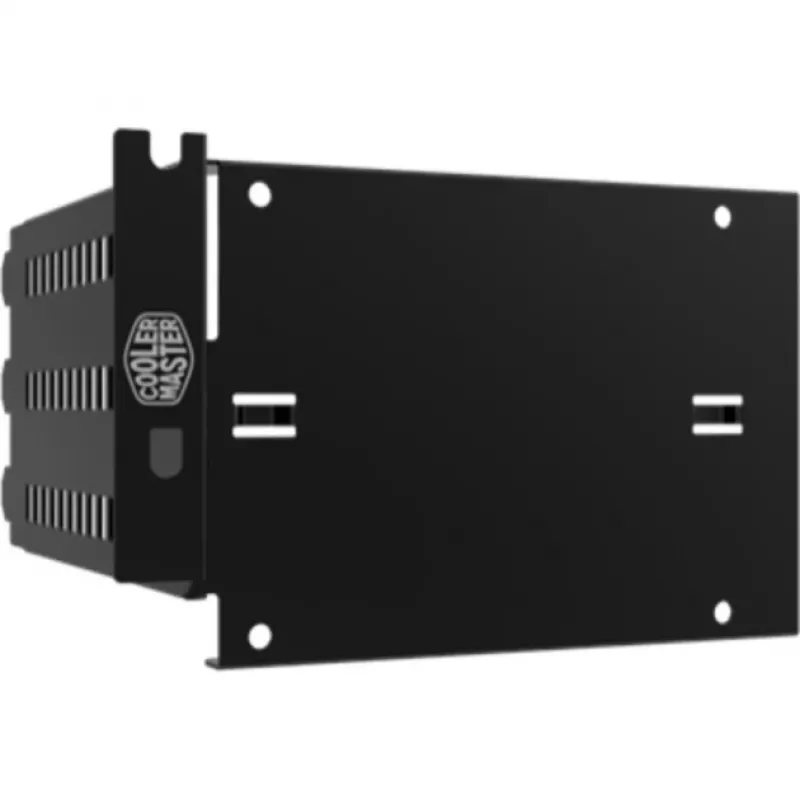
Carrier panel Cooler Master SSD Display Bracket (1bay)

Carrier panel Cooler Master SSD Display Bracket (1bay)
R338
The Cooler Master SSD Display Bracket (1bay) is a carrier panel designed for MasterCase series cases with FreeForm™ Modular System Technology. It lets you vertically display a single 2.5" SSD in the PCI slot area, improving visibility and allowing a clean presentation when combined with a tempered g... Read More
Stock 7 Code 345920 Brand COOLER MASTER Model MCA-C000R-KEST00 Warranty 2 Years

Shipping & Returns

Estimated delivery Thursday, October 1
You will be kept updated through our detailed tracking system
Payment options
EFTPayFastBank CardSnapScanZapperGoogle PayApple PayMobicredMoreTymePay on Arrival

The Cooler Master SSD Display Bracket (1bay) is a carrier panel designed for MasterCase series cases with FreeForm™ Modular System Technology. It lets you vertically display a single 2.5" SSD in the PCI slot area, improving visibility and allowing a clean presentation when combined with a tempered glass side panel. The tray is constructed from high-quality steel with a metallic grey/black finish and occupies three PCI slot spaces.

Advantages

The bracket provides a simple way to showcase an SSD without requiring internal drive bays, offering compatibility with MasterCase Pro models and other Cooler Master FreeForm Modular cases. Its steel construction and painted finish deliver durable support and a consistent look with modern PC builds. Installation is straightforward: mount the SSD to the tray and secure the tray into the case PCI area.

Suitable for

  • Displaying a single 2.5" SSD vertically in MasterCase series cases
  • Builds with tempered glass panels where drive visibility is desired
  • Systems using Cooler Master FreeForm™ Modular cases including MasterCase Pro and compatible models

Key specifications

  • Compatibility: Cooler Master MasterCase series with FreeForm™ Modular System
  • Drive bays: 1 × 2.5" SSD (vertical display)
  • PCI slot usage: occupies 3 PCI slot spaces
  • Material: high-quality steel
  • Finish / Colour: metallic grey / black
  • Manufacturer part number (MPN): MCA-C000R-KEST00
  • EAN: 4719512055779

How to use

Attach your 2.5" SSD to the carrier tray using the appropriate screws, then insert and secure the tray into the case's PCI slot area. Ensure the bracket aligns with the case’s FreeForm modular mounting points and occupies the necessary three PCI slots. Connect the SSD to power and data cables inside the system as usual before closing the case.

Recommendations

Install the bracket in a powered-off system on a static-free surface. If displaying the SSD behind tempered glass, check clearance with other components (for example, GPU) to ensure the bracket fits properly and does not obstruct airflow.
Key Highlights
  • Displaying a single 2.5" SSD vertically in MasterCase series cases
  • Builds with tempered glass panels where drive visibility is desired
  • Systems using Cooler Master FreeForm™ Modular cases including MasterCase Pro and compatible models
  • Compatibility: Cooler Master MasterCase series with FreeForm™ Modular System
  • Drive bays: 1 × 2.5" SSD (vertical display)
  • PCI slot usage: occupies 3 PCI slot spaces
  • Material: high-quality steel
  • Finish / Colour: metallic grey / black
  • Manufacturer part number (MPN): MCA-C000R-KEST00
  • EAN: 4719512055779
Specifications
Compatible products
MasterCase MasterCase Pro
Number of HDDs supported
1
Product colour
Black
Type
Carrier panel
Price history over the last 6 months
Carrier panel Cooler Master SSD Display Bracket (1bay)
Current
R338
Lowest
R324
Highest
R342
Change 24H
+R10   +3%
Week
+R13   +4%
Month
+R12   +4%

Popular products in this category

WhatsApp
Hi, I’m DistriNode’s AI assistant. I can help you find products, compare options, create quote PDFs, or open support requests.