Account Contact
Your Cart
Pay the courier with no extra fees.
Need help? DistriNode AI can handle any task on our site.

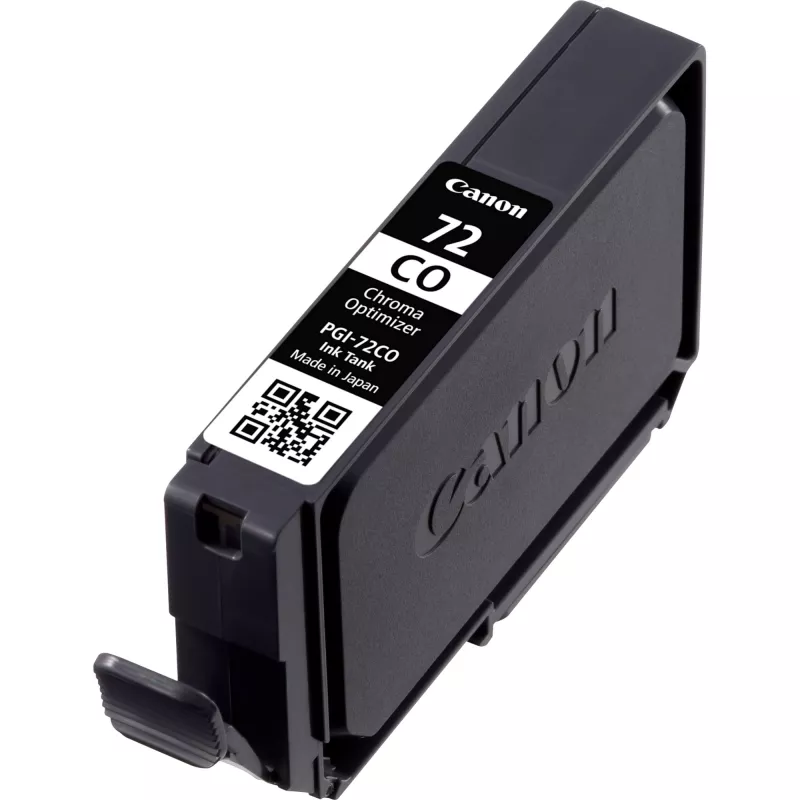
Canon PGI-72CO Clear Ink Cartridge (Chroma Optimiser)

Canon PGI-72CO Clear Ink Cartridge (Chroma Optimiser)
R432
The Chroma Optimizer clear ink from the professional LUCIA ink range improves surface uniformity and enhances gloss while expanding the printable colour gamut and deepening black tones. This pigment-based clear ink is applied over colour inks to achieve uniform gloss and more consistent output. The ... Read More
Stock 27 Code 30995 Brand Canon Model 6411B001 Warranty 2 Years

Shipping & Returns

Estimated delivery Tuesday, September 29
You will be kept updated through our detailed tracking system
Payment options
EFTPayFastBank CardSnapScanZapperGoogle PayApple PayMobicredMoreTymePay on Arrival

The Chroma Optimizer clear ink from the professional LUCIA ink range improves surface uniformity and enhances gloss while expanding the printable colour gamut and deepening black tones. This pigment-based clear ink is applied over colour inks to achieve uniform gloss and more consistent output. The 14 ml ink tank yields approximately 165 prints at 10×15 cm or about 31 prints at A3+ size based on the ISO/IEC 29102 standard.

Advantages

Chroma Optimizer produces more even gloss across prints, increases apparent colour richness by widening the gamut, and deepens black reproduction for stronger contrast. Being pigment-based, it is compatible with the LUCIA ink workflow and is applied as an overcoat on colour layers. The 14 ml tank format provides predictable yield figures under the ISO/IEC 29102 testing method.

Key specifications

  • Ink type: pigment-based clear ink
  • Ink series: LUCIA professional range
  • Application: applied on top of colour inks as an overcoat
  • Tank volume: 14 ml
  • Yield (ISO/IEC 29102): up to 165 prints (10×15 cm)
  • Yield (ISO/IEC 29102): up to 31 prints (A3+)

How to use

Install the 14 ml Chroma Optimizer tank according to your printer manufacturer’s instructions for LUCIA inks. The clear ink functions as an overcoat and is applied by the printer on top of colour layers during the print cycle; ensure you select the correct media and print mode that supports Chroma Optimizer for optimal results. Replace the tank when the printer indicates low ink or when print quality degrades.

Recommendations

Use media and printer settings specified for LUCIA ink systems to ensure compatibility. For consistent gloss and colour performance, allow prints to dry and cure according to the paper manufacturer’s guidance before handling or finishing.
Key Highlights
  • Genuine Canon Ink produces on average 35% more quality prints than imitation cartridges†††
  • Genuine Canon Ink provides consistent quality prints 100% of the time†††
  • Genuine Canon Ink is 100% reliable so you can print with less stress†††
  • Return every ink and toner cartridge to be reused or recycled. It's free, easy and environmentally friendly.
  • Original
  • Print technology: Inkjet printing
  • Standard Yield
  • Colour ink page yield: 165 pages
  • Brand compatibility: Canon
  • 1 pc(s)
Specifications
Brand compatibility
Canon
Cartridge capacity
Standard Yield
Colour
Yes
Colour ink page yield
165 pages
Compatibility
Canon PIXMA PRO-10
Country of origin
Japan
Harmonized System (HS) code
84439990
Operating relative humidity (H-H)
5 - 95%
Operating temperature (T-T)
15 - 35 °C
Package type
Blister
Page yield footnote
10x15cm, ISO/IEC 24734
Print technology
Inkjet printing
Quantity per pack
1 pc(s)
Storage relative humidity (H-H)
5 - 95%
Storage temperature (T-T)
10 - 35 °C
Type
Original

Leaflet

Open Leaflet
Price history over the last 6 months
Canon PGI-72CO Clear Ink Cartridge (Chroma Optimiser)
Current
R432
Lowest
R404
Highest
R441
Change 24H
+R23   +6%
Week
+R28   +7%
Month
+R23   +6%

Popular products in this category

WhatsApp
Hi, I’m DistriNode’s AI assistant. I can help you find products, compare options, create quote PDFs, or open support requests.