Account Contact
Your Cart
Pay the courier with no extra fees.
Need help? DistriNode AI can handle any task on our site.

Cable Gender Changer DisplayPort ShiverPeaks BS10-78003

Cable Gender Changer DisplayPort ShiverPeaks BS10-78003
R365
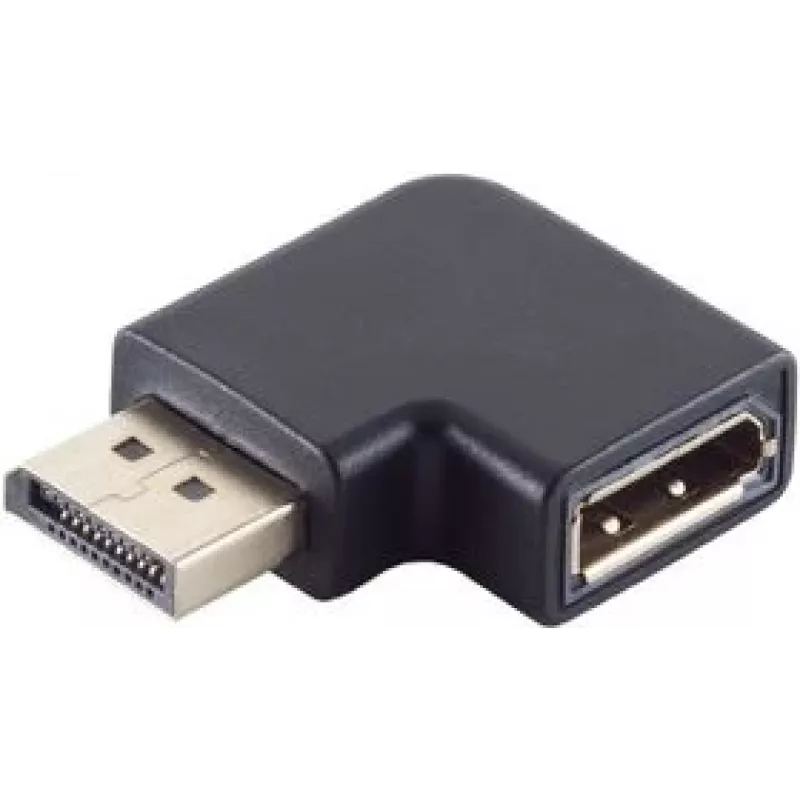
The ShiverPeaks BS10-78003 is a DisplayPort gender changer designed to join two DisplayPort cables securely. Featuring gold-plated contacts and a compact black housing, this adapter preserves signal integrity for video and audio transmission while allowing users to extend or reconfigure DisplayPort ... Read More
Stock 357 Code 2253486 Brand SHIVERPEAKS Model BS10-78003 Warranty 2 Years

Shipping & Returns

Estimated delivery Tuesday, October 6
You will be kept updated through our detailed tracking system
Payment options
EFTPayFastBank CardSnapScanZapperGoogle PayApple PayMobicredMoreTymePay on Arrival

The ShiverPeaks BS10-78003 is a DisplayPort gender changer designed to join two DisplayPort cables securely. Featuring gold-plated contacts and a compact black housing, this adapter preserves signal integrity for video and audio transmission while allowing users to extend or reconfigure DisplayPort connections without replacing cables.

Advantages

Gold-plated contacts reduce oxidation and help maintain reliable electrical contact for consistent transmission. The compact form factor and neutral black finish allow easy placement in tight spaces and compatibility with most AV setups. The simple, connector-to-connector design eliminates the need for additional converters or tools when adapting DisplayPort cable orientations.

Suitable for

  • Extending a DisplayPort cable run by joining two cables
  • Connecting devices where cable gender does not match (male-to-male or female-to-female adaptation)
  • Temporary or permanent AV workstation adjustments and cable management

Key specifications

  • Connector types: DisplayPort to DisplayPort
  • Contact plating: gold-plated contacts for improved conductivity and corrosion resistance
  • Colour: black housing
  • Form factor: compact inline gender changer adapter

How to use

Align each DisplayPort cable connector with the corresponding end of the gender changer and insert firmly until it seats. Ensure both cable ends are fully engaged to maintain stable signal transmission. If connectors have latches, verify they lock into place. When disconnecting, depress any latch mechanism before pulling to avoid damaging the connectors or cables.

Recommendations

For optimal performance, use high-quality DisplayPort cables that meet the signal requirements of your display and source device. Avoid placing excessive strain on the joined connection and secure cables to prevent accidental disconnection. This adapter is intended for connecting DisplayPort cables and is not a signal converter; ensure connected devices are DisplayPort compatible.
Key Highlights
  • Extending a DisplayPort cable run by joining two cables
  • Connecting devices where cable gender does not match (male-to-male or female-to-female adaptation)
  • Temporary or permanent AV workstation adjustments and cable management
  • Connector types: DisplayPort to DisplayPort
  • Contact plating: gold-plated contacts for improved conductivity and corrosion resistance
  • Colour: black housing
  • Form factor: compact inline gender changer adapter
Specifications
Cable jacket material
Polyvinyl chloride (PVC)
Connector 1
DisplayPort
Connector 1 form factor
Angled
Connector 1 gender
Male
Connector 2
DisplayPort
Connector 2 form factor
Straight
Connector 2 gender
Female
Connector contacts plating
Gold
Data transfer rate
32.4 Gbit/s
DisplayPort version
1.4
HDCP
Yes
Product colour
Black
Quantity per pack
1 pc(s)
Price history over the last 6 months
Cable Gender Changer DisplayPort ShiverPeaks BS10-78003
Current
R365
Lowest
R355
Highest
R365
Change 24H
+R9   +3%
Week
—   
Month
—   

Popular products in this category

WhatsApp
Hi, I’m DistriNode’s AI assistant. I can help you find products, compare options, create quote PDFs, or open support requests.