

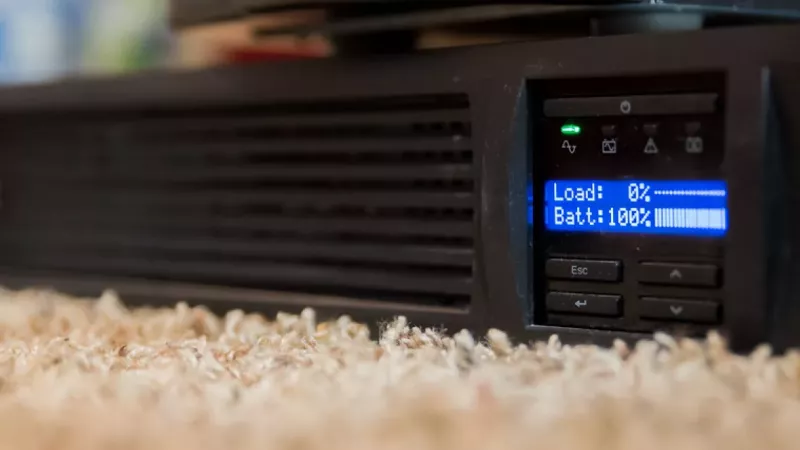
Load shedding has eased dramatically — but a UPS is still one of the smartest, cheapest ways to protect your electronics. A UPS (uninterruptible power supply) keeps selected equipment running for a short time when the mains power fails, and it shields sensitive devices from the surges, dips and abrupt restarts that damage hardware. Even in a calmer power year, that protection matters.
For South African homes and small offices, the questions are practical: can it keep a Wi-Fi router online, will it give a desktop PC enough time to shut down safely, and is it suitable for an office with a switch, fibre ONT, point-of-sale device or CCTV recorder? This guide explains how to choose a UPS without getting lost in model numbers.
Key Takeaway: Size a UPS by the watts of the gear you actually need to protect — not by the biggest VA number on the box. Buy comfortable headroom, decide whether you need minutes for a safe shutdown or longer runtime for connectivity, and keep high-power appliances off it.
Why a UPS Still Makes Sense in 2026
The grid has improved, but it has not become bulletproof — and a UPS protects against far more than blackouts. By early 2026 South Africa had gone more than 300 consecutive days without load shedding (the milestone was reached on 12 March 2026) as Eskom’s plant performance recovered and unplanned breakdowns fell sharply. That is genuinely good news.
But two things remain true. First, Eskom’s own 2026 winter outlook still flags a high-risk scenario in which load shedding could return if breakdowns spike. Second, an ageing grid still delivers surges, voltage dips and brownouts that quietly shorten the life of computers, networking gear and CCTV systems — and a sudden power loss can corrupt data or damage drives. A UPS rides through all of that.
Key Takeaway: Even with load shedding largely behind us, a UPS earns its place by protecting against power-quality problems and the occasional outage — and by giving your equipment a clean, safe shutdown every time.
Start With the Equipment You Actually Need to Protect
List the devices the UPS must support before you shop — the right unit depends entirely on that load. A UPS for a fibre ONT and router is very different from one for a gaming PC, monitor, NAS, switch and security recorder. Write down every item that must stay on during an outage, then check the power rating of each.
Most devices show power in watts (W) on the adapter, label or spec sheet. If the label only shows volts and amps, multiply them to estimate watts — a 12V 2A router adapter is roughly 24W. Real usage may be lower, but this gives you a safer planning number.
Understand VA and Watts
VA is not the same as watts — and the watt rating is the limit that actually decides whether your equipment will run. UPS models are advertised with a VA rating (650VA, 1000VA, 2000VA), but a unit sold as 1000VA may support a lower watt load depending on its power factor.
Add up your equipment wattage and choose a UPS with comfortable headroom; never run one at its absolute limit. Headroom helps with startup spikes, battery ageing and future additions. Brands such as APC and Eaton recommend sizing by the connected load and the runtime you need, not by VA alone.
Choose Your UPS by Use Case
Use this as a starting point, then confirm against the actual wattage of your devices.
| Use Case | Typical Load | Suggested UPS | What to Expect |
|---|---|---|---|
| Router + fibre ONT | ~20–60W | Mini/DC UPS or 650–850VA | Stay online for an extended period |
| Desktop PC + monitor | ~200–400W | 1000–1500VA line-interactive | Minutes — enough to save and shut down |
| Gaming PC + large monitor | ~400–700W | 1500VA+ line-interactive | A short bridge plus safe shutdown |
| Small office (router, switch, ONT, PoS, NVR) | ~100–300W | 1500–2200VA | Keep essentials only for longer runtime |
| Server / NAS / business-critical | Varies | Online (double-conversion) UPS | Continuous power conditioning |
If you only need internet during an outage, your load is small and a compact UPS or DC backup unit may be enough — just check voltage compatibility, connector size and current. A PC UPS, by contrast, is there to bridge short interruptions and give you time to save work and shut down cleanly, not to run a desktop for hours.

Runtime Matters More Than the Box Size
Two UPS units with the same VA rating can deliver very different runtimes — runtime depends on battery capacity, load, battery age and efficiency. The more you connect, the shorter the runtime. For a normal UPS, think in minutes, not hours.
If you genuinely need hours of backup — for example to run a desk through an extended outage — a standard UPS is the wrong tool. That is the job of a larger power station, inverter system or dedicated battery backup. A router-focused backup unit lasts far longer simply because the connected load is so small.
Key Takeaway: Match the product to the goal. Minutes for a safe PC shutdown is a UPS job; hours of running a household is an inverter/battery job. Mixing them up leads to disappointment.
Line-Interactive vs Online UPS
Line-interactive units suit homes and small offices; online (double-conversion) units suit servers and sensitive, uptime-critical equipment.
| Factor | Line-Interactive | Online (Double-Conversion) |
|---|---|---|
| Best for | Home, routers, basic PCs, network gear | Servers, business-critical, sensitive equipment |
| Power conditioning | Corrects moderate voltage changes | Continuous, full conditioning via inverter |
| Switchover | Brief transfer to battery on outage | No transfer — always on inverter |
| Cost | More affordable | Higher, for premium protection |
Check Sockets, Battery Replacement and Noise
Before buying, confirm the output sockets, whether the battery is user-replaceable, and how loud the unit is. Some UPS units use South African plug sockets, others use IEC outlets — you may need the correct cables for computers, monitors, switches or PDUs. UPS batteries wear out over time, so user-replaceable batteries save you replacing the whole unit later.
Noise matters too. Larger UPS units may have fans; for a bedroom or quiet office, check whether the model is fanless or how loud it gets under load and while charging.
Do Not Overload the UPS
A UPS is not a normal multiplug — never connect high-power appliances to it. Avoid heaters, kettles, laser printers, large speakers or anything with a heavy motor load unless the UPS is specifically rated for it. These can overload the unit or drain the battery in seconds.
Keep the UPS for what matters most: router, ONT, PC, monitor, small switch, NAS, NVR or business-critical low-power devices.

How to Buy Your UPS in South Africa
DistriNode stocks genuine, locally supported UPS units, batteries and power-distribution gear — matched to your load and backed by real expertise and fast South African delivery. Run through this checklist before you order:
- Add up the watts for every device you want to connect.
- Choose a UPS with wattage headroom, not just a large VA number.
- Decide whether you need minutes for shutdown or longer runtime for connectivity.
- Check output sockets and cable compatibility before ordering.
- Keep printers, heaters and high-power appliances off a normal UPS.
- Plan for battery replacement as part of long-term ownership.
Start with UPS products, line-interactive UPS options, online UPS options, UPS batteries and power distribution units.
Frequently Asked Questions
What size UPS do I need to keep my Wi-Fi router on?
A router and fibre ONT usually draw only about 20–60W combined, so a small UPS (650–850VA) or a dedicated mini/DC router backup can keep you online for an extended period. Just check the output voltage, connector and current match your devices.
How long will a UPS run my desktop PC during an outage?
Usually only minutes — and that is by design. A PC UPS is meant to bridge short interruptions and give you time to save your work and shut down safely. For hours of runtime you need an inverter or battery system, not a standard UPS.
VA or watts — which number should I size by?
Watts. VA is the headline figure on the box, but the watt rating is the real limit for your equipment. Add up the watts of everything you want to protect and choose a UPS with comfortable headroom above that total.
Can a UPS run a kettle, heater or laser printer?
No. These draw far too much power and will overload a normal UPS or flatten the battery almost instantly. Keep a UPS for low-power electronics — routers, PCs, monitors, switches, NAS and NVRs.
Is a UPS still worth it now that load shedding has stopped?
Yes. Beyond blackouts, a UPS protects against surges, voltage dips and brownouts from an ageing grid, and it gives your equipment a clean, safe shutdown. Eskom’s own outlook still flags a risk that load shedding could return, so the insurance remains worthwhile.
Sources
- APC UPS selector
- Eaton UPS resources
- South African Government — Eskom marks 300 days without load shedding (March 2026)
- Eskom load-shedding information