

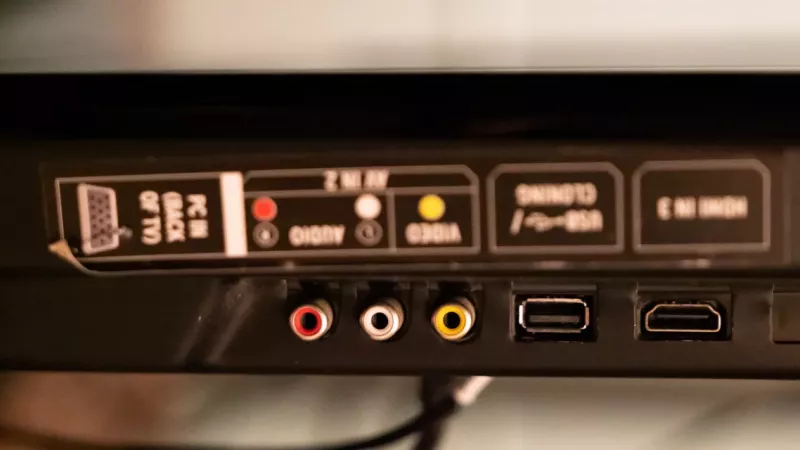
HDMI and DisplayPort can both deliver excellent image quality — the better cable depends on the screen, the computer and what you actually do with it. Buyers tend to focus on the connector shape, but the real decision is about resolution, refresh rate, device support and cable certification.
For South African offices, gaming desks and laptop setups, the safest answer is simple: match the cable to the ports you have and the display mode you actually need.
Key Takeaway: The connector type is only half the story. A port labelled HDMI or DisplayPort doesn’t guarantee a feature — the computer, the cable and the monitor must all support the resolution and refresh rate you want. A weak or uncertified cable is a common cause of flicker and black screens.
HDMI vs DisplayPort at a Glance
| Factor | HDMI | DisplayPort |
|---|---|---|
| Most common on | TVs, projectors, consoles, laptops | Desktop GPUs, business & gaming monitors |
| Best for | Living room, boardroom, console gaming | PC monitors, high refresh, adaptive sync |
| Multi-monitor | One display per port | Supports daisy-chaining (MST) |
| Key checkpoint | Cable certified for the bandwidth | Version supports target res/refresh |

Where HDMI Usually Makes Sense
HDMI is on almost everything — TVs, projectors, laptops, consoles and many monitors — so it’s usually the easiest choice for a television, boardroom display or console. For high refresh rate or 4K setups, just confirm the cable is certified for the bandwidth the device needs, or you may quietly drop to a lower refresh rate.
Where DisplayPort Usually Makes Sense
DisplayPort is the norm on desktop graphics cards and PC monitors. It’s often the better default for a desktop-to-monitor setup — especially where you want high refresh rates, adaptive sync (FreeSync/G-Sync) or daisy-chained monitors from a single port.

Version Names Are Not Enough
A port labelled HDMI or DisplayPort does not automatically guarantee every feature. The device, cable and monitor must all support the target resolution and refresh rate. A weak or uncertified cable can cause flicker, black screens or limited refresh-rate options — and it often gets blamed on the monitor instead.
Which Cable Should You Use?
| Your Setup | First Choice |
|---|---|
| TV, projector or console | HDMI |
| Desktop PC to monitor | DisplayPort |
| 4K 120Hz / high-refresh gaming | Either — check cable certification + device support |
| Office monitor on a laptop dock | Whichever both dock and monitor support |
| Long cable run | Quality certified cable, avoid extra adapters |
Key Takeaway: Don’t buy by connector type alone, and don’t assume a new monitor is faulty when an old cable is the culprit. When you chain docks, adapters and extensions, the weakest link sets the result — so keep the path short and certified.
How to Buy the Right Display Cable in South Africa
DistriNode stocks certified HDMI and DisplayPort cables, monitors, docks and adapters — matched to your resolution and refresh-rate needs, with local stock and fast delivery. Browse HDMI cables, DisplayPort cables, monitors, docking stations and display adapters.
Frequently Asked Questions
Is DisplayPort better than HDMI for gaming?
For desktop PC gaming, DisplayPort is often the better default — it handles high refresh rates and adaptive sync well. For console gaming, HDMI is the standard. For 4K high-refresh on either, the key is a certified cable and matching device support.
Why is my monitor not showing its full refresh rate?
Usually the cable or a link in the chain can’t carry the bandwidth. An old or uncertified cable, or an adapter, can quietly limit resolution and refresh rate. Try a certified cable rated for your target mode before assuming the monitor is faulty.
Can I convert HDMI to DisplayPort or vice versa?
Yes, with the right active adapter or dock, but every adapter is a potential weak link. Where possible, use a direct cable that both devices support. If you must adapt, buy a quality active adapter rated for your resolution and refresh rate.
Does a more expensive cable give a better picture?
Not in itself — digital either works or it doesn’t. What matters is that the cable is certified for the bandwidth you need. A correctly certified cable delivers the full signal; paying more beyond that doesn’t improve image quality.
Sources
- HDMI Licensing Administrator — Ultra High Speed cables
- VESA — DisplayPort 2.1