


Choosing a gaming laptop in 2026 is less about the sticker on the lid and more about what the manufacturer did with the parts inside. Two machines with the same graphics chip can behave very differently once a game is running, because the power limit, the cooling and the memory configuration are decided by the laptop brand, not by the chip maker. If you only compare model names, you can easily pay more for a slower machine.
This guide walks through the decisions in the order that actually matters: the graphics tier and its power limit first, then processor, memory, storage, screen, cooling, battery and ports. Because this is South Africa, we also cover what load-shedding means for a gaming laptop, and why 2026 is an unusual year to buy, with no new GeForce generation arriving and memory prices still climbing. You will not find invented frame-rate charts here, only the things you can check on a spec sheet before you pay.
Why 2026 is an unusual year to buy a gaming laptop
Normally, gamers time their purchases around new graphics launches. In 2026 that rhythm has broken. In February, Tom’s Hardware reported, citing The Information, that NVIDIA did not plan to launch any new gaming GPUs this year, that the rumoured RTX 50 Super refresh had been deprioritised and that the next generation was pushed further out. NVIDIA’s own comment to the publication was short: “Demand for GeForce RTX GPUs is strong, and memory supply is constrained.”
The practical meaning is simple. The GeForce RTX 50 Series laptop chips that launched with the Blackwell architecture remain the current generation for the rest of 2026. Waiting a few months for a “Super” laptop that may never ship is not a strategy. What does change from month to month is pricing, and that is where memory comes in.
Memory prices are still going up
On 30 September 2026, market research firm TrendForce published its fourth-quarter outlook: DRAM contract prices are projected to rise 10–15% quarter-on-quarter and NAND Flash contract prices 15–20%. TrendForce also notes that notebook inventory is increasingly reflecting higher component costs, and that some PC brands are reducing SSD capacities to keep their bill of materials down. Contract prices are what manufacturers pay, not shelf prices, but they flow through to laptops over time.
In 2026 there is no “next generation” to wait for. The real question is whether the laptop in front of you has the right GPU tier, enough memory and enough storage, because upgrading memory and storage later is getting more expensive, not cheaper.
What this means for South African buyers
Locally, laptop prices also move with the rand exchange rate, so global component costs are only part of the story. The sensible approach is to decide on your minimum specification now, watch the laptops and notebooks category for a model that meets it, and not stretch for a top-tier GPU if your games and screen do not need it.
GPU tier: the single most important choice
For gaming, the graphics processor does most of the work. NVIDIA’s current laptop line-up is the GeForce RTX 50 Series, listed on the official RTX 50 Series laptops page: RTX 5050, RTX 5060, RTX 5070, RTX 5070 Ti, RTX 5080 and RTX 5090. All of them support DLSS 4 with Multi Frame Generation and NVIDIA Reflex, which matters because AI upscaling and frame generation are now a large part of how laptops reach smooth frame rates in demanding games.
Video memory per tier
Video memory (VRAM) limits how high you can push texture quality, especially at higher resolutions. According to NVIDIA’s laptop GPU comparison, the memory configurations are as follows.
| Laptop GPU | VRAM (GDDR7) | Total Graphics Power range set by NVIDIA |
|---|---|---|
| RTX 5050 | 8 GB | 35–100 W |
| RTX 5060 | 8 GB | 45–100 W |
| RTX 5070 | 8 GB or 12 GB | 50–100 W |
| RTX 5070 Ti | 12 GB | 60–115 W |
| RTX 5080 | 16 GB | 80–150 W |
| RTX 5090 | 24 GB | 95–150 W |
Notice two things. First, the RTX 5070 exists with either 8 GB or 12 GB, so check the exact configuration in the product listing. Second, the power ranges are wide, and that brings us to the most misunderstood number in gaming laptops.
Integrated graphics are not a gaming GPU
Modern processors have capable integrated graphics, and they are fine for older or lightweight titles and cloud gaming. But if a listing does not mention a dedicated GeForce RTX chip, it is not a gaming laptop in the sense this guide uses, however “gaming” the marketing looks.
TGP: why the same GPU can perform very differently
TGP stands for Total Graphics Power. As ASUS ROG explains in its TGP guide, it is the maximum amount of power the laptop’s graphics chip can use. ASUS gives a clear example: an 80 W RTX 4060 will consistently outperform a 60 W RTX 4060 when everything else is equal. The same logic applies to every RTX 50 chip in the table above.
Laptop makers pick a point inside NVIDIA’s range that suits their chassis. A thin, light machine usually sits near the bottom; a thick machine with big fans sits near the top. That is why a well-cooled RTX 5060 laptop can be a better buy than a slim RTX 5070 that is held back by a low power limit. Exact results depend on the game, so we will not quote frame-rate gaps, but the direction is consistent.
Dynamic Boost and cooling
Many laptops also use Dynamic Boost, which temporarily shifts power from the processor to the graphics chip when the GPU needs it more. Some specification sheets list the combined maximum. Cooling matters just as much: ASUS notes that if the cooling cannot cope, the GPU lowers its power to protect itself, which is called thermal throttling. A high TGP on paper is only useful if the fans and heat pipes can sustain it.
Where to find the real TGP
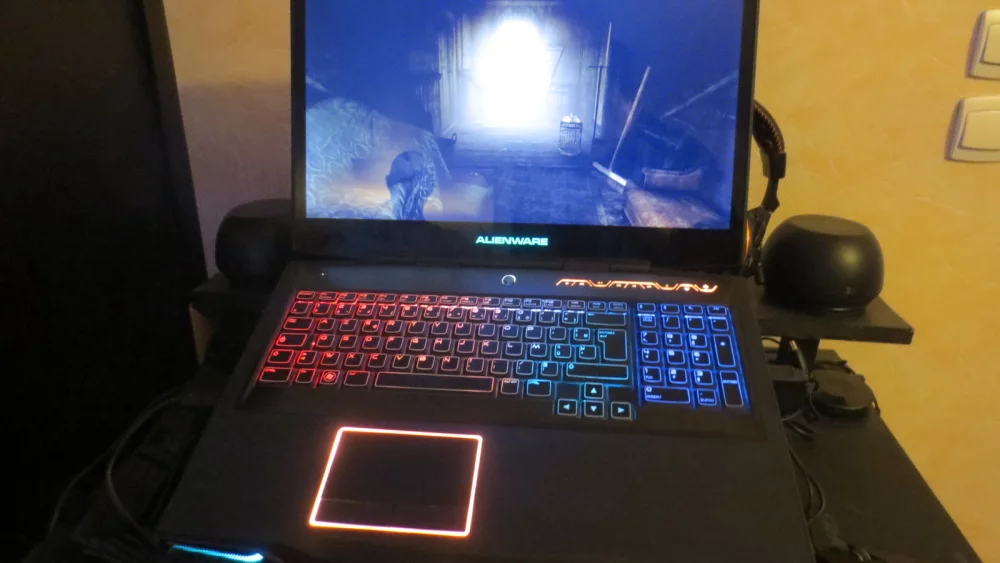
Look for “TGP”, “Max Graphics Power” or “GPU power” in the manufacturer’s spec sheet. If a listing does not mention it at all, check the manufacturer’s product page or independent reviews before buying. Treat a missing TGP as a reason to dig deeper, not as a detail to ignore.
Compare GPU name and wattage together. “RTX 5070, 100 W” and “RTX 5070, 50 W” are effectively two different products that happen to share a name.
Processor: important, but rarely the bottleneck
Most current gaming laptops use either an Intel Core Ultra or an AMD Ryzen processor in the higher-performance families. For gaming, any modern chip from those performance series will feed an RTX 5050 or RTX 5060 comfortably. Processor choice starts to matter more with an RTX 5080 or 5090, in competitive esports titles where you want very high frame rates, and if you also stream, compile code or edit video.
Cores versus power
Just as with the GPU, the processor shares the laptop’s cooling and power budget. A chip with many cores in a thin chassis may run at lower sustained speeds than a slightly weaker chip in a well-cooled machine. Do not overpay for the top processor if it means accepting a lower GPU tier; for gaming the GPU almost always gives more value.
NPU and “AI PC” labels
Many 2026 laptops advertise a neural processing unit for AI features. It can be useful for Windows features and some creative tools, but for games the important AI hardware is the Tensor cores in the GeForce GPU, which run DLSS. Do not let an AI badge distract from TGP and VRAM.
RAM: 16 GB versus 32 GB, and whether you can upgrade
16 GB of system memory is the practical minimum for a gaming laptop in 2026. It runs most games, but modern titles plus a browser, voice chat and launchers in the background can push it. 32 GB gives breathing room for heavy multitasking, content creation, modding and future games. Given TrendForce’s outlook for memory contract prices, buying the right amount now is safer than planning to add it later.
Soldered or slotted memory
Some laptops use replaceable SO-DIMM modules; many thin designs use memory soldered to the motherboard, which can never be upgraded. Check the specification for the number of slots and the maximum supported capacity. If the laptop has soldered memory, buy the capacity you will need for the life of the machine. If it has free slots, a 16 GB model can be upgraded later from our memory RAM range, but make sure you match the type and speed listed by the manufacturer.
Dual-channel matters
Two matched modules (dual-channel) generally perform better than one large module, particularly for integrated graphics and processor-heavy games. A laptop sold with a single module in one slot is common at entry level; adding a matching second stick is one of the most worthwhile upgrades if the design allows it.
Storage: SSD size and the number of slots
Modern game installs are large, and updates keep growing. A 512 GB SSD fills quickly once Windows, a few big titles and their patches are installed. 1 TB is a sensible baseline for a gaming laptop; 2 TB is comfortable for people who keep a large library installed. TrendForce specifically mentions that some brands are cutting SSD capacities to save costs, so read this line of the spec sheet carefully.
Second M.2 slot
Many gaming laptops have a second M.2 slot, which is the easiest way to add space later without cloning the system drive. Check whether the slot is present and whether it is populated. A model with a smaller drive but a free slot can be a better long-term purchase than a model with a slightly larger drive and no expansion.
Speed is rarely the problem
Almost any NVMe SSD in a gaming laptop is fast enough for game loading. Capacity, not headline read speed, is what most buyers run out of first.
Display: refresh rate, resolution and panel type
The screen is the part you look at every minute, and it should match the GPU. A high refresh rate (144 Hz, 165 Hz, 240 Hz and above) makes motion smoother and helps in fast games, but only if the GPU can deliver frames close to that number. A powerful GPU paired with a basic 60 Hz panel wastes performance.
Resolution versus GPU tier
Full HD and the taller 1920 × 1200 format are the easiest for entry-level GPUs. QHD-class resolutions (2560 × 1440 or 2560 × 1600) look much sharper on 16-inch screens but need more GPU power, or reliance on DLSS. 4K-class panels on laptops are mainly for creative work; for gaming they demand the top tiers.
IPS, OLED and mini-LED
IPS panels are common and reliable. OLED offers deep blacks and very fast pixel response, with more care needed around static elements. Mini-LED backlights give high brightness for HDR content. Whatever the type, check brightness, colour coverage and whether the screen supports variable refresh (G-SYNC or adaptive sync), which reduces tearing without adding much latency.
MUX switch
A MUX switch lets the dedicated GPU drive the screen directly instead of passing frames through the integrated graphics. It is worth looking for on gaming-oriented models. If you mainly play on an external screen, the laptop’s video outputs usually connect directly to the GPU anyway, but check the manufacturer’s documentation.
Cooling, noise and build
Cooling decides whether the advertised TGP is sustained for an hour or only for a few minutes. Thicker chassis, larger fans, more heat pipes or vapour chambers generally support higher power. The trade-off is weight and noise. Most gaming laptops offer performance profiles in the manufacturer’s control software, letting you choose between quieter and faster modes.
South African heat
Summer ambient temperatures in much of the country are higher than in the European test rooms where many reviews are done. A laptop that is borderline in a cool room may run louder and throttle sooner in a hot room. Use it on a hard surface, keep the intakes clear and consider a laptop stand or cooling pad for long sessions.
Keep the vents clean
Dust builds up in fans and fins over time, raising temperatures and noise. Plan to have the cooling system cleaned periodically, following manufacturer guidance, especially in dusty environments.
Battery, load-shedding and power planning
Gaming laptops are not battery champions. When unplugged, they usually limit GPU power heavily to protect the battery, so real gaming happens on the charger. Battery life matters for study, office work and video playback between gaming sessions.
Load-shedding and a gaming laptop
Load-shedding is one of the strongest local arguments for a laptop over a desktop: when the power goes, the laptop keeps running on its own battery and you lose neither your work nor your unsaved game progress. Eskom publishes schedules on its official load-shedding portal, which helps you plan heavy gaming sessions around expected outages.
During an outage, switch Windows to a power-saving profile. Microsoft explains how in its guide to Windows power modes: under Settings, System, Power & battery you can set different modes for plugged-in and battery use. Lower screen brightness, close launchers you do not need and consider switching to integrated graphics if the laptop supports it.
UPS, inverters and power banks
If you want to keep gaming on the charger during outages, you need a backup system that can handle the charger’s rated wattage, which is printed on the power brick. High-end gaming laptops have powerful adapters, so a small router-sized UPS will not be enough. Many larger laptops use proprietary barrel chargers; some smaller ones can charge over USB-C Power Delivery, but often at lower power than the original adapter. Check the charger rating before you size any backup system.
Weight and portability
Gaming laptops range from relatively slim 14-inch machines to heavy 18-inch desktop replacements. Remember to add the power brick: on high-wattage models it can be large and heavy. If you carry the laptop to campus or the office daily, a 14- or 16-inch model with a moderate TGP is often more practical than an 18-inch flagship you leave at home.
Size classes at a glance
| Screen size | Typical character | Who it suits |
|---|---|---|
| 14 inch | Portable, usually lower TGP | Students and commuters who game occasionally |
| 15–16 inch | Balance of cooling, screen and weight | Most buyers; one machine for everything |
| 17–18 inch | Highest power limits, heavy | Desk-based gaming, desktop replacement |
Ports and connectivity
Check the ports against your setup. You will want enough USB-A for a mouse and headset dongle, at least one USB-C (ideally with DisplayPort output and charging), an HDMI output for a TV or monitor, and wired Ethernet if you play online at home. Fast Wi-Fi support helps, but a cable to the router is still the most consistent connection for multiplayer.
External monitor
Many gamers play on a larger screen at home. If that is you, a good computer monitor with a high refresh rate can be more important than the laptop’s own panel. Confirm which output is wired to the dedicated GPU.
What is enough for which games
Every game publishes minimum and recommended requirements on its store page; that is the most reliable check. In broad terms, without promising specific frame rates:
Esports and lighter titles
Competitive shooters, MOBAs and many popular online games are designed to run on modest hardware. An RTX 5050 or RTX 5060 laptop with a decent TGP and a high-refresh Full HD screen is a strong match.
Modern AAA games
Big releases with high-quality textures and ray tracing benefit from an RTX 5070 or 5070 Ti with good power and at least 12 GB of VRAM if you want higher texture settings at QHD-class resolutions. DLSS helps lower tiers a great deal.
Maximum settings and creative work
The RTX 5080 and 5090, with 16 GB and 24 GB of VRAM respectively, are for buyers who want the highest settings at high resolutions or who also run demanding creative and AI workloads. They come in heavier, louder chassis and are priced accordingly.
Budget classes without the guesswork
Prices change daily, so we describe classes rather than numbers. Live prices are always visible in the laptops category.
Entry level
RTX 5050 or RTX 5060, 16 GB RAM, 512 GB to 1 TB SSD, Full HD high-refresh screen. Prioritise TGP and an upgradeable memory slot over extras like RGB lighting.
Mid-range
A high-TGP RTX 5060 or RTX 5070, ideally 12 GB VRAM where offered, 16 to 32 GB RAM, 1 TB SSD and a QHD-class high-refresh screen. This is the best value tier for most people.
Upper and flagship
RTX 5070 Ti, 5080 or 5090 with 32 GB RAM and 1–2 TB SSD. Here, check cooling reviews carefully: these chips only shine when the chassis can feed them power.
Accessories that change the experience
A laptop keyboard and touchpad are a compromise for gaming. A dedicated gaming mouse is the first upgrade most players notice. A proper headset improves positional audio and voice chat, and a full-size gaming keyboard helps when the laptop sits on a stand at home.
Laptop stand or cooling pad
Raising the rear of the laptop improves airflow for many designs and puts the screen at a better height when you use external peripherals. It is a small purchase that can make long sessions more comfortable.
Common mistakes when buying a gaming laptop
- Comparing only GPU names and ignoring the TGP set by the manufacturer.
- Paying for the strongest processor while accepting a weaker GPU tier.
- Buying 16 GB of soldered RAM for a laptop you plan to keep for many years.
- Choosing a 512 GB SSD with no free M.2 slot.
- Pairing a powerful GPU with a basic low-refresh screen, or a weak GPU with a demanding high-resolution panel.
- Waiting for a 2026 RTX 50 Super laptop refresh that has been reported as deprioritised.
- Underestimating the charger wattage when planning backup power for load-shedding.
Checklist before you buy
- Pick the GPU tier that suits your games and screen resolution.
- Find the exact TGP and compare it with NVIDIA’s range for that chip.
- Confirm VRAM, especially for RTX 5070 models (8 GB or 12 GB).
- Choose 16 GB RAM minimum, 32 GB if it is soldered or you multitask heavily.
- Check SSD size (1 TB recommended) and whether there is a second M.2 slot.
- Match refresh rate and resolution to the GPU, and look for a MUX switch.
- Check weight, charger size and ports against how you will use it.
- Plan for load-shedding: battery life, power modes and charger wattage for any UPS.
- Budget for a mouse and headset.
Frequently asked questions
Should I wait for new GeForce laptop GPUs?
Reports from early 2026 say NVIDIA does not plan new gaming GPUs this year because memory supply is constrained. The RTX 50 Series is the current generation, so there is no obvious reason to wait if you need a laptop now.
Is an RTX 5060 laptop enough?
For esports and many current games at Full HD, a well-powered RTX 5060 is a sensible choice. For high settings at higher resolutions in demanding titles, look further up. Always check the TGP and the game’s published requirements.
Is 16 GB of RAM still enough in 2026?
It is the minimum for gaming. Choose 32 GB if the memory cannot be upgraded, if you stream or create content, or if you want the laptop to stay comfortable for longer.
Can a gaming laptop run during load-shedding?
Yes, on battery, but gaming performance is reduced when unplugged. For full performance during outages, you need a backup system rated for the laptop charger’s wattage.
Why do two laptops with the same GPU cost differently?
Different TGP, cooling, screen, memory, storage and build quality. The GPU name is only the starting point.
The best gaming laptop is not the one with the biggest model number. It is the one whose GPU power, cooling and screen are balanced for the games you actually play.
Ready to compare? Browse gaming-ready machines, accessories and upgrades at DistriNode, where specifications and live prices are listed for every model. Start at distrinode.co.za.
Leave a comment