

A modern desktop can chew through rendering queues, compile jobs and demanding games while staying so quiet that the loudest thing on the desk is the keyboard. That result is rarely an accident. Acoustic performance is engineered in two stages: first through component selection, which fixes the lowest noise floor the machine can ever reach, and then through configuration, which decides how often the system actually sits at that floor. This guide covers both stages in the order you should tackle them.
Understand the Four Sources of Noise
Every sound a computer makes comes from one of four places: airflow driven by fans, mechanical vibration from motors and drives, electrical coil whine from inductors under load, and — in liquid-cooled systems — the pump. Fans dominate in almost every build, but they generate noise in several distinct ways, and each one calls for a different fix.
- Rotational noise rises steeply with speed. Halving fan RPM typically cuts perceived loudness far more than halving the number of fans.
- Bearing noise — clicking, grinding or chatter — depends on bearing quality and becomes obvious at low speeds, exactly where a silent build spends most of its life.
- Turbulence appears when air is forced through restrictive grilles, dense filters or tight gaps. A fan pushing against resistance is always louder than the same fan breathing freely.
- Transferred vibration turns the case itself into a speaker. Hard-mounting a drive or fan against thin steel amplifies frequencies you would never hear otherwise.
Keep these mechanisms in mind and every recommendation below will make sense: the goal is always more airflow per rotation, better bearings, less restriction and less coupling between moving parts and panels.
Component Choices That Set the Acoustic Ceiling
The case establishes the baseline
Case selection matters more than most first-time builders expect. Look for room for 140 mm fans front and rear, generous clearance behind the motherboard tray for cabling, and rubber-grommeted mounts for drives. Sound-damped models line the panels with bitumen or foam mats that absorb mid-frequency noise; they work, but they also raise internal temperatures slightly, so pair them with a large ventilation area rather than a sealed front.
The classic dilemma — solid damped front panel versus open mesh — has a practical answer: mesh with slow fans usually beats damping with fast fans. Restriction forces higher RPM, and higher RPM is the very thing you are trying to avoid.
Case fans: diameter beats RPM every time
A 140 mm fan at 650 RPM moves roughly as much air as a 120 mm unit spinning several hundred RPM faster, while producing noticeably less noise. Fit the largest fans your chassis accepts and run them slowly. Prioritise models with fluid dynamic or magnetic levitation bearings, a wide PWM control range that reaches below 400 RPM, and anti-vibration pads on the corners. A sensible starting layout is two intakes at the front and one exhaust at the rear — slight positive pressure keeps dust out of unfiltered gaps. Browse the current range of case fans and compare noise ratings at comparable airflow figures, not at maximum speed.
CPU cooling: thermal mass is your ally
The quietest CPU cooler is the one with the most reserve. A large twin-tower heatsink with two slow 140 mm fans can absorb a sustained all-core load while barely changing pitch, because its fin area lets it shed heat at low airflow. Compact coolers hit their limits quickly and respond with a sharp ramp in fan speed that your ears register immediately. When comparing CPU coolers, check the rated dissipation against your processor's real sustained power draw — not the box TDP — and leave at least a 30 percent margin. That headroom is what buys you a flat, silent fan curve later.
The power supply: the fan everyone forgets
PSU fans are wired to internal temperature, not to your motherboard, so a poor unit will drone regardless of your settings. Two specifications predict silence: efficiency and load headroom. An 80 PLUS Gold or better unit wastes less energy as heat, and a unit sized so your typical gaming load lands near 50 percent of its rating runs coolest. Many quality models add a semi-passive mode that stops the fan entirely below roughly a third of rated load, which means a genuinely silent desktop at idle. Compare semi-passive power supplies one wattage class above your calculated draw.
Graphics card acoustics
The GPU is usually the loudest component under load, and cooler size is the deciding factor. A card with a 2.7-slot or larger heatsink and three fans will run the same chip both cooler and quieter than a compact dual-fan design. Verify that the model supports zero-RPM idle, and remember that a modest power limit reduction — 10 to 15 percent — often costs only a few percent of frame rate while removing a disproportionate amount of fan noise.
Storage and the small contributors
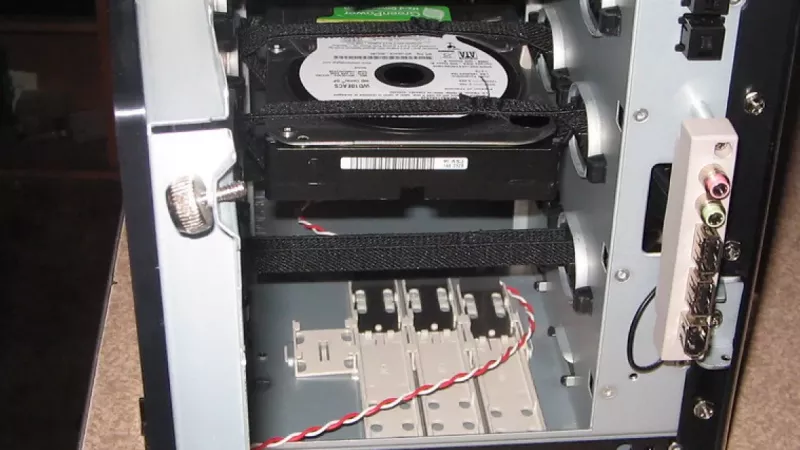
Solid-state drives are silent; mechanical drives are not, and their low-frequency hum travels through the chassis efficiently. If a build needs bulk mechanical storage, mount the drive in rubber grommets or a decoupled cage. Aging chipset fans, cheap 40 mm spinners on expansion cards and old optical drives are further candidates for replacement or removal in a silence-focused machine.
Settings That Remove Decibels for Free
Once the hardware is in place, configuration determines the day-to-day experience. These adjustments cost nothing and typically deliver more perceived improvement than any single component swap.
Build a custom fan curve in UEFI
Default motherboard curves are tuned for worst-case thermals, not acoustics. Enter UEFI, switch each header to PWM, and rebuild the curve: fans near their minimum speed up to 55–60 °C CPU temperature, a gentle slope to about 70 °C, and full cooling reserved for the range above that. Set the minimum duty threshold as low as stability allows. The difference between a stock curve and a tuned one is often the difference between hearing the computer and forgetting it is on.
Undervolt the processor and graphics card
Silicon ships with generous voltage margins. Reducing CPU voltage through UEFI offset settings, or lowering the GPU voltage-frequency curve in vendor software, cuts power draw and heat output at identical performance. Twenty to forty watts less heat under load translates directly into slower fans. Undervolting changes no clocks upward, stresses nothing, and is fully reversible — validate stability with a sustained load test and enjoy the free headroom.
Hysteresis, ramp delays and zero-RPM windows
Short load spikes should not produce audible fan surges. Enable fan speed hysteresis or ramp delay in UEFI so that speed changes trail temperature changes by several seconds. Where the motherboard supports it, allow case fans to stop entirely below a threshold temperature; a desktop that idles at genuine zero noise resets your perception of what loud means.
Assembly Details Worth Ten Extra Minutes
Small mechanical decisions during the build compound into an audible result.
- Use the rubber anti-vibration pads or soft mounts supplied with quality fans instead of screwing metal directly to metal.
- Route cables away from fan intakes; a cable bundle centimetres from the blades creates surprisingly loud turbulence.
- Place the tower on a solid surface, not on a hollow desk top that acts as a resonance box — or set the case feet on a damping mat.
- Leave the area around intake vents clear by at least 15 cm; starved fans compensate with speed.
- Clean filters on a schedule. A clogged filter is acoustically identical to a restrictive front panel.
Rule of thumb: if any single fan in the system is clearly audible above the rest, fixing that one fan improves the build more than upgrading all the others.
Frequently Asked Questions
Is liquid cooling quieter than air cooling?
Not automatically. An all-in-one unit adds a pump — a noise source air coolers do not have — and its thin radiator fans often spin faster than the fans on a large tower heatsink. A big air cooler is usually the safer acoustic choice; liquid wins mainly where clearance around the socket is constrained or aesthetics demand it.
How quiet is quiet in numbers?
Below roughly 30 dBA at half a metre a desktop fades into the background of a normal room. Manufacturer ratings are measured in isolation, so treat listed figures as comparative rather than absolute; two 20 dBA parts do not sum to silence, but each will be far less intrusive than one 35 dBA part.
Do fan hubs and controllers actually help?
They help with consistency. Driving all case fans from a single PWM signal keeps them at matched speeds, which prevents beat-frequency effects where two fans at slightly different RPM produce a slow, pulsing hum. A hub also frees motherboard headers for finer per-zone control.
Does undervolting shorten component lifespan or void the warranty?
Running silicon at lower voltage reduces electrical and thermal stress, so the effect on lifespan is neutral to positive. Unlike overclocking, undervolting is performed through official UEFI options and vendor tools and does not push the part beyond its rated behaviour.
Are sound-damped cases too hot for gaming hardware?
Damped cases with adequate intake area handle mid-range and upper mid-range hardware comfortably. For graphics cards drawing 350 W and more, a high-airflow mesh case with slow, large fans usually ends up both cooler and quieter than a sealed, insulated one.
Building for silence is one of the few upgrades you appreciate every single hour the machine is powered on. Choose generously sized cooling, decouple everything that moves, and let a careful fan curve do the rest — the wholesale catalogue at DistriNode covers every category discussed above, from bearings-first fans to semi-passive power supplies.
Leave a comment