Account Contact
Your Cart
Pay the courier with no extra fees.
Need help? DistriNode AI can handle any task on our site.

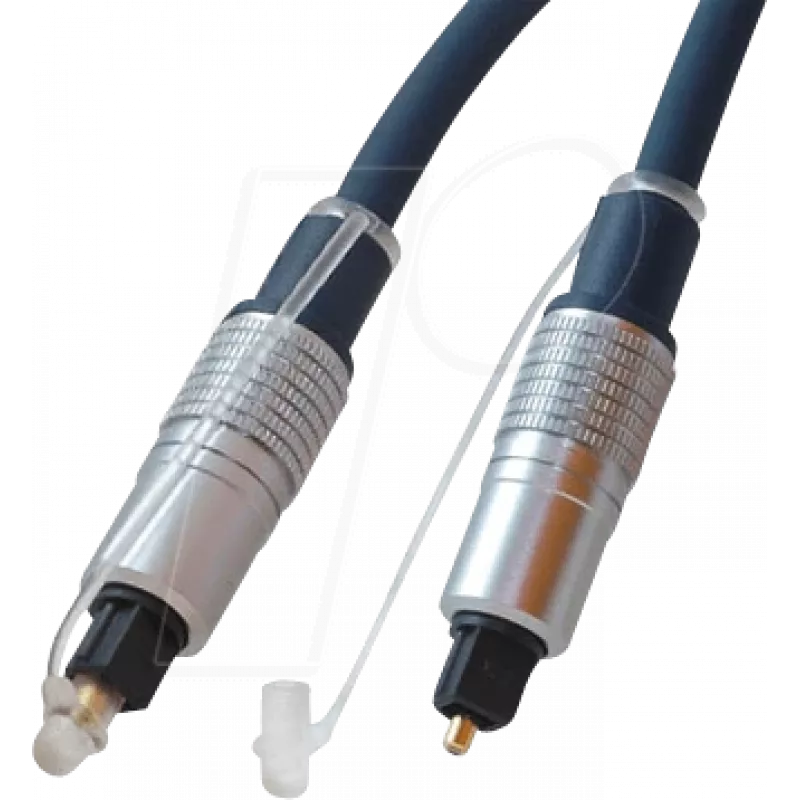
Audio Cable TOSLINK ShiverPeaks SP69006-3.0 3m Blue

Audio Cable TOSLINK ShiverPeaks SP69006-3.0 3m Blue
R373
The ShiverPeaks SP69006-3.0 is a 3-meter TOSLINK optical audio cable with male connectors on both ends, designed for digital audio transmission between compatible devices. The cable uses gold-plated contacts to promote reliable connection and longevity, and its blue jacket provides a distinct visual... Read More
Stock 61 Code 2256177 Brand SHIVERPEAKS Model SP69006-3.0 Warranty 2 Years

Shipping & Returns

Estimated delivery Tuesday, October 6
You will be kept updated through our detailed tracking system
Payment options
EFTPayFastBank CardSnapScanZapperGoogle PayApple PayMobicredMoreTymePay on Arrival

The ShiverPeaks SP69006-3.0 is a 3-meter TOSLINK optical audio cable with male connectors on both ends, designed for digital audio transmission between compatible devices. The cable uses gold-plated contacts to promote reliable connection and longevity, and its blue jacket provides a distinct visual accent for home or professional setups. It carries digital optical signals without electromagnetic interference, allowing clean audio transfer for supported source and playback equipment.

Advantages

This TOSLINK cable supports interference-free digital audio transmission, ensuring consistent sound quality over the full 3 m length. Gold-plated contacts improve corrosion resistance and help maintain stable connections. The cable’s optical design prevents ground loops and RF/EMI disturbances common with electrical connections. A colored jacket simplifies cable identification and routing in multi-device installations.

Suitable for

  • Connecting TVs to soundbars or AV receivers
  • Linking gaming consoles to home audio systems
  • Integrating CD/DVD/Blu-ray players with digital audio inputs
  • Standard optical connections in media rooms and desktop audio setups

Key specifications

  • Cable type: TOSLINK (optical digital audio)
  • Length: 3.0 m
  • Connector gender: male–male
  • Contact finish: gold-plated
  • Jacket color: blue
  • Signal type: digital optical (PCM, compatible with standard S/PDIF over optical)

How to use

Align each male TOSLINK connector with the optical input or output on your devices and insert gently until it seats; do not force the connector. Ensure the optical ports are free from dust before connecting to avoid signal loss. Route the cable to avoid tight bends; maintain a gentle curvature with no sharp kinks. When disconnecting, pull by the connector housing rather than the cable jacket to preserve the termination.

Recommendations

For optimal performance, keep the optical path free of direct strong light and protect connectors from dust when not in use. Use the cable for distances up to 3 m as specified, and avoid running it parallel to heavy power cables to simplify cable management and reduce the chance of physical strain on connectors.

Key Highlights
  • Connecting TVs to soundbars or AV receivers
  • Linking gaming consoles to home audio systems
  • Integrating CD/DVD/Blu-ray players with digital audio inputs
  • Standard optical connections in media rooms and desktop audio setups
  • Cable type: TOSLINK (optical digital audio)
  • Length: 3.0 m
  • Connector gender: male–male
  • Contact finish: gold-plated
  • Jacket color: blue
  • Signal type: digital optical (PCM, compatible with standard S/PDIF over optical)
Specifications
Cable length
3 m
Connector 1
TOSLINK
Connector 1 form factor
Straight
Connector 1 gender
Male
Connector 2
TOSLINK
Connector 2 form factor
Straight
Connector 2 gender
Male
Connector contacts plating
Gold
Product colour
Blue
Price history over the last 6 months
Audio Cable TOSLINK ShiverPeaks SP69006-3.0 3m Blue
Current
R373
Lowest
R363
Highest
R373
Change 24H
+R10   +3%
Week
—   
Month
—   

Popular products in this category

WhatsApp
Hi, I’m DistriNode’s AI assistant. I can help you find products, compare options, create quote PDFs, or open support requests.