Account Contact
Your Cart
Pay the courier with no extra fees.
Need help? DistriNode AI can handle any task on our site.

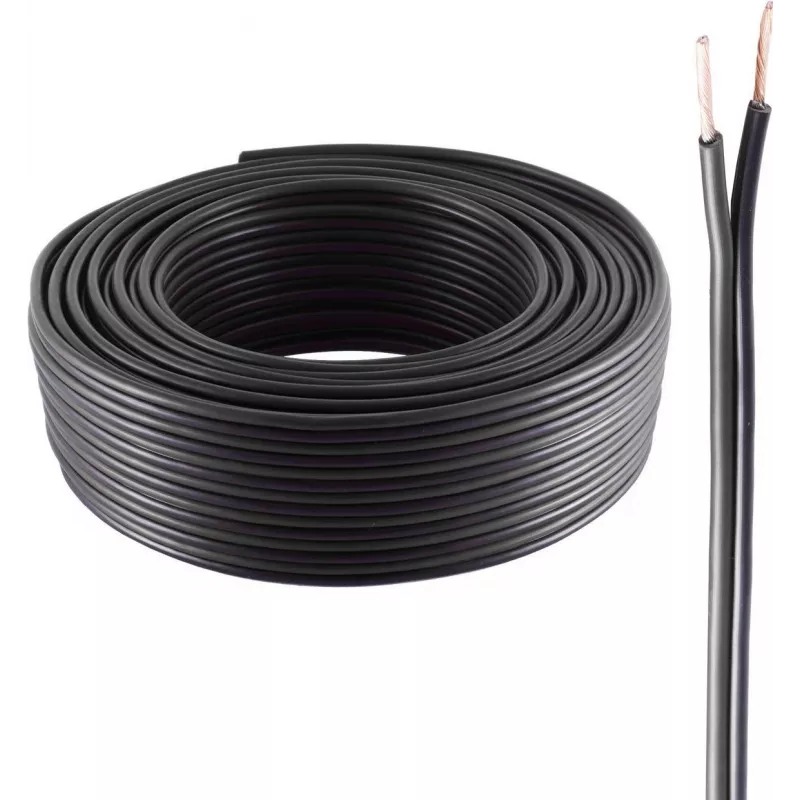
Audio cable ShiverPeaks BS06-21105 25 m Black

Audio cable ShiverPeaks BS06-21105 25 m Black
R652
The ShiverPeaks BS06-21105 25 m Black audio cable is a 25-metre-length cable designed to transmit audio signals with minimal degradation. Its black jacket and flexible construction allow routing across rooms, stages, or studio environments while maintaining consistent signal integrity over longer di... Read More
Stock 81 Code 2254019 Brand SHIVERPEAKS Model BS06-21105 Warranty 2 Years

Shipping & Returns

Estimated delivery Tuesday, October 6
You will be kept updated through our detailed tracking system
Payment options
EFTPayFastBank CardSnapScanZapperGoogle PayApple PayMobicredMoreTymePay on Arrival

The ShiverPeaks BS06-21105 25 m Black audio cable is a 25-metre-length cable designed to transmit audio signals with minimal degradation. Its black jacket and flexible construction allow routing across rooms, stages, or studio environments while maintaining consistent signal integrity over longer distances. The cable is supplied without fitted connectors, enabling custom termination to suit specific equipment and connector preferences.

Advantages

This audio cable combines a long 25 m reach with a durable, flexible outer sheath to resist kinking and wear during repeated use. The un-terminated design permits professional soldering or fitting of chosen connectors, allowing tailored compatibility with mixers, amplifiers, speakers or recording devices. The cable construction focuses on preserving audio quality and reducing signal loss across the run.

Suitable for

  • Connecting audio equipment where custom connector termination is required
  • Stage and live sound setups needing long cable runs
  • Studio installations and patching between racks or consoles
  • Home audio systems where concealed or routed cabling is preferred

Key specifications

  • Cable length: 25 m
  • Colour: Black
  • Connector status: Supplied without connectors for custom termination
  • Construction: Flexible outer jacket designed for routing and repeated handling
  • Intended use: Audio signal transmission with focus on minimal signal loss

How to use

Measure the required run and cut the cable to length if necessary. Prepare the cable ends according to the connector type you intend to fit, ensuring proper shielding and conductor separation before soldering or crimping. After terminating, route the cable along safe pathways, avoiding sharp bends and sources of electrical interference. Test the connection with the intended audio equipment and adjust terminations if any signal degradation is detected.

Recommendations

For best results, choose connectors and termination methods compatible with your equipment and the cable gauge. When installing long runs, avoid parallel routing next to mains power cables to reduce potential interference; secure the cable with appropriate clips or ties to prevent strain on terminations.

Key Highlights
  • Connecting audio equipment where custom connector termination is required
  • Stage and live sound setups needing long cable runs
  • Studio installations and patching between racks or consoles
  • Home audio systems where concealed or routed cabling is preferred
  • Cable length: 25 m
  • Colour: Black
  • Connector status: Supplied without connectors for custom termination
  • Construction: Flexible outer jacket designed for routing and repeated handling
  • Intended use: Audio signal transmission with focus on minimal signal loss
Specifications
Cable length
25 m
Connector 1
No
Connector 2
No
Jacket material
Polyvinyl chloride (PVC)
Product colour
Black
Quantity per pack
1 pc(s)
Price history over the last 6 months
Audio cable ShiverPeaks BS06-21105 25 m Black
Current
R652
Lowest
R641
Highest
R652
Change 24H
+R9   +1%
Week
—   
Month
—   

Popular products in this category

WhatsApp
Hi, I’m DistriNode’s AI assistant. I can help you find products, compare options, create quote PDFs, or open support requests.