Account Contact
Your Cart
Pay the courier with no extra fees.
Need help? DistriNode AI can handle any task on our site.

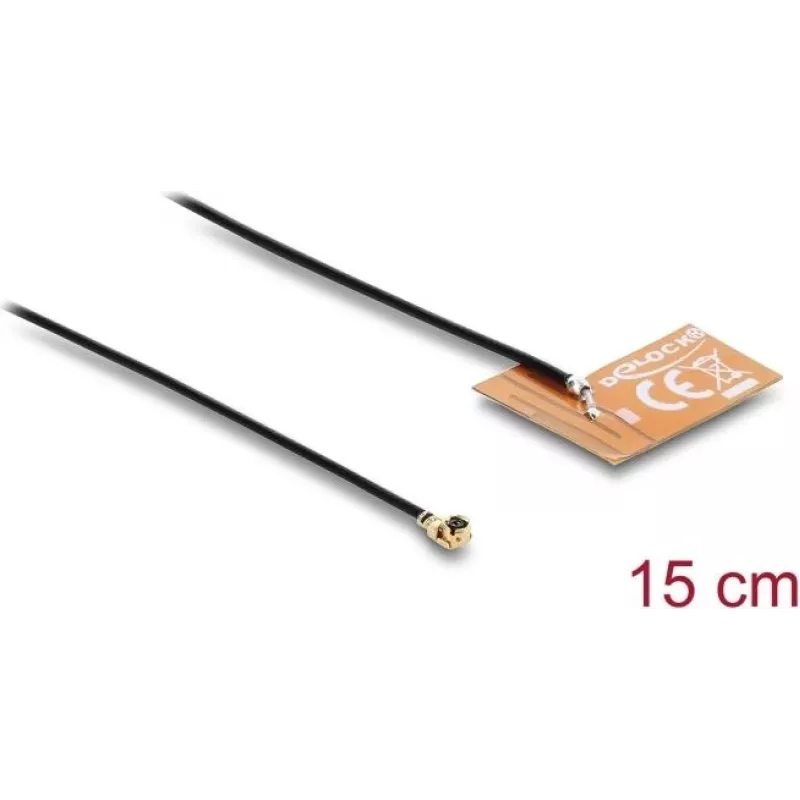
Antenna DELOCK 2.4 GHz I-PEX MHF® I plug omnidirectional 2–3 dBi with 15 cm FPC cable for internal adhesive mounting

Antenna DELOCK 2.4 GHz I-PEX MHF® I plug omnidirectional 2–3 dBi with 15 cm FPC cable for internal adhesive mounting
R162
DELOCK 2.4 GHz WiFi antenna with I-PEX MHF® I plug is an internal omnidirectional antenna designed to improve wireless performance in devices operating on the 2.4 GHz band. The compact antenna delivers a gain of 2–3 dBi and is supplied with a 15 cm flexible printed circuit (FPC) cable with a 1.13 mm... Read More
Stock 95 Code 1739556 Brand DELOCK Model 90695 Warranty 2 Years

Shipping & Returns

Estimated delivery Friday, October 2
You will be kept updated through our detailed tracking system
Payment options
EFTPayFastBank CardSnapScanZapperGoogle PayApple PayMobicredMoreTymePay on Arrival

DELOCK 2.4 GHz WiFi antenna with I-PEX MHF® I plug is an internal omnidirectional antenna designed to improve wireless performance in devices operating on the 2.4 GHz band. The compact antenna delivers a gain of 2–3 dBi and is supplied with a 15 cm flexible printed circuit (FPC) cable with a 1.13 mm thickness, allowing connection to boards or radio modules using an I-PEX MHF® I socket. It is intended for adhesive mounting inside enclosures, enabling discreet installation without external protrusions.

Advantages

The antenna provides uniform omnidirectional coverage for short to medium-range 2.4 GHz communications and a modest gain of 2–3 dBi to assist in improving signal strength compared with built-in PCB traces. Its 15 cm FPC cable offers flexible routing inside small housings, while the I-PEX MHF® I plug ensures a standardized, low-profile connection to compatible radio modules. Adhesive mounting simplifies internal placement and reduces the need for mechanical fastening features in the enclosure.

Suitable for

Key specifications

How to use

Connect the I-PEX MHF® I plug to the corresponding socket on your wireless module or PCB, ensuring the connector is aligned and fully seated. Peel off the protective layer from the adhesive backing and place the antenna on a flat surface inside the device enclosure, positioning it away from large metal objects and high-noise components to reduce attenuation. Route the FPC cable carefully to avoid sharp bends and secure it within the enclosure if necessary. Reassemble the device and verify wireless performance with appropriate signal-testing tools.

Recommendations

For optimal performance, mount the antenna on a non-metallic surface and maintain some separation from metal shielding and batteries. Test different internal positions to find the best orientation for signal coverage. When replacing or connecting the antenna, handle the I-PEX plug and FPC cable gently to avoid damaging the fine connector or cable traces.

Key Highlights
  • Routers and access points with internal antenna connections
  • Gateways and network bridges used in home and industrial networks
  • IoT devices and smart sensors requiring internal 2.4 GHz antennas
  • Embedded wireless modules and development boards with I-PEX MHF® I sockets
  • Enclosed devices where external antennas are undesirable
  • Frequency range: 2.4 GHz band
  • Radiation pattern: omnidirectional
  • Gain: 2–3 dBi
  • Connector: I-PEX MHF® I plug (for mating socket)
  • Cable: 15 cm FPC cable, 1.13 mm thickness
  • Mounting: internal adhesive mounting
  • Form factor: compact internal antenna for installation inside enclosures
Price history over the last 6 months
Antenna DELOCK 2.4 GHz I-PEX MHF® I plug omnidirectional 2–3 dBi with 15 cm FPC cable for internal adhesive mounting
Current
R162
Lowest
R151
Highest
R162
Change 24H
+R10   +6%
Week
+R11   +7%
Month
+R10   +7%

Popular products in this category

WhatsApp
Hi, I’m DistriNode’s AI assistant. I can help you find products, compare options, create quote PDFs, or open support requests.