Account Contact
Your Cart
Pay on delivery – no extra fees
Need help? Ask our AI

ADATA HV320 external hard drive 1 TB USB 3.2 Gen 1 (3.1 Gen 1) White

ADATA HV320 external hard drive 1 TB USB 3.2 Gen 1 (3.1 Gen 1) White
R3,340
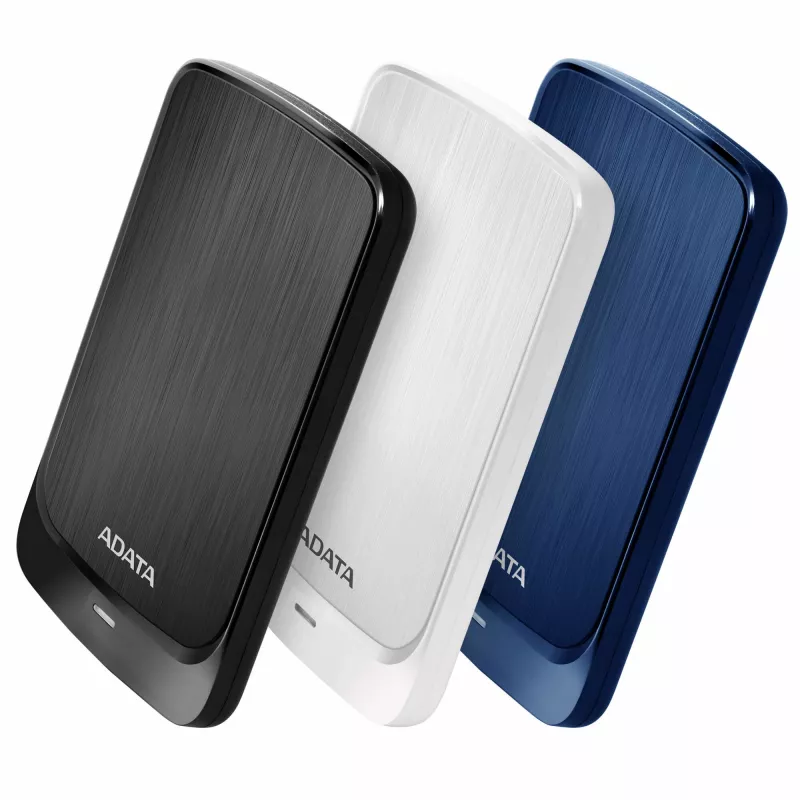
The ADATA HV320 1TB external hard drive provides portable storage in a slim, lightweight enclosure. With a 10.7 mm thickness and a white hairline-brushed front cover framed by a glossy border, this USB 3.2 Gen 1 HDD combines compact design with practical capacity for backing up files, carrying media... Read More
Stock Out Of StockNo Stock Code 2401889 Brand ADATA Model AHV320-1TU31-CWH Warranty 2 Years

Shipping & Returns

The ADATA HV320 1TB external hard drive provides portable storage in a slim, lightweight enclosure. With a 10.7 mm thickness and a white hairline-brushed front cover framed by a glossy border, this USB 3.2 Gen 1 HDD combines compact design with practical capacity for backing up files, carrying media, and expanding device storage. The drive supports hardware AES 256-bit encryption and includes shock sensors with a red indicator to alert you to impacts.

Advantages

The HV320 offers a very slim profile that fits easily into a pocket and a choice of attractive finishes. USB 3.2 Gen 1 connectivity delivers fast transfers for everyday use, while capacities up to 1 TB (this model) give room for documents, photos and videos. Built-in shock sensors provide visible impact alerts and AES 256-bit encryption allows password protection of stored data.

Suitable for

  • Backing up personal files and system data
  • Transporting photos, videos and documents
  • Expanding storage for laptops and desktops
  • Storing media collections for streaming or playback

Key specifications

  • Brand: ADATA
  • Model: HV320 (AHV320-1TU31-CWH)
  • Capacity: 1 TB
  • Interface: USB 3.2 Gen 1
  • Thickness: 10.7 mm
  • Weight: 0.18 kg
  • Colour: White
  • Security: AES 256-bit hardware encryption
  • Features: Shock sensors with red indicator

How to use

Connect the HV320 to a computer using the supplied USB cable; the drive will appear as an external storage device. Use your operating system’s file manager to copy, move or delete files. To enable AES 256-bit encryption and set a password, install ADATA’s encryption utility (if provided) or follow the drive’s documentation for hardware-encryption setup. Always safely eject the drive before disconnecting to prevent data loss.

Recommendations

Store the drive on a flat, stable surface while in use, avoid exposing it to strong impacts or extreme temperatures, and keep regular backups of important data to another device or cloud service for additional protection.
Key Highlights
  • Backing up personal files and system data
  • Transporting photos, videos and documents
  • Expanding storage for laptops and desktops
  • Storing media collections for streaming or playback
  • Brand: ADATA
  • Model: HV320 (AHV320-1TU31-CWH)
  • Capacity: 1 TB
  • Interface: USB 3.2 Gen 1
  • Thickness: 10.7 mm
  • Weight: 0.18 kg
  • Colour: White
  • Security: AES 256-bit hardware encryption
  • Features: Shock sensors with red indicator
Specifications
Bus power
5 V
Bus powered
USB
Cables included
USB
Depth
125.7 mm
HDD capacity
1 TB
Height
10.7 mm
Housing material
Plastic
LED indicators
Yes
Mac operating systems supported
Mac OS X 10.10 Yosemite, Mac OS X 10.11 El Capitan, Mac OS X 10.12 Sierra, Mac OS X 10.13 High Sierra, Mac OS X 10.6 Snow Leopard, Mac OS X 10.7 Lion, Mac OS X 10.8 Mountain Lion, Mac OS X 10.9 Mavericks
Operating temperature (T-T)
5 - 50 °C
Product colour
White
Security algorithms
256-bit AES
Thunderbolt technology
No
Type
HDD
USB connector
USB
USB version
3.2 Gen 1 (3.1 Gen 1)
Weight
180 g
Wi-Fi
No
Width
80.5 mm
Windows operating systems supported
Yes

Leaflet

Open Leaflet
Price history is not available yet
We are still collecting enough daily price data for this product.

Popular products in this category

WhatsApp
Hi, I’m DistriNode’s AI assistant. I can help you find products, compare options, create quote PDFs, or open support requests.