Account Contact
Your Cart
Pay the courier with no extra fees.
Need help? DistriNode AI can handle any task on our site.

Adapter ShiverPeaks 57004-M Mono 3.5mm Cinch to Jack

Adapter ShiverPeaks 57004-M Mono 3.5mm Cinch to Jack
R286
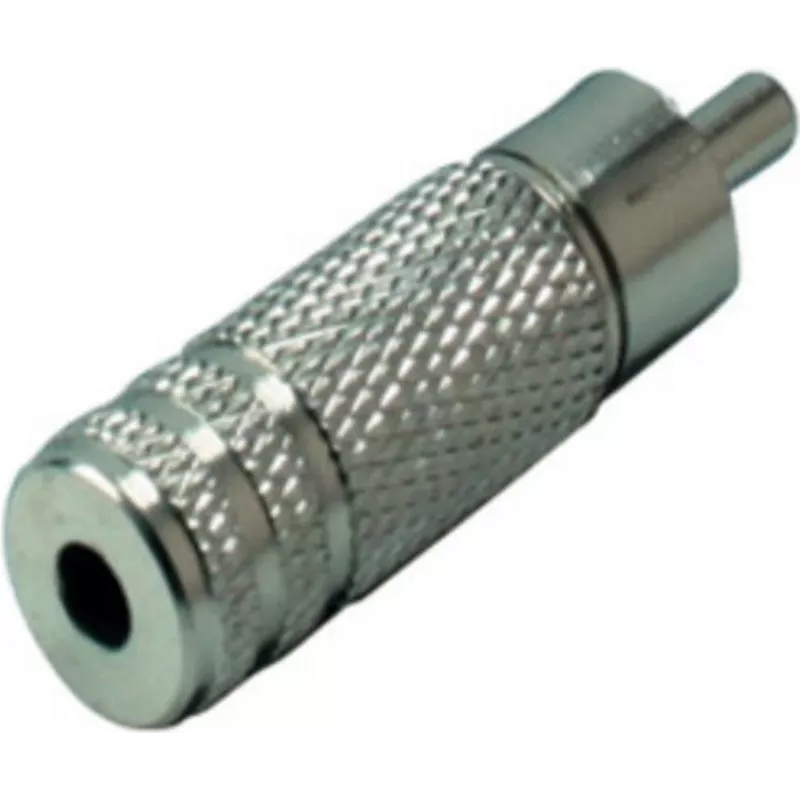
ShiverPeaks Adapter 57004-M Mono 3.5mm Cinch to Jack is a passive audio adapter that converts a mono RCA (Cinch) plug to a 3.5 mm mono jack. It is intended for simple signal routing between devices with different connector types, enabling audio transfer from equipment with an RCA output to devices t... Read More
Stock 1037 Code 2352059 Brand SHIVERPEAKS Model 57004-M Warranty 2 Years

Shipping & Returns

Estimated delivery Tuesday, October 6
You will be kept updated through our detailed tracking system
Payment options
EFTPayFastBank CardSnapScanZapperGoogle PayApple PayMobicredMoreTymePay on Arrival

ShiverPeaks Adapter 57004-M Mono 3.5mm Cinch to Jack is a passive audio adapter that converts a mono RCA (Cinch) plug to a 3.5 mm mono jack. It is intended for simple signal routing between devices with different connector types, enabling audio transfer from equipment with an RCA output to devices that accept a 3.5 mm mono input. The adapter is compact and crafted with a metal housing for reliable mechanical connection and basic shielding.

Advantages

The adapter provides a straightforward, passive conversion without electronics, preserving the original audio signal path for mono sources. Its metal construction offers durability and consistent connector alignment, while the compact form factor makes it easy to carry or store with portable audio gear. Because it is passive, it requires no power and introduces minimal complexity into a signal chain.

Suitable for

  • Connecting vintage audio players or receivers with RCA mono outputs to devices with a 3.5 mm mono jack input
  • Routing mono signals from mixers or recording equipment to portable recorders or amplifiers
  • Temporary connections in studios, practice rooms, or on-location setups where a direct passive adapter is sufficient

Key specifications

  • Connection type: RCA (Cinch) plug to 3.5 mm mono jack
  • Signal type: Mono audio
  • Construction: Metal housing and contacts for mechanical durability
  • Function: Passive, no power required
  • Form factor: Compact inline adapter for direct plug-to-jack conversion

How to use

Insert the RCA (Cinch) plug into the source device’s RCA output and insert the 3.5 mm mono jack into the target device’s mono input. Ensure both devices are powered down or volume is reduced when connecting to avoid pops or transient noise. The adapter performs a direct passive connection; no configuration or drivers are required. Verify correct mono routing on devices that offer stereo/mono switching to ensure the intended channel receives the signal.

Recommendations

Use the adapter for short, direct connections and avoid placing stress on the connectors by bending cables at sharp angles. For critical or long cable runs, consider balanced connections or active conversion solutions. Keep contacts clean and store the adapter in a protective pouch to maintain reliable connections.

Key Highlights
  • Connecting vintage audio players or receivers with RCA mono outputs to devices with a 3.5 mm mono jack input
  • Routing mono signals from mixers or recording equipment to portable recorders or amplifiers
  • Temporary connections in studios, practice rooms, or on-location setups where a direct passive adapter is sufficient
  • Connection type: RCA (Cinch) plug to 3.5 mm mono jack
  • Signal type: Mono audio
  • Construction: Metal housing and contacts for mechanical durability
  • Function: Passive, no power required
  • Form factor: Compact inline adapter for direct plug-to-jack conversion
Price history over the last 6 months
Adapter ShiverPeaks 57004-M Mono 3.5mm Cinch to Jack
Current
R286
Lowest
R276
Highest
R286
Change 24H
+R10   +4%
Week
—   
Month
—   

Popular products in this category

WhatsApp
Hi, I’m DistriNode’s AI assistant. I can help you find products, compare options, create quote PDFs, or open support requests.